
Article directory
If the e-commerce website administrator has sufficient privileges, they can maintain and operate the MySQL database through the phpMyAdmin database control panel .
When a database error occurs, you can perform table maintenance "analysis" or "inspection" on the WordPress database.
But then an error message like this may appear:
- wp_postmeta analyze warning Found row where the auto_increment column has the value 0
- wp_postmeta check warning Found row where the auto_increment column has the value 0
- Found row where the auto_increment column has the ..
The following is the Chinese translation:
- wp_postmeta analysis warning found row where auto_increment column has value 0
- wp_postmeta check warning found row where auto_increment column has value 0
- Find the row where the auto_increment column is..
What does database auto increment mean?
- increments
- British ['ɪŋkrɪm(ə)nt] US ['ɪŋkrəmənt]
- n. [number] increment; increase; increase; surplus; increase
Why does "auto_increment column has the value 0" appear?
This is because there may be one or more fields that can be automatically incremented and have a value of 0.
- Chen Weiliangfound many usesWordPress websitedoSEOA friend of mine also had the same problem.
How to fix it?
Here are some very simple methods to fix MySQL database problems!
Step 1: Click on the data table where the problem occurs.
Step 2: Click on "meta_id" or "post_id" ▼
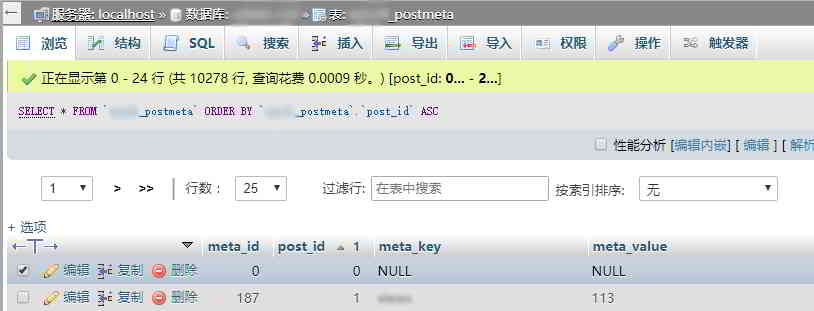
- Then, the sorting starts in order, whereNULL with ID 0 will be sorted at the top.
Step 3: Delete the data column containing 0, 0, NULL, or NULL values.
- delete the value of the id data column 0 0 NULL NULL Field.
Finally, analyze and test the MySQL data table again.
I found that the warning error "warning Found row where the auto_increment column has the value 0" no longer appears, the problem has been solved, haha!
Hopefully, the article "MySQL Warning: Found row where the auto_increment column" shared on Chen Weiliang's blog ( https://www.chenweiliang.com/ ) will be helpful to you.
Feel free to share this article's link: https://www.chenweiliang.com/cwl-756.html