
Die handhawing van stabiele dienswerking op Linux- bedieners is van kardinale belang vir webwerf- SEO .
Die CWP-beheerpaneel sal jou help met diensmoniteringsinstrumente.
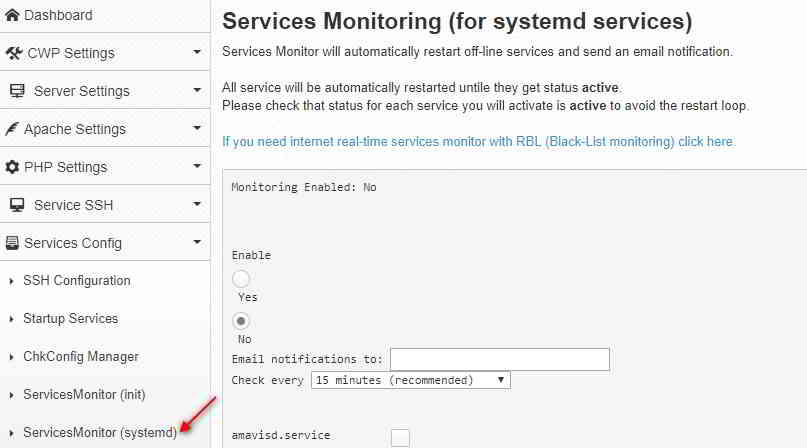
Hoe om ServicesMonitor (systemd) in CWP-kontrolepaneel te aktiveer?
Om diensmonitering in CWP te aktiveer:
- koppel aan jouCWP安装
- VindDienste Config->Dienstemonitor( systemd )选项
- Kies/Voer in:
In staat te stel / afskakel- Dit sal diensmonitering aktiveer/deaktiveer.
Email kennisgewingsStuur na - Voer die e-posadres in waar jy kennisgewings sal ontvang.
Kontroleer elke- tydsinterval tussen tjeks - Kies die diens wat jy wil monitor, byvoorbeeld: mariadb.service, monit.service
- klik提交knoppie.Jy sal 'n bevestigingsboodskap sien:
Service Monitoring is not enabled
Enabling monitoring in cron
MAILTO=cwp1@ chenweilaing.com
*/15 * * * * root /usr/local/bin/svcMonitor-systemd
Monitoring Enabled: Yes
注意 事项:
- 如果sistem statusdiens is
Unknown,Monitering sal nie vir dienste werk nie. - Geselekteerde dienste om te monitor sal in lêer gestoor word
/usr/local/etc/services-monitor-systemd中. - Monitering van cron-take kan in die lêer gevind word
/etc/cron.d/svcMonitor-systemd中opdaag.
Jy kan ook dienste handmatig byvoeg/verwyder deur die chkconfig -opdrag te gebruik:
chkconfig service_name onchkconfig service_name off
Byvoorbeeld, wanneer alle beskikbare dienste geaktiveer is, sal ons cron-boodskappe vertoon soos:
From: (Cron Daemon) <[email protected]>
Subject: Cron <root@cwp1> /usr/local/bin/svcMonitor-systemd

Restarted service amavisd.service on cwp1 at Sat Mar 31 01:00:01 EDT 2018 Job for amavisd.service failed because the control process exited with error code. See “systemctl status amavisd.service” and “journalctl -xe” for details.

Restarted service arp-ethers.service on cwp1 at Sat Mar 31 01:00:03 EDT 2018 Restarted service [email protected] on cwp1 at Sat Mar 31 01:00:04 EDT 2018 Failed to stop [email protected]: Unit name [email protected] is missing the instance name.

See system logs and ‘systemctl status [email protected]‘ for details.

Failed to get load state of [email protected]: Unit name [email protected] is missing the instance name.

Failed to start [email protected]: Unit name [email protected] is missing the instance name.

See system logs and ‘systemctl status [email protected]‘ for details.

Restarted service console-shell.service on cwp1 at Sat Mar 31 01:00:05 EDT 2018 Restarted service garb.service on cwp1 at Sat Mar 31 01:00:06 EDT 2018 Restarted service [email protected] on cwp1 at Sat Mar 31 01:00:07 EDT 2018 Failed to stop [email protected]: Unit name [email protected] is missing the instance name.

See system logs and ‘systemctl status [email protected]‘ for details.

Failed to get load state of [email protected]: Unit name [email protected] is missing the instance name.

Failed to start [email protected]: Unit name [email protected] is missing the instance name.

See system logs and ‘systemctl status [email protected]‘ for details.

Restarted service ntalk.service on cwp1 at Sat Mar 31 01:00:09 EDT 2018 Job for ntalk.service failed because a configured resource limit was exceeded. See “systemctl status ntalk.service” and “journalctl -xe” for details.

Restarted service rdisc.service on cwp1 at Sat Mar 31 01:00:10 EDT 2018 Job for rdisc.service failed because the control process exited with error code. See “systemctl status rdisc.service” and “journalctl -xe” for details.

Restarted service [email protected] on cwp1 at Sat Mar 31 01:00:17 EDT 2018 Failed to stop [email protected]: Unit name [email protected] is missing the instance name.

See system logs and ‘systemctl status [email protected]‘ for details.

Failed to get load state of [email protected]: Unit name [email protected] is missing the instance name.

Failed to start [email protected]: Unit name [email protected] is missing the instance name.

See system logs and ‘systemctl status [email protected]‘ for details.

Restarted service svnserve.service on cwp1 at Sat Mar 31 01:00:18 EDT 2018 Job for svnserve.service failed because the control process exited with error code. See “systemctl status svnserve.service” and “journalctl -xe” for details.

Restarted service tcsd.service on cwp1 at Sat Mar 31 01:00:19 EDT 2018 Job for tcsd.service failed because the control process exited with error code. See “systemctl status tcsd.service” and “journalctl -xe” for details.

Restarted service vzfifo.service on cwp1 at Sat Mar 31 01:00:20 EDT 2020
CWP-kontrolepaneel Aktiveer ServicesMonitor (systemd) Video-tutoriaal
Hieronder is 'n YouTube- video-tutoriaal oor hoe om ServicesMonitor (systemd) in die CWP-beheerpaneel te aktiveer ▼
Hopelik sal die artikel "Hoe om ServicesMonitor (systemd) in CWP-beheerpaneel in te skakel" wat op Chen Weiliang se blog ( https://www.chenweiliang.com/ ) gedeel is, vir jou nuttig wees.
Deel gerus die skakel na hierdie artikel: https://www.chenweiliang.com/cwl-1414.html