
Artikulo Direktoryo
Ang mosunod usa ka YouTube video tutorial sa CWP control panel: Mga estadistika ug tsart sa Postfix mail server ▼
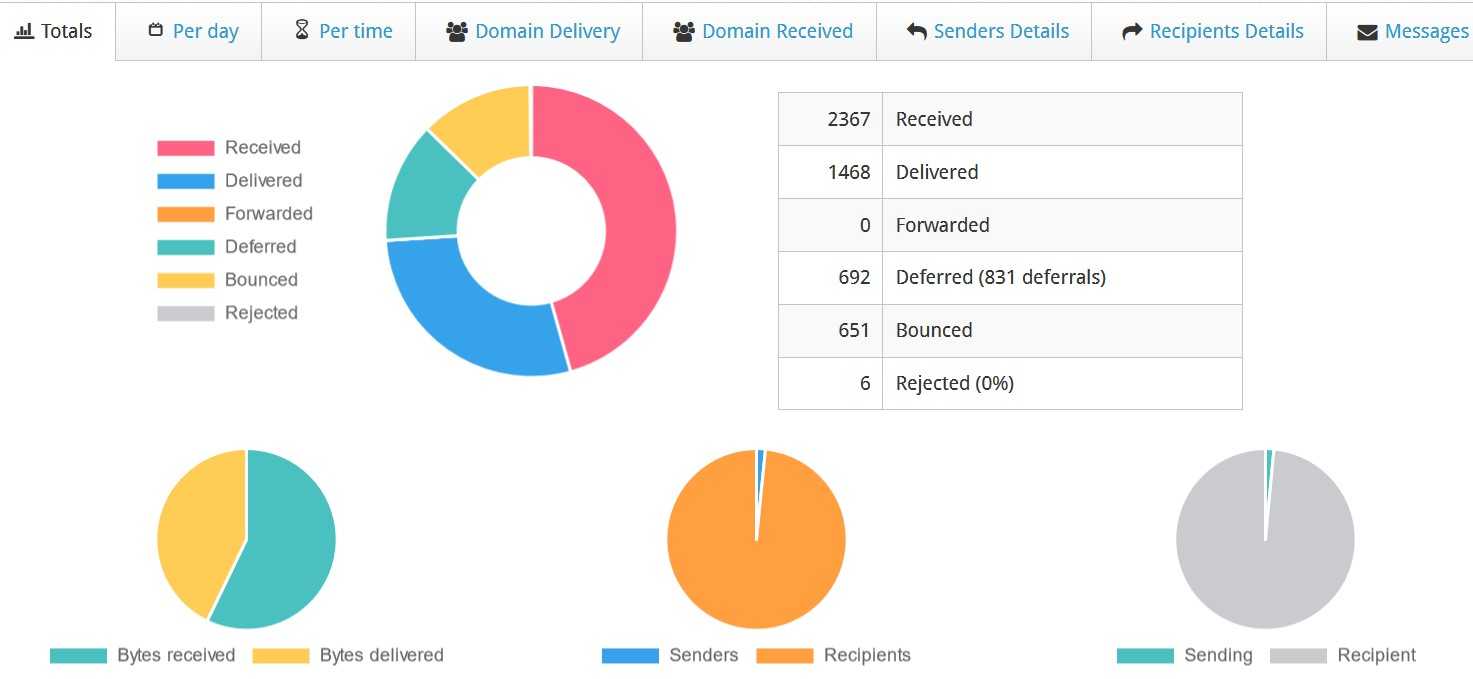
Ang pag-instalar sa CWP control panel nagtugot kanimo sa pagtan-aw sa mga estadistika sa mail server sa pie chart format. ▼
postfix komon nga command line
Ania ang usa ka summary sa pipila ka komon nga postfix command lines.
Sugo aron ilista ang mga pila sa koreo ug mga Mail ID ▼
postqueue -p
mailq
postqueue -p |tail
postqueue -pugmailqAng sugo mao ra.
postfix pagsugod nga sugo
Pagsugod sa postfix server ▼
postfix:postfix start
hunong ang postfix server ▼
postfix:postfix
I-reload ang configuration sa postfix ▼
service postfix reload
I-restart ang postfix service command
I-restart ang postfix server ▼
service postfix restart
Tan-awa ang postfix nga bersyon ▼
postconf mail_version
Ipakita ang default nga kantidad sa postfix ▼
postconf -d
Ipakita ang dili default nga mga kantidad sa postfix ▼
postconf -n
I-refresh ang pila sa mail ▼
postfix flush
postfix debug command
Iproseso dayon ang pila ▼
postqueue -f
Iproseso ang bisan unsang email nga natanggong sa pila ▼
postsuper -r ALL && postqueue -f
Basaha ang email gikan sa mail queue ▼
postcat -q MAIL_ID
Kuhaa ang mensahe sa MAIL_ID gikan sa pila ▼
postsuper -d MAIL_ID
Kuhaa ang tanang mensahe gikan sa pila ▼
postsuper -d ALL
Kuhaa dayon ang tanan gikan sa pila nga mail ▼
find /var/spool/postfix/deferred/ -type f | xargs -n1 basename | xargs -n1 postsuper -d
I-delete ang tanang mensahe sa nalangan nga pila ▼
postsuper -d ALL deferred
postfix maintenance nga mga sugo
Paghan-ay ug pag-ihap sa mga email pinaagi sa "Gikan sa Address" ▼
postqueue -p | awk '/^[0-9,A-F]/ {print $7}' | sort | uniq -c | sort -nI-delete ang tanang email nga gipadala: mailto:[email protected] ▼
postqueue -p|grep '^[A-Z0-9]'|grep user@ adminlogs. info|cut -f1 -d' '|tr -d \*|postsuper -d -
I-delete ang tanang email nga gipadala gikan sa [email protected]▼
postqueue -p|awk '/^[0-9,A-F].*user@ admin.info / {print $1}'|cut -d '!' -f 1|postsuper -d -I-delete ang tanang email gikan sa domain adminlogs.info▼
postqueue -p | grep '^[A-Z0-9]'|grep @adminlogs. info|cut -f1 -d' ' |tr -d \*|postsuper -d -
Mubo ang estadistika sa pila sa mensahe ▼
postqueue -p | tail -n 1
Gidaghanon sa mga email sa mail queue ▼
postqueue -p | grep -c "^[A-Z0-9]"
Email Quick Count sa Mail Queue ▼
find /var/spool/postfix/deferred -type f | wc -l
Tan-awa ang mail log▼
tail -f /var/log/maillog
Pag-ihap ug paghan-ay sa malampuson nga pop3/imap logins ▼
grep "\-login" /var/log/dovecot-info.log |grep "登录:"|awk {'print $7'}|sort|uniq -c|sort -nPag-ihap ug paghan-ay sa malampuson nga SMTP postfix logins (para sa pagsubay sa mga spammer)▼
grep -i "sasl_username" /var/log/maillog |awk {'print $9'}|sort|uniq -c|sort -nPag-ihap ug paghan-ay sa malampuson nga SMTP postfix logins sa eksaktong petsa "Hunyo 6" ▼
grep -i "sasl_username" /var/log/maillog |grep "Jun 18"|awk {'print $9'}|sort|uniq -c|sort -nAnalisaha ang postfix logs ▼
pflogsumm /var/log/maillog | less
- Kung wala kay pflogsumm, mahimo nimong i-install kini nga rpm package"
postfix-perl-scripts"
Adunay usab postfix paglikay sa spam setup tutorial ▼

Hinaut nga ang artikulong "Common Postfix Command Lines: Sending Emails to Execute Startup, Restart, Debugging, and Maintenance Services" nga gipaambit sa blog ni Chen Weiliang ( https://www.chenweiliang.com/ ) makatabang kanimo.
Ayaw pagpanuko sa pagpaambit niini nga link sa artikulo: https://www.chenweiliang.com/cwl-27769.html