
લેખ ડિરેક્ટરી
માર્કડાઉન હિયર પ્લગઇન ડાઉનલોડ કરો (ક્રોમ એક્સટેન્શન ઇન્સ્ટોલેશન ટ્યુટોરીયલ)
માર્કડાઉન એક "ઈમેલ-શૈલી" માર્કઅપ ભાષા છે, અને ચેન વેઈલિયાંગ ભારપૂર્વક ભલામણ કરે છે કે બધા ઓનલાઈન માર્કેટિંગ પ્રેક્ટિશનરો આ ભાષા શીખે અને તેમાં નિપુણતા મેળવે.
જો તમે પહેલા માર્કડાઉન વિશે સાંભળ્યું હોય પણ તમે ચાઝુઓ એકેડેમીમાં ઓનલાઈન માર્કેટિંગ શીખવા માટે કોર્સ કરી રહ્યા છો અને ઈ-કોમર્સ માર્કેટિંગ કોપી લખવાની જરૂર છે , તો કદાચ તમને લાગે છે કે માર્કડાઉન શીખવું ખૂબ મુશ્કેલ છે, તેથી તમે તે શીખ્યા નથી.
હકીકતમાં, WeChat માર્કેટિંગમાં રોકાયેલ કોઈપણ સંપાદક ફક્ત દસ મિનિટમાં તે શીખી શકે છે.
તે સમયે, તમે નિસાસો નાખી શકો છો "હું શા માટે અગાઉ ઓનલાઈન માર્કેટિંગ કોપી લખવાનું માર્કડવોન શીખ્યો નથી"?
વાસ્તવમાં, સામાન્ય રીતે ઉપયોગમાં લેવાતા માર્કડાઉન સિન્ટેક્સના માત્ર 5 પ્રકારો છે:
- આ ટેક્સ્ટને પ્રથમ-સ્તરના શીર્ષક તરીકે ચિહ્નિત કરવા માટે # અને N-સ્તરના શીર્ષક તરીકે ચિહ્નિત કરવા માટે N # નો ઉપયોગ કરો.
- * અથવા 1 ઉમેરી રહ્યા છે. "2." 3. ટેક્સ્ટને સૂચિ તરીકે સાકાર કરી શકાય તે પહેલાં.
- તેને સંદર્ભ તરીકે ચિહ્નિત કરવા માટે ફકરાની પહેલાં > ઉમેરો
- ઇટાલિક દર્શાવવા માટે ટેક્સ્ટની પહેલાં અને પછી એક * અને બોલ્ડ દર્શાવવા માટે બે * ઉમેરો
- હાઇપરલિંક દાખલ કરવા માટે [ટેક્સ્ટ](લિંક એડ્રેસ) નો ઉપયોગ કરો
પ્લગઇન ડાઉનલોડ
અહીં માર્કડાઉન કરો સત્તાવાર ડાઉનલોડ સરનામું:
http://markdown-here.com/get.html
માર્કડાઉન અહીં એક બ્રાઉઝર પ્લગઇન છે (Chrome/Firefox/Safari) જે બ્રાઉઝરમાં એડિટરમાં માર્કડાઉન ટેક્સ્ટને રેન્ડર કરેલ HTML માં રૂપાંતરિત કરે છે.તમે CSS ને કસ્ટમાઇઝ પણ કરી શકો છો, જેઓ વારંવાર માર્કડાઉન ફોર્મેટનો ઉપયોગ કરે છે તેમના માટે ખરેખર સરસ છે. તમે ઇમેઇલ્સ, દસ્તાવેજો વગેરે લખવા માટે માર્કડાઉનનો ઉપયોગ કરો છો.
અહીં માર્કડાઉન ઇન્સ્ટોલ અને સેટ કરવા માટે, ફક્ત નીચેના પગલાં અનુસરો:
- Google Chrome માં Markdown Here પ્લગઇન ઇન્સ્ટોલ કરો
- અહીં માર્કડાઉન વિકલ્પને ગોઠવો, કેટલાક CSS કસ્ટમાઇઝ કરો
સાર્વજનિક એકાઉન્ટ ઝડપી ટાઇપસેટિંગ પદ્ધતિ
- માર્કડાઉન ફોર્મેટમાં લેખ લખો, વિગતો માટે કૃપા કરીને આ લેખનો સંદર્ભ લો: "WeChat પબ્લિક એકાઉન્ટને ઝડપથી કેવી રીતે ટાઈપસેટ કરવું?અબજોપતિ લી ઝિયાઓલાઈનું લેઆઉટ માત્ર 1 સેકન્ડ લે છે"
WP+ સત્તાવાર એકાઉન્ટ લખવાની પ્રક્રિયા
- વાપરવુ વર્ડપ્રેસ વેચેટ કરોજાહેર એકાઉન્ટ પ્રમોશન?વિગતો માટે આ લેખ જુઓ:"વર્ડપ્રેસ WeChat સત્તાવાર એકાઉન્ટ એડિટરમાં પેસ્ટ કરે છે, લેખ ટાઇપસેટિંગ શૈલીને કેવી રીતે સાચી બનાવવી? 》
કસ્ટમ CSS
મુખ્ય ફેરફારો નીચે મુજબ છે:
- ફોન્ટ (કદ, રંગ)
- રેખા અંતર
- શબ્દ અંતર
સારાંશ સિદ્ધાંતો નીચે મુજબ છે:
- લેખના મુખ્ય ભાગનું ફોન્ટનું કદ પ્રાધાન્ય 14-18px ની વચ્ચે છે, જેમાં 16px સૌથી યોગ્ય છે.
- લાઇન સ્પેસિંગ લાઇન સ્પેસિંગ કરતા 1.5-1.75 ગણું છે, જે વધુ આરામદાયક લાગશે.
- મોબાઇલ ટર્મિનલ પરના લેખોને પ્રથમ લાઇન પર ઇન્ડેન્ટ કરવાની જરૂર નથી.
- ફકરાઓ વચ્ચે, ખાલી લીટી શ્રેષ્ઠ છે.
CSS પ્લગઇન અહીં માર્કડાઉન કરો
ચેન વેઇલિયાંગના માર્કડાઉન અહીં પ્લગઇનમાંથી નીચેના CSS કોડને Chrome → સેટિંગ્સ → એક્સટેન્શન → markdown.here → વિકલ્પો → મૂળભૂત રેન્ડરિંગ CSS માં કોપી કરો .
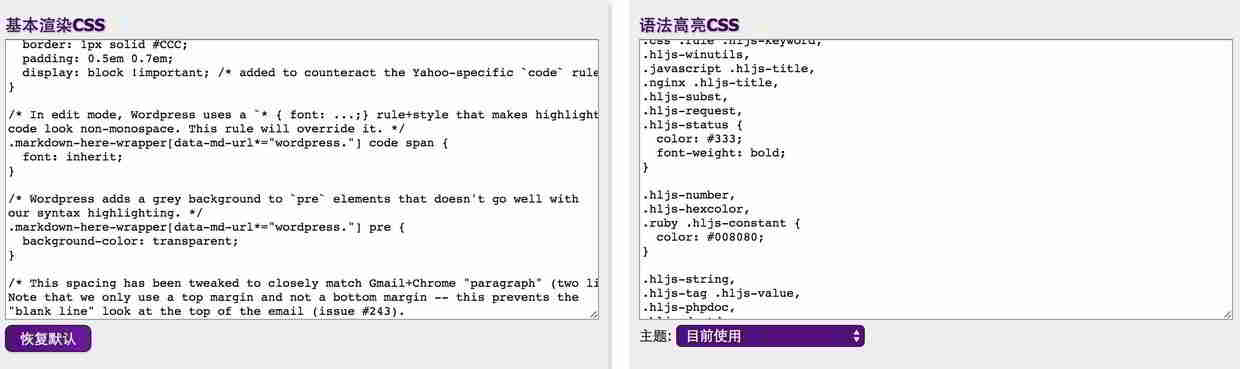
/*
CSS Name: Markdown here插件CSS
Version: 3.0
Description: Designed by <a href="https://www.chenweiliang.com/">陈沩亮博客</a>
Author: 陈沩亮
Author URI: https://www.chenweiliang.com/
License: GNU General Public License
License URI: http://www.gnu.org/licenses/gpl-2.0.html
Copyright: (c) 2017 陈沩亮.
*/

.markdown-here-wrapper {
 font-size: 16px;
 line-height: 1.75em;
 letter-spacing: 2px;
 padding-left: 1em;
 padding-right: 1em;
 margin: 1.5em 5px !important;
}


div p {
 font-size: 16px;
 line-height: 1.75em;
 letter-spacing: 2px;
 padding-left: 1em;
 padding-right: 1em;
 margin: 1.5em 5px !important;
}

pre, code {
 font-size: 14px;
 font-family: Roboto, 'Courier New', Consolas, Inconsolata, Courier, monospace;
 margin: auto 5px;
}

code {
 white-space: pre-wrap;
 border-radius: 2px;
 display: inline;
}

pre {
 font-size: 15px;
 line-height: 1.4em;
 display: block; !important;
}

pre code {
 white-space: pre;
 overflow: auto;
 border-radius: 3px;
 padding: 1px 1px;
 display: block !important;
}

strong, b{
 color: #BF360C;
}

em, i {
 color: #009688;
}

hr {
 border: 1px solid #BF360C;
 margin: 1.5em auto;
}

p {
 font-size: 16px;
 line-height: 1.75em;
 letter-spacing: 2px;
 padding-left: 1em;
 padding-right: 1em;
 margin: 1.5em 5px !important;
}

table, pre, dl, blockquote, q, ul, ol {
 margin: 10px 5px;
}

ul, ol {
 padding-left: 15px;
}

li {
 margin: 10px;
}

li p {
 margin: 10px 0 !important;
}

ul ul, ul ol, ol ul, ol ol {
 margin: 0;
 padding-left: 10px;
}

ul {
 list-style-type: circle;
}

dl {
 padding: 0;
}

dl dt {
 font-size: 1em;
 font-weight: bold;
 font-style: italic;
}

dl dd {
 margin: 0 0 10px;
 padding: 0 10px;
}

blockquote, q {
 border-left: 2px solid #009688;
 padding: 0 10px;
 color: #777;
 quotes: none;
 margin-left: 1em;
}

blockquote::before, blockquote::after, q::before, q::after {
 content: none;
}

h1, h2, h3, h4, h5, h6 {
 margin: 20px 0 10px;
 padding: 0;
 font-style: bold !important;
 color: #009688 !important;
 text-align: center !important;
 margin: 1.5em 5px !important;
 padding: 0.5em 1em !important;
}

h1 {
 font-size: 24px !important;
 border-bottom: 1px solid #ddd !important;
}

h2 {
 font-size: 20px !important;
 border-bottom: 1px solid #eee !important;
}

h3 {
 font-size: 18px;
}

h4 {
 font-size: 16px;
}


table {
 padding: 0;
 border-collapse: collapse;
 border-spacing: 0;
 font-size: 1em;
 font: inherit;
 border: 0;
 margin: 0 auto;
}

tbody {
 margin: 0;
 padding: 0;
 border: 0;
}

table tr {
 border: 0;
 border-top: 1px solid #CCC;
 background-color: white;
 margin: 0;
 padding: 0;
}

table tr:nth-child(2n) {
 background-color: #F8F8F8;
}

table tr th, table tr td {
 font-size: 16px;
 border: 1px solid #CCC;
 margin: 0;
 padding: 5px 10px;
}

table tr th {
 font-weight: bold;
 color: #eee;
 border: 1px solid #009688;
 background-color: #009688;
}
નવા મીડિયા પ્રોફેશનલ્સ માટે અહીં બે વધુ માર્કડાઉન કસ્ટમ શૈલીઓ છે:
યાંગ ઝિપિંગ:
https://github.com/veganshe/CodeBlock/blob/master/Markdown-here/markdown-here-yzp.css
લી ઝિયાઓલાઈ:
https://gist.github.com/xiaol ai /aa190255b7dde302d10208ae247fc9f2
આશા છે કે, ચેન વેઇલિયાંગના બ્લોગ ( https://www.chenweiliang.com/ ) પર શેર કરાયેલ "માર્કડાઉન અહીં પ્લગઇન ડાઉનલોડ (ક્રોમ એક્સટેન્શન ઇન્સ્ટોલેશન ટ્યુટોરીયલ)" લેખ તમારા માટે મદદરૂપ થશે.
આ લેખની લિંક શેર કરવા માટે નિઃસંકોચ રહો: https://www.chenweiliang.com/cwl-471.html