
Tsab ntawv teev npe
Cov lus qhia rub tawm thiab teeb tsa Jekyll no yuav coj koj ib kauj ruam zuj zus kom muaj koj tus kheej blog yam tsis siv ib lub nyiaj!
Tsim ib lub vev xaib blog uas tsis hloov pauv txij thaum pib - txawm tias cov neeg pib tshiab tuaj yeem ua tau yooj yim! Tsis tas yuav tsim lub vev xaib nyuaj , hais lus zoo rau kev tsim lub vev xaib, thiab muaj koj tus kheej blog hauv ob peb feeb xwb los tso koj lub peev xwm thiab kev muaj tswv yim! 🚀🎉
Jekyll yog dab tsi?

Jekyll, lub tshuab hluav taws xob lub vev xaib zoo li qub, tsim nyog rau tsim cov vev xaib blog.
Nws tuaj yeem siv cov ntawv sau ua lus cim thiab siv qhov teeb tsa los tsim cov vev xaib zoo li qub.
Koj tuaj yeem hloov kho qhov tsos ntawm lub vev xaib, URL, cov ntaub ntawv tso tawm ntawm nplooj ntawv, thiab ntau dua ...
Jekyll qhov tsis zoo yog qhov tseeb: vim tias nws tsis siv lub database, nws tsis haum rau kev tsim cov vev xaib e-commerce.
Qhov zoo ntawm Jekyll yog dab tsi?
- Jekyll yooj yim siv thiab kawm.
- Jekyll tuaj yeem tsim cov vev xaib nrawm thiab ruaj ntseg zoo li qub.
- Jekyll muaj ntau lub ntsiab lus thiab plugins muaj.
Yuav pib siv Jekyll li cas?
- Nruab Jekyll.
- Tsim ib lub vev xaib Jekyll tshiab.
- Xaiv lub ntsiab lus Jekyll.
- Ntxiv koj cov ntsiab lus:Jekyll cov lus qhia tshiab
- Saib ua ntej koj lub vev xaib.
- Tsim koj lub vev xaib.
- Siv koj lub vev xaib:Jekyll zoo li qub blog raug xa mus rau Surge.sh dawb
Nruab Jekyll los ntawm rubyInstaller
Txoj kev yooj yim tshaj plaws rau nruab Ruby thiab Jekyll yog siv RubyInstaller rau Windows.
RubyInstaller yog Windows-raws li tus neeg ua haujlwm ywj pheej uas suav nrog cov lus Ruby, qhov chaw ua haujlwm, cov ntaub ntawv tseem ceeb, thiab lwm yam.
Peb tsuas yog npog RubyInstaller-2.4 thiab siab dua ntawm no. Cov qub versions yuav tsum tau manual installation ntawm Devkit.
Kauj Ruam 1: RubyInstaller
- Download tau thiab nruab los ntawm RubyInstaller DownloadsRuby + Devkitversion.
- Nruab siv cov kev xaiv pib.
Kauj Ruam 2: Sau cmd
xovxwmWIN key + R key, ces nkag cmd, ces nias Enter ▼
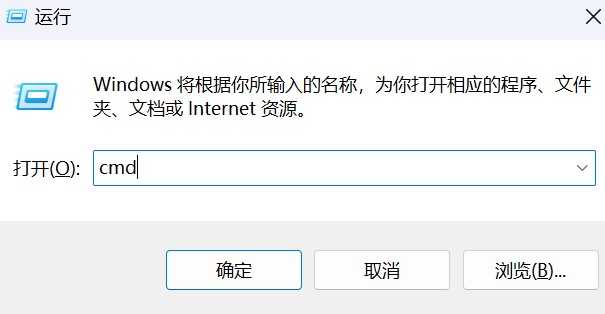
Kauj Ruam 3:Nkag mus hais kom ua input ridk installCov kauj ruam hauv cov theem kawg ntawm kev teeb tsa.
- Qhov no yog yuav tsum tau rau nruab lub pov haum nrog ib txwm extensions.
- Xaiv los ntawm kev xaiv
MSYS2 and MINGW development tool chain. Khiav cov lus txib
ruby -v和gem -vtxhawm rau txheeb xyuas tus lej version kom paub meej tias qhov kev teeb tsa puas ua tiav.
Qhib Windows Start menu thiab nrhiavStart Command Prompt with Ruby, txhawm rau pab ruby kab hais kom ua.
Kauj Ruam 4: Hloov qhov chaw pov thawj mus rau qhov chaw Suav teb
Vim muaj kev sib txuas hauv network thiab teeb meem ceev, ua ntej txiav txim siab hloov kho lub pov haum, nws tau pom zoo kom hloov lub pov haum mus rau Suav qhov chaw ▼
gem sources --remove https://rubygems.org/
gem sources -a https://gems.ruby-china.com/
lossis
gem sources --add https://gems.ruby-china.com/ --remove https://rubygems.org/
Kauj Ruam 5: Cia peb xyuas qhov chaw tam sim no ▼
gem sources -l
- Xyuas kom tseeb tias tsuas muaj
gems.ruby-china.com
Kauj Ruam 6: Hloov kho lub pob zeb Ruby ▼
gem update
Kauj Ruam 7: Peb teeb tsa cov khoom ▼
gem install jekyll bundlerKauj Ruam 8: Xyuas seb Jekyll puas tau teeb tsa tiav lawm ▼
jekyll -v
Tsim ib lub vev xaib Jelly zoo li qub blog ntawm koj lub computer hauv zos
Kauj Ruam 1:Hloov daim ntawv tsav tsheb ▼
Nkag mus ncaj qha rau hauv cmdd:
Kauj Ruam 2: Hloov daim nplaub tshev tam sim no ▼
cd /d d:\Jekyll\
Kauj Ruam 3: Siv cov lus txib hauv qab no los tsim lub vev xaib Jekyll tshiab ▼
jekyll new site1
Kauj Ruam 4: Sau daim ntawv qhia txog qhov project ▼
cd site1
Kauj Ruam 5: Pib qhov kev pabcuam Jekyll ▼
bundle exec jekyll serve
hloov--livereloadkev xaiv rauserveAutomatically refresh nplooj ntawv txhua zaus hloov pauv rau cov ntaub ntawv qhov chaw ▼
bundle exec jekyll serve --livereload
- Thaum koj tsim koj lub vev xaib, siv
jekyll servelos yogjekyll build - Txhawm rau yuam kom lub browser rov ua dua tshiab ntawm txhua qhov kev hloov pauv, siv
jekyll serve --livereload. jekyll serveBuilt-in site version_siteTsis haum rau kev xa tawm.- Siv cov txuas thiab cov cuab yeej URLs los ntawm qhov chaw tsim
jekyll serveyuav sivhttps://localhost:4000Tus nqi yog teem los ntawm cov kab hais kom ua kab teeb tsa, tsis yog nyob rau hauv qhov chaw teeb tsa cov ntaub ntawv.
Kauj Ruam 6:nkag mus http://localhost:4000 Saib qhov project.
Nco tseg:
- Yog tias cov ntaub ntawv raug muab tso rau hauv xxx.github . io/blog, nws yuav ua rau Github Page tsis hloov kho.
- Yog vim li cas rau qhov tshwm sim no yog tias GitHub yuav tsuas nyeem xxx.github . io/_includes nyob rau hauv Jekyll thiab yuav tsis mus tob rau hauv blog/_includes.
- Hmoov zoo, qhov teeb meem no tsis yog teeb meem nyuaj, tsuas yog teeb tsa Github Nplooj ntawv ntawm GitHub thiab qhov teeb meem yuav raug daws sai sai!
Yuav ua li cas rho tawm Jekyll lub vev xaib tau teeb tsa hauv lub computer hauv zos los ntawm cov lus txib?
Koj tuaj yeem siv cov lus txib hauv qab no kom tshem tawm lub vev xaib Jekyll hauv zos.
Rho tawm cov ntaub ntawv generated:
Kauj Ruam 1: Khiav cov lus txib hauv qab no kom tshem tawm cov ntaub ntawv tsim tawm ▼
jekyll clean
Kauj Ruam 2: Rho tawm tag nrho cov npe ntawm lub vev xaib
- Yog hais tias koj xav kom rho tawm tag nrho lub website directory, koj yuav manually rho tawm cov
C:/Users/a/myblognplaub tshev.
🔗 Nyeem ntxiv▼

Jekyll cov peev txheej
Jekyll yog qhov yooj yim, blog-style moj khaum rau kev tsim cov vev xaib zoo li qub.
Nws siv cov lus Markdown thiab Liquid template, uas cia koj yooj yim tsim cov vev xaib zoo nkauj, dynamic.
Saib cov ntaub ntawv Jekyll kom paub ntau ntxiv.
Nov yog qee qhov muaj txiaj ntsig zoo txog Jekyll Kuv vam tias cov peev txheej no tuaj yeem pab koj siv Jekyll los tsim lub vev xaib!
Vam tias, tsab xov xwm "Jekyll Download and Installation Tutorial: Building a Static Blog Website from Scratch on Your Local Computer" uas tau muab qhia rau Chen Weiliang lub blog ( https://www.chenweiliang.com/ ) yuav pab tau koj.
Xav qhia qhov txuas ntawm tsab xov xwm no: https://www.chenweiliang.com/cwl-31549.html