
Tsab ntawv teev npe
Cia kuv piav qhia qhov teeb meem ntawm Cursor shared account rau koj.
Ib tug phooj ywg tshiab qhia kuv tias nws siv 12 yuan los yuav ib tus account Cursor Pro sib koom ntawm ib lub platform. Kuv nug nws tam sim ntawd, "Koj puas paub tias muaj pes tsawg tus neeg siv tus account no tib lub sijhawm?" Nws hais tias nws tsis paub. Kuv hais tias, "Koj puas paub tias koj cov code snippets yuav tshwm sim hauv lwm tus neeg lub sidebars?" Nws xav tsis thoob.
Cursor yog ib yam dab tsi uas txhua tus neeg uas tau siv paub tias nws zoo kawg nkaus li cas. Nws tsis yog ib qho yooj yim VS Code plugin; nws muab cov peev xwm loj-loj ncaj qha rau hauv koj cov txheej txheem coding. Thaum koj coding, nws nkag siab txog tag nrho cov qauv project; thaum koj refactoring, nws rhuav tshem cov haujlwm tsis siv neeg; thiab thaum koj debugging, nws pab koj taug qab cov ntsiab lus. Qhov tseeb, tom qab siv nws, rov qab mus rau VS Code ib txwm zoo li hloov ntawm lub tsheb tsis siv neeg mus rau lub tsheb tsis siv neeg - nws tsis yog tias koj tsav tsis tau, nws tsuas yog xav tias nkees xwb.
Qhov teeb meem yog tias qhov version dawb ntawm Cursor's quota yeej tsis txaus.
Vim li cas kuv qhov Cursor credit limit dawb tsis txaus?
Kev ua kom tiav yooj yim thiab kev sib tham yooj yim yog qhov yooj yim, tab sis thaum koj pib ua haujlwm rau cov haujlwm loj, koj yuav pom tias cov teeb meem nrog rau qhov dawb version yog li cas. Kev nkag siab tsis tiav cov ntsiab lus, kev hloov kho nyuaj yuav tsum tau rhuav tshem cov lus qhia ntau zaus, thiab thaum lub sijhawm hu xov tooj ntawm tus qauv tas lawm, lub sijhawm teb yuav poob rau qhov uas yuav ua rau koj tsis ntseeg koj lub neej.
Kuv tus kheej yog ib tus neeg siv dawb yav dhau los, thiab txhua zaus kuv siv tsis tau nyiaj thaum lub sijhawm tseem ceeb , nws zoo li koj tab tom yuav khiav mus rau qhov kawg thaum koj pom koj txoj hlua khau tawg.
Yog li ntawd, ntau tus neeg thawj qhov kev xav yog hloov kho mus rau Cursor Pro.
Txawm li cas los xij, cov txheej txheem hloov kho tshiab no yeej ua rau cov neeg siv hauv Suav teb ntxhov siab heev.
Vim li cas nws thiaj nyuaj rau them rau kev tso npe Cursor Pro official?

Cursor siv lub tshuab them nyiaj Stripe, thiab nws txoj kev tswj hwm kev pheej hmoo yog nruj heev. Feem ntau ntawm daim npav Visa, daim npav Mastercard, thiab txawm tias qee daim npav virtual hauv Suav teb tau txheeb xyuas ncaj qha tias yog kev lag luam muaj kev pheej hmoo siab thiab raug tsis lees paub. Koj yuav pom cov lus yuam kev zoo li...Your card was declined"los yog"Your card does not support this type of purchase"
Thiab qhov txaus ntshai tshaj plaws yog tias kev sim them nrog ntau daim npav sib txawv yuav ua rau koj tus ID kho vajtse raug cim. Qhov ntawd txhais tau tias koj yuav tsis tuaj yeem them txawm tias koj hloov daim npav, vim tias nws twb tau cim koj cov ntaub ntawv lawm.
Yog li ntawd, yog tias koj tsis muaj daim npav rho nyiaj txawv teb chaws, qhov no yeej tsis yog qhov kev xaiv rau koj.
Yuav xaiv li cas ntawm Cursor top-up service thiab dedicated account?
Tseem muaj ob txoj kev xaiv uas tseem tshuav: ib qho uas yuav pab kom koj tsis txhob txhawj, thiab ib qho uas yuav pab kom koj tsis txhob muaj teeb meem.
Qhov kev xaiv thawj zaug yog Cursor top-up. Qhov no suav nrog kev nrhiav ib tus neeg los top up koj tus account yam tsis tau hloov koj tus kheej. Qhov zoo ntawm txoj kev no yog tias koj cov cai cursor uas tau teeb tsa ua ntej, cov cwj pwm plugin, thiab cov chaw teeb tsa project yuav nyob twj ywm. Qhov tsis zoo yog tias koj yuav tsum nrhiav tus neeg muab kev pabcuam top-up txhim khu kev qha; txwv tsis pub, yog tias cov txheej txheem top-up ua rau muaj kev ntsuas tswj kev pheej hmoo, koj tus account yuav raug cuam tshuam.
Kuv tus kheej tsis tau sim siv cov kev pabcuam ntxiv nyiaj ntawm lwm tus, tab sis cov phooj ywg uas tau hais tias thaum xaiv tus neeg muab kev pabcuam, koj yuav tsum xyuas seb lawv puas muaj cov channel ntxiv nyiaj ruaj khov thiab zam cov uas pheej yig tab sis siv cov daim npav uas muaj kev pheej hmoo siab.
Qhov kev xaiv thib ob yog mus yuav ncaj qha rau ib tus account tshwj xeeb Cursor Pro uas tau qhib ua ntej ntawm Account Planet.
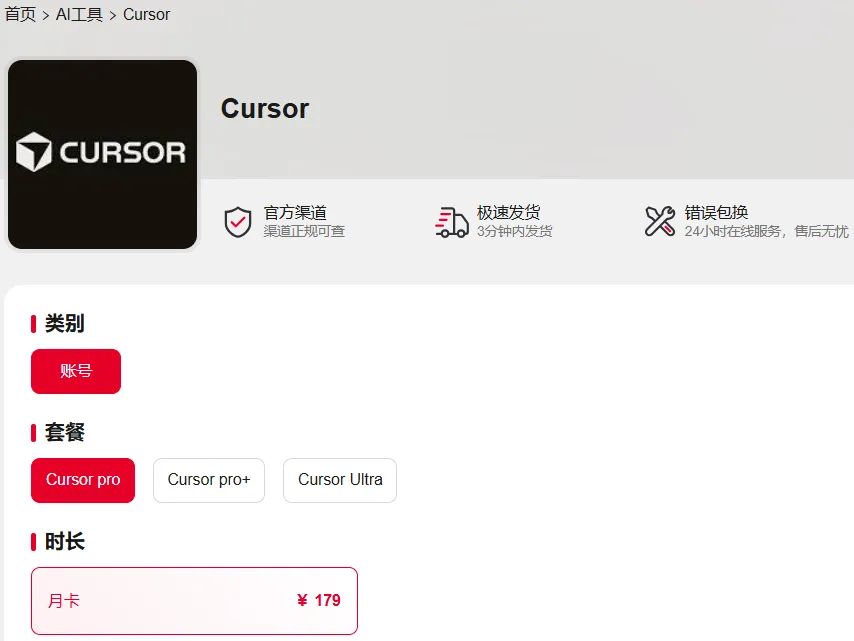
Qhov no yog qhov nws zoo li: koj tuaj yeem yuav nws thiab siv nws tam sim ntawd; tsis tas yuav sau npe, nrhiav daim npav, lossis dhau qhov teeb meem ntawm kev txheeb xyuas. Rau cov neeg uas saib taus qhov ua tau zoo, qhov no yog txoj hauv kev yooj yim tshaj plaws. Tab sis muaj ib qho tseem ceeb heev ntawm no, uas kuv yuav tham txog tom qab.
Tau txais tus account luv nqi los ntawm Account Planet tam sim no, xa khoom ruaj ntseg hauv 5 feeb xwb ▼
Peb qhov teeb meem loj ntawm cov nyiaj Cursor sib koom: Koj tau poob rau hauv pes tsawg?
Tiamsis ua ntej peb tham txog tej no, kuv yuav tsum taw qhia txog ib qho teeb meem uas ntau tus neeg tsis paub txog.
Nws yog ib tus account sib koom.
Muaj ntau tus account Cursor sib koom ua lag luam tsuas yog ob peb duas las xwb, uas zoo li pheej yig, tab sis yog tias koj yog tus sau code tiag tiag, kuv xav kom koj nyob deb. Qhov no tsis yog kev hais ua kom dhau; qhov laj thawj yooj yim heev.
Qhov teeb meem thawj zaug yog kev ceev ntiag tug.
Cursor muaj ib qho feature hu ua Settings Sync, uas synchronizes koj cov chaw. Qhov feature no synchronizes koj cov keeb kwm tshawb nrhiav, cov code snippets, thiab cov npe ntaub ntawv qhib tsis ntev los no. Yog tias koj siv ib tus account sib koom, cov ntaub ntawv no yuav raug synchronized rau qhov twg? Nws yuav raug synchronized rau tsib lossis rau tus neeg sib koom tib tus account nrog koj. Txawm koj qhov project hu li cas los xij, cov yam ntxwv twg koj tab tom ua haujlwm rau, thiab module twg koj tau hloov kho tsis ntev los no - lawv tuaj yeem pom txhua yam no hauv sidebar thaum lawv qhib Cursor.
Qhov no tsis yog kev pheej hmoo uas xav xwb; nws yog tus cwj pwm qub ntawm Settings Sync. Xav txog cov txiaj ntsig yog tias cov ntaub ntawv no tau raug xau thaum koj ua haujlwm rau ib qhov project ntawm lub tuam txhab.
Qhov teeb meem thib ob yog kev txeeb quota.
Feem ntau cov account sib koom muaj ntau tus neeg sib koom ib qho kev txwv ntawm tus account ceev. Xav txog koj maj nrawm kom ua tiav lub sijhawm kawg thiab xav tau AI los kho dua ib daim logic nyuaj, tsuas yog pom tias koj qhov kev txwv twb tau siv tag lawm los ntawm lwm tus neeg khiav cov scripts. Koj raug yuam kom rov qab mus rau hom qeeb, tos kom teb kom txog thaum koj nug koj qhov muaj nyob. Qhov tseeb, qhov kev paub no phem dua li siv cov version dawb.
Qhov teeb meem thib peb yog kev ncua tus account.
Qhov no yog qhov teeb meem tseem ceeb tshaj plaws. Cursor qhov kev tshawb pom raug cai ntawm kev nkag mus tib lub sijhawm los ntawm ntau qhov chaw thiab cov khoom siv yog qhov tseeb heev. Kev hloov IP ntau zaus nrog cov nyiaj sib koom, lossis cov neeg los ntawm thaj chaw sib txawv siv tib tus account tib lub sijhawm, yooj yim ua rau muaj kev ntsuas kev pheej hmoo. Tsis yog koj yuav poob koj cov nyiaj tom qab raug txwv, tab sis qhov tseem ceeb dua, nws yuav cuam tshuam koj txoj kev ua haujlwm.
Yog li koj pom, ob peb duas las yuav zoo li pheej yig, tab sis tus nqi koj them yog kev pheej hmoo ntawm kev ceev ntiag tug, kev txwv tsis ruaj khov, thiab qhov ua tau tias koj tus account yuav raug thaiv txhua lub sijhawm.
Qhov txawv ntawm tus account Cursor sib koom thiab tus account tshwj xeeb yog dab tsi?
Qhov txawv loj dua li ntau tus neeg xav.
Ib tus account tshwj xeeb yog 100% ywj pheej; nws yog rau koj siv xwb. Qhov txwv ntawm qhov credit yog koj li, qhov configuration yog koj li, thiab qhov kev ruaj ntseg ntawm code yog koj li. Koj tsis tas yuav txhawj txog ib tus neeg hauv lwm lub nroog siv koj tus account los khiav cov scripts thiab siv tag koj qhov credit limit, koj tsis tas yuav txhawj txog koj txoj kev project tshwm sim hauv ib tus neeg txawv teb chaws lub sidebar, thiab koj tsis tas yuav txhawj txog koj tus account raug txwv tam sim ntawd ib hnub.
Rov qab mus rau tus txiv neej uas tau yuav ib tus account sib koom rau 12 yuan thaum pib, tom qab ntawd kuv nug nws tias, "Koj siv nws tau pes tsawg hnub lawm?" Nws hais tias nws tau siv nws tau peb hnub, thiab nws twb tawm ntawm hom qeeb ob zaug lawm. Tsis tas li ntawd, nws pom qee cov ntaub ntawv ntxiv hauv nws daim nplaub tshev project uas nws tsis tau qhib ua ntej. Nws tsis paub tias nws puas yog teeb meem nrog tus account sib koom, tab sis nws txiav txim siab hloov rov qab mus rau ib qho tshwj xeeb.
Tus nqi ntawm kev txuag tau 12 yuan piv rau kev nkim ob lossis peb hnub yeej yooj yim heev rau kev xam.
Seb Cursor Pro puas tsim nyog yuav nyob ntawm koj qhov xwm txheej siv.
Kuv xav tias tsis muaj lus teb rau lo lus nug no; nws nyob ntawm koj qhov kev siv.
Yog tias koj tab tom tswj cov haujlwm nruab nrab mus rau loj, feem ntau yuav tsum nyeem thiab coj lwm tus neeg cov lej, thiab rov kho dua thiab debugging tas li, ces Cursor Pro cov qauv ua haujlwm siab, cov neeg sawv cev ntse workflows, thiab kev ua tiav cov lej tsis txwv tuaj yeem txhim kho koj qhov kev ua haujlwm tau zoo. Kuv qhov kev paub pom tseeb tshaj plaws tom qab siv Cursor Pro yog tias cov haujlwm uas yav dhau los xav tau hloov ntawm IDEs thiab cov cav tshawb nrhiav tam sim no feem ntau yog ua tiav hauv Cursor nws tus kheej, txuag lub sijhawm tiag tiag.
Txawm li cas los xij, yog tias koj tsuas yog sau cov ntawv sau lossis ua qee yam kev tsim kho yooj yim xwb, qhov zoo ntawm Pro version nyuaj rau pom tag nrho. Hauv qhov no, qhov version pub dawb yuav txaus, lossis koj tuaj yeem siv qhov credit sim rau Pro version los sim nws thiab saib seb koj puas xav tau nws tiag.
Qhov tseeb, cov cuab yeej tsis tas yuav zoo dua thaum lawv kim dua, thiab lawv tsis tas yuav zoo dua thaum lawv pheej yig dua. Qhov tseem ceeb yog kom phim koj tus cwj pwm ua haujlwm. Yog tias koj sau code txhua hnub, kev siv nyiaj rau cov cuab yeej zoo zoo li tus kws ua zaub mov yuav riam zoo - qhov rov qab los ntawm kev nqis peev yog siab heev. Tab sis yog tias koj tsuas yog sau code ob peb zaug hauv ib xyoos, kev yuav riam chav ua noj uas muaj nqis ntau txhiab daus las thiab cia nws sau hmoov av hauv tsev yog qhov tsis tsim nyog.
Cov Lus Qhia Tseem Ceeb: Yuav ua li cas thiaj yuav Cursor Pro tau zoo
Yog li, cia peb rov qab mus rau lo lus nug qub.
Yuav ua li cas thiaj yuav Cursor Pro tau zoo tshaj? Kuv xav kom koj yuav ib tus account uas koj them taus. Nws tsis muaj kev txhawj xeeb, ruaj ntseg, thiab koj tsis tas yuav txhawj txog kev nyiag koj cov ntaub ntawv ntiag tug, koj cov credit limit raug nyiag, lossis koj tus account raug txwv.
Tsis txhob txi koj txoj kev ua haujlwm zoo thiab kev ruaj ntseg ntawm cov lej tsuas yog kom txuag tau ob peb duas las xwb.
Kev daws qee qhov tsis txaus ntawm cov ntaub ntawv tej zaum yog qhov me me uas kuv ua tau hnub no.
Tau txais tus account luv nqi los ntawm Account Planet tam sim no, xa khoom ruaj ntseg hauv 5 feeb xwb ▼
Yog koj pom tsab xov xwm no muaj txiaj ntsig, thov koj nyiam, qhia, thiab ua raws kuv. Sib ntsib dua lwm zaus!
Vam tias, tsab xov xwm "Kev Tshuaj Xyuas: Puas Yog Qhov Kev Pabcuam Sib Koom Cursor Uas Muaj Nqis Tsuas Yog Ob Peb Dollar Xwb?" uas tau muab faib rau ntawm Chen Weiliang lub blog ( https://www.chenweiliang.com/ ) yuav pab tau koj.
Xav qhia qhov txuas ntawm tsab xov xwm no: https://www.chenweiliang.com/cwl-34360.html