
Linuxサーバー上で安定したサービス運用を維持することは、ウェブサイトのSEOにとって非常に重要です。
CWPコントロールパネルは、サービス監視ツールを提供します。
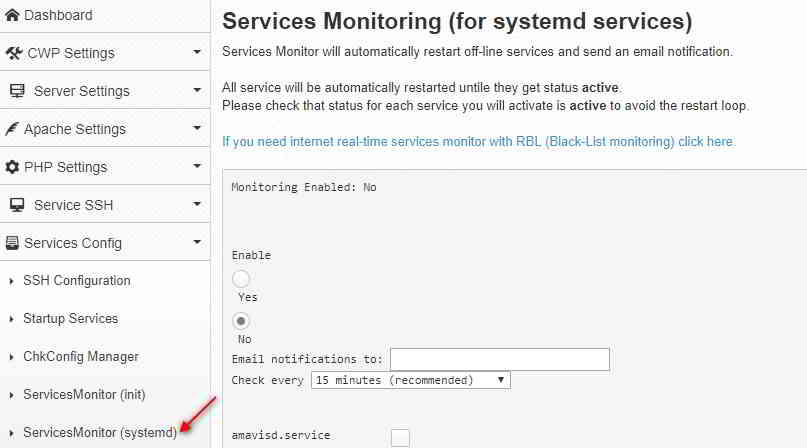
CWPコントロールパネルでServicesMonitor(systemd)を有効にする方法は?
CWPでサービス監視を有効にするには:
- あなたに接続するCWP取り付け
- 查找Services Config-> ServicesMonitor( systemd )オプション
- 選択/入力:
有効化/無効化-これにより、サービス監視が有効/無効になります。
Email 通知送信先-通知を受信するメールアドレスを入力します。
すべてをチェック-チェック間の時間間隔 - 監視するサービスを選択します。例:mariadb.service、monit.service
- クリックして提出するボタン。確認メッセージが表示されます。
Service Monitoring is not enabled
Enabling monitoring in cron
MAILTO=cwp1@ chenweilaing.com
*/15 * * * * root /usr/local/bin/svcMonitor-systemd
Monitoring Enabled: Yes
注意事項
- もしsystemdステータスサービスは
Unknown、サービスの監視は機能しません。 - 監視する選択したサービスはファイルに保存されます
/usr/local/etc/services-monitor-systemd中。 - cronジョブの監視はファイルにあります
/etc/cron.d/svcMonitor-systemd中現れる。
chkconfigコマンドを使用して、サービスを手動で追加/削除することもできます。
chkconfig service_name onchkconfig service_name off
たとえば、利用可能なすべてのサービスが有効になっている場合、次のようなcronメッセージが表示されます。
From: (Cron Daemon) <[email protected]>
Subject: Cron <root@cwp1> /usr/local/bin/svcMonitor-systemd

Restarted service amavisd.service on cwp1 at Sat Mar 31 01:00:01 EDT 2018 Job for amavisd.service failed because the control process exited with error code. See “systemctl status amavisd.service” and “journalctl -xe” for details.

Restarted service arp-ethers.service on cwp1 at Sat Mar 31 01:00:03 EDT 2018 Restarted service [email protected] on cwp1 at Sat Mar 31 01:00:04 EDT 2018 Failed to stop [email protected]: Unit name [email protected] is missing the instance name.

See system logs and ‘systemctl status [email protected]‘ for details.

Failed to get load state of [email protected]: Unit name [email protected] is missing the instance name.

Failed to start [email protected]: Unit name [email protected] is missing the instance name.

See system logs and ‘systemctl status [email protected]‘ for details.

Restarted service console-shell.service on cwp1 at Sat Mar 31 01:00:05 EDT 2018 Restarted service garb.service on cwp1 at Sat Mar 31 01:00:06 EDT 2018 Restarted service [email protected] on cwp1 at Sat Mar 31 01:00:07 EDT 2018 Failed to stop [email protected]: Unit name [email protected] is missing the instance name.

See system logs and ‘systemctl status [email protected]‘ for details.

Failed to get load state of [email protected]: Unit name [email protected] is missing the instance name.

Failed to start [email protected]: Unit name [email protected] is missing the instance name.

See system logs and ‘systemctl status [email protected]‘ for details.

Restarted service ntalk.service on cwp1 at Sat Mar 31 01:00:09 EDT 2018 Job for ntalk.service failed because a configured resource limit was exceeded. See “systemctl status ntalk.service” and “journalctl -xe” for details.

Restarted service rdisc.service on cwp1 at Sat Mar 31 01:00:10 EDT 2018 Job for rdisc.service failed because the control process exited with error code. See “systemctl status rdisc.service” and “journalctl -xe” for details.

Restarted service [email protected] on cwp1 at Sat Mar 31 01:00:17 EDT 2018 Failed to stop [email protected]: Unit name [email protected] is missing the instance name.

See system logs and ‘systemctl status [email protected]‘ for details.

Failed to get load state of [email protected]: Unit name [email protected] is missing the instance name.

Failed to start [email protected]: Unit name [email protected] is missing the instance name.

See system logs and ‘systemctl status [email protected]‘ for details.

Restarted service svnserve.service on cwp1 at Sat Mar 31 01:00:18 EDT 2018 Job for svnserve.service failed because the control process exited with error code. See “systemctl status svnserve.service” and “journalctl -xe” for details.

Restarted service tcsd.service on cwp1 at Sat Mar 31 01:00:19 EDT 2018 Job for tcsd.service failed because the control process exited with error code. See “systemctl status tcsd.service” and “journalctl -xe” for details.

Restarted service vzfifo.service on cwp1 at Sat Mar 31 01:00:20 EDT 2020
CWPコントロールパネルEnableServicesMonitor(systemd)ビデオチュートリアル
以下は、CWPコントロールパネルでServicesMonitor(systemd)を有効にする方法に関するYouTube動画チュートリアルです▼
Chen Weiliang氏のブログ(https://www.chenweiliang.com/ )に掲載されている記事「CWPコントロールパネルでServicesMonitor(systemd)を有効にする方法」が、皆様のお役に立てば幸いです。
この記事のリンクはご自由に共有してください:https://www.chenweiliang.com/cwl-1414.html