
articulus Directory
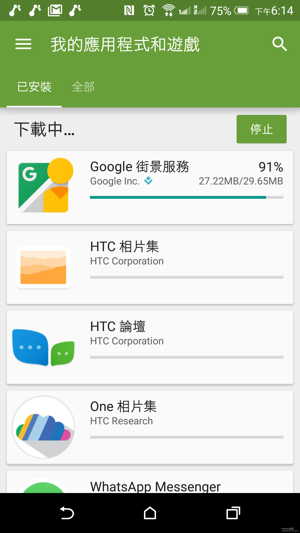
Cum app ex Google Play Store depones,Google Play servat showing expectans download 100% adhæsit, non potuit ad update ac install apps,Errores nuntios cum incertis numeris licebit.
- Turma Google Play huius rei conscia est et eum reficere laborat.
Etiam sequentia pro maiori vide et solutiones propositas experiri.
Quid est Google Play Store error?
Errores Google Play Store, fere errores in numeris incertis generatis comprehendi cum tabulas e Google Play Store excutere conantes, his rebus causari possunt:
- Google Play Store update
- Google Play Store cache
- Google Play Store notitia repono
- Ratio Google
Infra vulgatissima sunt exemplaria errorum apud Google Play Store:
- Google Play Store errore codice 0
- Google Play Store errore codice 18
- Google Play Store errore codice 20
- Google Play Store errore codice 103
- Google Play Store errore codice 194
- Google Play Store errore codice 404
- Google Play Store errore codice 492
- Google Play Store errore codice 495
- Google Play Store errore codice 505
- Google Play Store errore codice 506
- Google Play Store errore codice 509
- Google Play Store errore codice 905
- Google Play Store errore codice 906
Fige Google Play Store errores
- Quaeso experire sequentia opera ut errores figere Google Play Store.
Patet Google Play Store cache
Gradus I: Aperi Occasus menu in tuom.
Gradus II: Vade ad Applications vel Application Procurator.
- (Haec optio variari potest prout in fabrica usus est)
Gradus III, volumen ad omnia Apps et librum usque ad Google Play Store app ▼
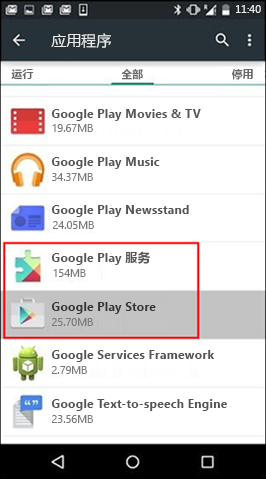
Gradus 4: Aperi applicationis singula et preme "Vim Siste" puga pyga.
Gradus V: Click in "Cache Serena" ▼ puga
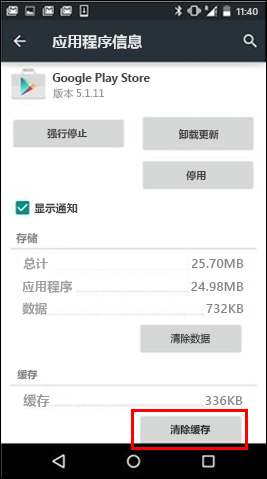
Gradus 6: superiora repete vestigia, sed repone "Google Play Store" cum "Google Play Services" in Gradus III.
Step VII: Try ut download app iterum.
Patet Google Play Store data
Si purgando Google Play Store et Google Play Services cella quaestionem non solvit, conare purgationem Google Play Store data:
Gradus I: Quaeso aperire "Optiones" menu in fabrica.
Gradus II: Vade ad Applications vel Application Procurator.
- (Haec optio variari potest prout in fabrica usus est)
Gradus III, volumen ad "Omnes Apps" et librum usque ad Google Play Store app.
Gradus 4: Aperi applicationis singula et preme "Vim Siste" puga pyga.
Gradus V: Click in "Free Data" puga ▼
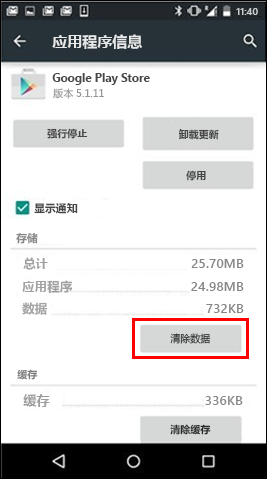
- Post cache et data purgatione, Google Play Store error resolvi debet.
- Si quaestio non resolvitur, pergere quaeso.
delere de Google et addere illud
Si cella aperiens et data quaestionem non figit, rationem de Google dele, tuom sileo et rationem tuam re-adde.
Gradus I: Aperi Occasus menu in tuom.
Gradus 2: Sub Rationibus preme Google, preme Google Rationem delere vis ▼
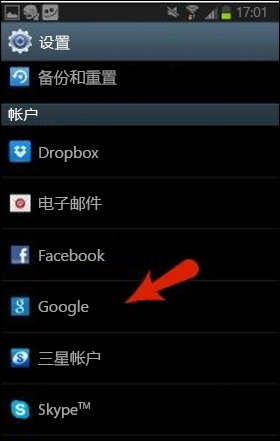
Gradus 3: Quaeso preme "Menu" iconem in angulo dextro scrinii superiorem.
Gradus IV: Click "Ratio remove" ▼
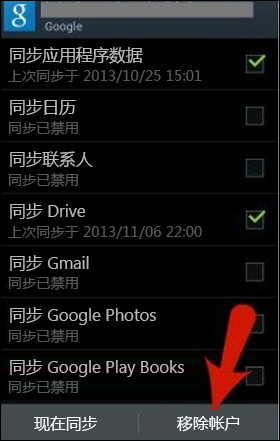
Step V: Sileo fabrica et rursus rationem add.
- Deinde experior ut download app quod antea non potuit ut download.
Lectio extensa;
Spes Chen Weiliang Blog ( https://www.chenweiliang.com/ ) Communis "Problema solvendo Errorem Codicis nequitur Download ac Inaugurare Apps in Google Play Store", quod tibi utile est.
Grata communicare nexum huius articuli:https://www.chenweiliang.com/cwl-682.html