
Article Directory
Rehefa mampiasa Rclone hamindrana rakitra amin'ny OneDrive ianao dia mety hiatrika olana toy ny hafainganam-pandeha miadana sy ny fahatapahan'ny fifandraisana...
Nahoana no miadana ny Rclone mifandray amin'ny Onedrive?
Ny antony fototra dia ny fanerena ny famerana ny OneDrive API, ary ny default Rclone built-in API dia ampiasain'ny olona maromaro miaraka, ka mihamiharihary ireo olana ireo ...
Ny fampiasana ny API manokana naorin'ny tena mba hifandraisana amin'ny OneDrive dia afaka manatsara be ireo toe-javatra ireo, ary ho an'ny dikan-tsarimihetsika Office 365 E5 mandritra ny telo volana, ny fampiasana tsindraindray ny Rclone dia hanavao ho azy ny sarany, fa tsy minia miborosy ny API, izay bebe kokoa. azo antoka sy milamina.
Fanampin'izany, ny API naorin-tena dia azo ampiasaina amin'ny kaonty hafa sy fampiharana hafa.
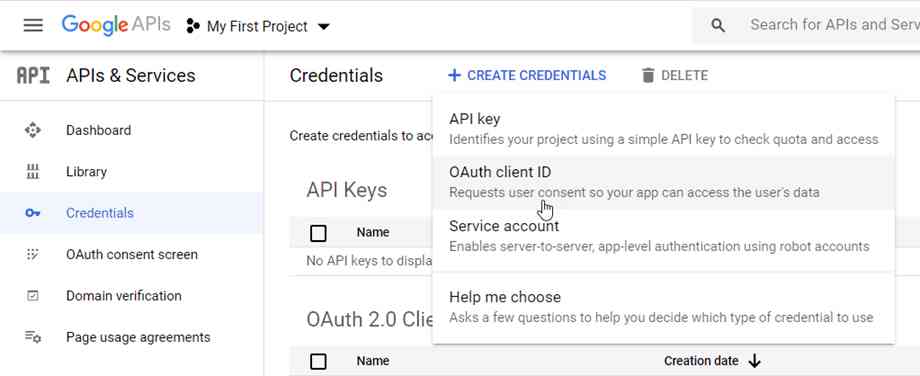
Raha API namboarina ho an'ny Google Drive io dia jereo ity lesona ▼ ity
Rclone mampifandray Onedrive fitsapana hafainganam-pandeha
Ny voalohany dia ny hizaha toetra ny hafainganam-pandehan'ny fampiasana ny API default an'ny Rclone mba hifandraisana amin'ny Onedrive▼

Ity farany dia fitsapana ataon'ny mpiserasera amin'ny fampiasana ny Microsoft API nangatahan'izy ireo hifandraisana amin'ny Onedrive ▼

- Hita mazava tsara fa mihoatra ny in-10 ny fahasamihafan'ny hafainganam-pandeha.
Ahoana ny fomba hamoronana API kapila tambajotra Microsoft Onedrive?
Ahoana ny fomba hahazoana ID Client sy tsiambaratelon'ny mpanjifa ao amin'ny Microsoft Azure Management Center, kitiho azafady ny rohy eto ambany hahitanao ny fomba hamoronana API kapila tambajotra Microsoft Onedrive ▼

Mahazo token ny Rclone
Misintona Rclone amin'ny solosainao eo an-toerana ▼
Raiso ho ohatra ny Windows, mandehana any amin'ny lahatahiry misy ny rclone.exe aorian'ny decompression, ampidiro cmd ao amin'ny adiresin'ny explorer ary tsindrio ny Enter hanokatra ny baikon'ny baiko amin'ny lalana ankehitriny.
Soloy amin'ity baiko manaraka ityClient_ID,Client_secret ary tanteraho ▼
rclone authorize "onedrive" "Client_ID" "Client_secret"
- Hisy navigateur mipoitra manaraka, mangataka anao hiditra ao amin'ny kaontinao mba hanomezana alalana azy.
Aorian'ny fanomezan-dàlana dia miseho ao amin'ny varavarankelin'ny baikon'ny baiko ity hafatra manaraka ity:
If your browser doesn't open automatically go to the following link: http://127.0.0.1:53682/auth
Log in and authorize rclone for access
Waiting for code...
Got code
Paste the following into your remote machine --->
{"access_token":"xxxxxxxxxxxxxxxxxx","expiry":"2024-05-15T21:18:39.5036298+08:00"}
<---End paste{"access_token":"xxxxxxxxxxxxxxxxxx","expiry":"2024-05-15T21:18:39.5036298+08:00"}Ity atiny manontolo ity (anisan'izany ny fononteny) dia ny marika, kopia ary tehirizo.
Rclone dia mifandray amin'ny OneDrive
Ampidiro SSH ity baiko manaraka ity▼
rclone config
Ity fampahalalana manaraka ity dia hiseho, azafady jereo ireto torolalana manaraka ireto mba hampiasana ▼
- fepetra:Satria ny RCLONE dia havaozina tsindraindray, rehefa hitanao ity lesona ity dia mety hiova kely ny safidy menu, fa ny hevitra ankapobeny dia tsy hiova. Aza mieritreritra ny hanao kopia ny fandidiana.
$ rclone config

e) Edit existing remote
n) New remote
d) Delete remote
r) Rename remote
c) Copy remote
s) Set configuration password
q) Quit config
e/n/d/r/c/s/q> n # 输入 n,新建
name> onedrive # 输入网盘名称,类似标签,这是用来区别不同的网盘。
Type of storage to configure.
Enter a string value. Press Enter for the default ("").
Choose a number from below, or type in your own value
1 / 1Fichier
\ (fichier)
2 / Akamai NetStorage
\ (netstorage)
3 / Alias for an existing remote
\ (alias)
4 / Amazon Drive
\ (amazon cloud drive)
5 / Amazon S3 Compliant Storage Providers including AWS, Alibaba, Ceph, Digital Ocean, Dreamhost, IBM COS, Lyve Cloud, Minio, RackCorp, SeaweedFS, and Tencent COS
\ (s3)
6 / Backblaze B2
\ (b2)
7 / Better checksums for other remotes
\ (hasher)
8 / Box
\ (box)
9 / Cache a remote
\ (cache)
10 / Citrix Sharefile
\ (sharefile)
11 / Compress a remote
\ (compress)
12 / Dropbox
\ (dropbox)
13 / Encrypt/Decrypt a remote
\ (crypt)
14 / Enterprise File Fabric
\ (filefabric)
15 / FTP Connection
\ (ftp)
16 / Google Cloud Storage (this is not Google Drive)
\ (google cloud storage)
17 / Google Drive
\ (drive)
18 / Google Photos
\ (google photos)
19 / Hadoop distributed file system
\ (hdfs)
20 / Hubic
\ (hubic)
21 / In memory object storage system.
\ (memory)
22 / Jottacloud
\ (jottacloud)
23 / Koofr, Digi Storage and other Koofr-compatible storage providers
\ (koofr)
24 / Local Disk
\ (local)
25 / Mail.ru Cloud
\ (mailru)
26 / Mega
\ (mega)
27 / Microsoft Azure Blob Storage
\ (azureblob)
28 / Microsoft OneDrive
\ (onedrive)
29 / OpenDrive
\ (opendrive)
30 / OpenStack Swift (Rackspace Cloud Files, Memset Memstore, OVH)
\ (swift)
31 / Pcloud
\ (pcloud)
32 / Put.io
\ (putio)
33 / QingCloud Object Storage
\ (qingstor)
34 / SSH/SFTP Connection
\ (sftp)
35 / Sia Decentralized Cloud
\ (sia)
36 / Storj Decentralized Cloud Storage
\ (storj)
37 / Sugarsync
\ (sugarsync)
38 / Transparently chunk/split large files
\ (chunker)
39 / Union merges the contents of several upstream fs
\ (union)
40 / Uptobox
\ (uptobox)
41 / Webdav
\ (webdav)
42 / Yandex Disk
\ (yandex)
43 / Zoho
\ (zoho)
44 / http Connection
\ (http)
45 / premiumize.me
\ (premiumizeme)
46 / seafile
\ (seafile)
Storage> 28 # 输入28表示选择Microsoft OneDrive
Option client_id.
OAuth Client Id.
Leave blank normally.
Enter a value. Press Enter to leave empty.
client_id> # 输入 Client Id (客户端 ID)
Microsoft App Client Secret
Leave blank normally.
Enter a string value. Press Enter for the default ("").
client_secret> # 输入 Client Secret (客户端密码)
Edit advanced config? (y/n)
y) Yes
n) No
y/n> n # 输入 n
Remote config
Make sure your Redirect URL is set to "http://localhost:53682/" in your custom config.
Use auto config?
* Say Y if not sure
* Say N if you are working on a remote or headless machine
y) Yes
n) No
y/n> n # 输入 n
For this to work, you will need rclone available on a machine that has a web browser available.
Execute the following on your machine (same rclone version recommended) :
rclone authorize "onedrive" "client_id" "client_secret"
Then paste the result below:
result> {"access_token":"XXXXXXXXX","expiry":"2024-05-15T21:18:39.5036298+08:00"} # 输入 token
Choose a number from below, or type in an existing value
1 / OneDrive Personal or Business
\ "onedrive"
2 / Root Sharepoint site
\ "sharepoint"
3 / Type in driveID
\ "driveid"
4 / Type in SiteID
\ "siteid"
5 / Search a Sharepoint site
\ "search"
Your choice> 1 # # 这里询问你要选择的类型,因为你使用的是OneDrive,所以输入1
Found 1 drives, please select the one you want to use:
0: OneDrive (business) id=xxxxxxxxxxxxxx
Chose drive to use:> 0 # 检测到网盘,此处号码是0,所以输入0
Found drive 'root' of type 'business', URL: https:// xxx.sharepoint. com/personal/xxxxxx/Documents
Is that okay?
y) Yes
n) No
y/n> y # 请你确认,如果没有问题,请输入 y

--------------------
[od-e5-api]
type = onedrive
client_id = xxxxxxxxxx
client_secret = xxxxxxxxxxxxxxxx
token = {"access_token":"xxxxxxxxxxxxxxxxxx","expiry":"2024-05-15T21:18:39.5036298+08:00"}
drive_id = xxxxxxxxxxxxxxxxxxxxxxxxx
drive_type = business
--------------------
y) Yes this is OK
e) Edit this remote
d) Delete this remote
y/e/d> y # 最后会显示网盘的配置信息,请确认是否准确无误? 如果没有问题,请输入 y
Current remotes:

Name Type
==== ====
onedrive onedrive

e) Edit existing remote
n) New remote
d) Delete remote
r) Rename remote
c) Copy remote
s) Set configuration password
q) Quit config
e/n/d/r/c/s/q> q # 输入 q 退出- Hatreto, Rclone dia nifandray soa aman-tsara tamin'ny kapila tambazotra OneDrive tamin'ny fampiasana ny API naorin-tena.
Rehefa voarindra dia azonao ampiasaina ireto manaraka iretorcloneDidy hijery:
Tanisao ny lahatahiry eo amin'ny ambaratonga ambony amin'ny onedrive▼
rclone lsd onedrive:
Tanisao ao amin'ny onedrive▼ ny rakitra rehetra
rclone ls onedrive:
Adikao amin'ny lahatahiry iray nomena anarana ny lahatahiry eo an-toeranabackuplahatahiry onedrive▼
rclone copy /home/source onedrive:backup
Copy Cut Delete Command
Adikao any amin'ny lahatahiry fakan'ny kapila tambazotra onedrive ▼ ny rakitra fikirakirana Rclone
rclone copy /root/.config/rclone/rclone.conf onedrive:/
kopia eo an-toerana /home/backup Mandehana any amin'ny lahatahiry backup izay misy ny kapila tambajotra antsoina hoe onedrive, ary ny mifamadika amin'izany ▼
rclone copy --progress /home/backup onedrive:backup
- amin'ny fampidirana ity paramètre ity
--ignore-existingAzo atao tsinontsinoavina ny rakitra efa naverina tamin'ny kapila tambajotra, izay mitovy amin'ny backup incremental ▼
rclone copy --ignore-existing /home/backup onedrive:backup
Adikao amin'ny lahatahiry backup an'ny kapila tambazotra antsoina hoe onedrive ny rakitra CWP manual backup eo an-toerana, ary ny mifamadika amin'izany ▼
rclone copy --progress /newbackup/full/manual/accounts/eloha.tar.gz onedrive:cwp-newbackup/full/manual/accounts/
Avy amin'ny kapila tambazotra onedrive, kopia ny rakitra backup voalahatra CWP mandeha ho azy any an-toerana /newbackup Catalog▼
rclone copy --progress onedrive:cwp-newbackup/full/daily/Friday/accounts/eloha.tar.gz /newbackup/

rclone copy --progress onedrive:cwp-backup2/ /home/backup2/
Avy amin'ny kapila tambazotra onedrive, kopia ny rakitra backup manual CWP mankany amin'ny eo an-toerana /newbackup/newbackup/full/manual/accounts/ Catalog▼
rclone copy --progress onedrive:cwp-newbackup/full/manual/accounts/eloha.tar.gz /newbackup/newbackup/full/manual/accounts/
Adikao avy amin'ny kapila tambazotra onedriveVestaCPBackup ny rakitra ao an-toerana /home/backup Catalog▼
rclone copy --progress onedrive:backup/admin.2018-04-12_13-10-02.tar /home/backup
Move (Cut) Command ▼
rclone move /home/backup onedrive:backup
Fafao ny lahatahiry backup amin'ny kapila tambazotra miaraka amin'ny anarana fanamafisana onedrive▼
rclone delete onedrive:backup
Mamorona lahatahiry backup izay manamboatra kapila tambajotra antsoina hoe onedrive ▼
rclone mkdir onedrive:backup
Adika ▼
rclone copy
mihetsika ▼
rclone move
vonoy ▼
rclone delete
Sync ▼
rclone sync
Raha mila torolalana momba ny fampiasana baiko Rclone bebe kokoa dia jereo ny fanangonana baiko Rclone etsy ambany▼

Ahoana ny fametrahana OneDrive?
Raha mila ampidirina amin'ny lahatahiry eo an-toerana ianao dia azonao atao ny mijery ny lesona momba ny fametrahana Rclone teo aloha▼

Famerana ny OneDrive Private API
Na dia afaka manatsara ny traikefan'ny fampiakarana aza ny API tsy miankina naorin-tena, dia mety ho voafetra ny fampiakarana raha ampiasaina matetika loatra.
Inona no fetra farany ambony indrindra ho an'ny Microsoft OneDrive API?
Microsoft dia tsy nilaza mazava ny fetra farany ambony indrindra amin'ny OneDrive API. Ity manaraka ity ny antontan-taratasy voalohany:
Mifototra amin'ny fampiasana, amboarinay tsara ny tokonam-baravarana mba ahafahan'ny mpampiasa mampiasa ny habetsaky ny loharanon-karena ambony indrindra nefa tsy mampandefitra ny fahamendrehana sy ny fahombiazany.
- Araka ny azonao vinavinaina amin'ny fijerena ny famaritana ny karazana fetran'ny API hafa, dia misy fetra roa, total ary matetika.
- Ny fitambarany dia ny isan'ny antso azo atao ao anatin'ny iray andro, ary ny matetika dia ny isan'ny antso azo atao isa-minitra.
- Ary rehefa tonga ny tokonam-baravarankely, dia voahenjana ny fampiakarana rakitra.
- Koa satria tsy azo avy amin'ny antontan-taratasy ofisialy ny sanda marina, azo atao ve ny maka izany sanda marina izany amin'ny alàlan'ny fitsapana tena izy?
- ratsy ny valiny.Tsy nisy fitsipika hita tamin'ny fitsapana tena izy, noho izany dia amboarina amin'ny fomba mavitrika io fetra io ary mifanaraka amin'ny antontan-taratasy ofisialy.
Ahoana no hialako amin'ny famerana ny OneDrive API?
Aza mampiditra rakitra be loatra ao anatin'ny fotoana fohy, ny haben'ny rakitra dia tsy maninona, ny fanalahidy dia ny isan'ny rakitra.
Momba ny fanavaozana automatique Office 365 E5:
- Araka ny traikefan'ireo mpampiasa mampiasa ny dikan-tsarimihetsika developer nandritra ny taona maro, raha mbola mampiasa ny API manokana naorin'ny tena ianao dia afaka manavao ny famandrihana.
- Raha ny matetika dia tsy misy fenitra, ary ny bebe kokoa no tsara kokoa.
- Ny fikosehana ny API dia mety tsy mendrika ny fatiantoka, indrindra fa ny fampiasana GitHub Actions, satria ny mpizara dia Microsoft Azure, noho izany dia maro ny olona mampiasa fomba mitovy amin'ny fanosehana ny API tsy misy dikany, ary ny Microsoft Azure dia te hamantatra azy mora foana.
Antenaina fa hanampy anao ilay lahatsoratra hoe "Miadana ve ny fifandraisana Rclone amin'ny OneDrive? Mamindra sy mampiakatra hafainganam-pandeha? Mametraha ny hafainganam-pandehan'ny API" nozaraina tao amin'ny bilaogin'i Chen Weiliang ( https://www.chenweiliang.com/ ).
Aza misalasala mizara ity rohy ity: https://www.chenweiliang.com/cwl-27906.html