
مقالې لارښود
مخکې، د چن ویلیانګ بلاګ په CentOS 6 کې د مونیټ نصبولو او تنظیم کولو په اړه یو ټیوټوریل شریک کړ. ▼

په هرصورت، په CentOS 7 کې د Monit څارنې پروګرام تنظیم کول د CentOS 6 څخه یو څه توپیر لري؛ دا په بشپړ ډول ورته نه دی.
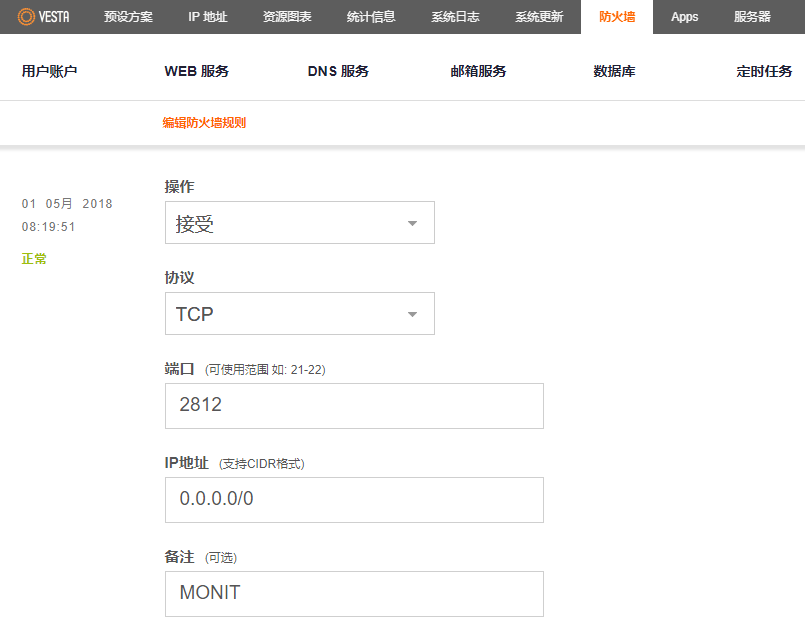
که ستاسو د لینکس کوربه CentOS 7 چلوي، او تاسو په Vesta CP پینل کې Monit نصب کړی وي، تاسو کولی شئ د Monit څارنې پروګرام تنظیم کولو لپاره دا ټیوټوریل تعقیب کړئ.
د څارنې پروسې خدمت
لاندې د مونیټ څارنې پروسې د خدماتو ترتیب کولو مینځپانګه ده (د څارنې ځینې لږ کارول شوي خدمتونه حذف کړئ):
د څارنې ترتیب کول
د مونیټ ترتیب کولو فایل نومونه د CentOS 6 او 7 لپاره مختلف دي:
- د CentOS 6 لپاره د مونیټ ترتیب کولو فایل نوم "monit.conf" دی
- د CentOS 7 لپاره د مونیټ ترتیب کولو فایل نوم "monitrc" دی
د SFTP سافټویر په کارولو سره خپل لینکس سرور ته د لاسرسي وروسته ، د Monit ترتیب فایل ایډیټ کړئ ▼
/etc/monitrc
په دې "monitrc" فایل کې د لاندې تشکیلاتو مینځپانګه اضافه کړئ ▼
##
## 陈沩亮博客示例monit配置文件说明:
## 1. 域名以 www.etufo.org 为例。
## 2. 后面带xxx的均是举例用的名字,需要根据自己的需要修改。
##
################################################## #############################
## Monit control file
################################################## #############################
#
# 检查周期,默认为2分钟,对于网站来说有点长,可以根据需要自行调节,这改成30秒。
set daemon 30

include /etc/monit.d/*

# 日志文件
set logfile /var/log/monit.log

#
# 邮件通知服务器
#
#set mailserver mail.example.com
set mailserver localhost with timeout 30 seconds

#
# 通知邮件的格式设置,下面是默认格式供参考
#
## Monit by default uses the following alert mail format:
##
## --8<--
## From: monit@$HOST # sender
## Subject: monit alert -- $EVENT $SERVICE # subject
##
## $EVENT Service $SERVICE #
## #
## Date: $DATE #
## Action: $ACTION #
## Host: $HOST # body
## Description: $DESCRIPTION #
## #
## Your faithful employee, #
## monit #
## --8<--
##
## You can override the alert message format or its parts such as subject
## or sender using the MAIL-FORMAT statement. Macros such as $DATE, etc.
## are expanded on runtime. For example to override the sender:
#
# 简单的,这只改了一下发送人,有需要可以自己修改其它内容。
set mail-format { from: admin@xxxx }

# 设置邮件通知接收者。建议发到gmail,方便邮件过滤。
set alert xxx@xxxx

set httpd port 2812 and #设置http监控页面的端口
use address www.etufo.org # http监控页面的IP或域名
##allow localhost # 允许本地访问
##allow 203.82.90.239 # 允许指定IP访问
allow user:password # 访问用户名密码

################################################## #############################
## Services
################################################## #############################
#
# 系统整体运行状况监控,默认的就可以,可以自己去微调
#
# 系统名称,可以是IP或域名
#check system www.etufo.org
# if loadavg (1min) > 4 then alert
# if loadavg (5min) > 2 then alert
# if memory usage > 75% then alert
# if cpu usage (user) > 70% then alert
# if cpu usage (system) > 30% then alert
# if cpu usage (wait) > 20% then alert


# 可选的ssl端口的监控,如果有的话
# if failed port 443 type tcpssl protocol http
# with timeout 15 seconds
# then restart

# 监控mariadb
check process mysql with pidfile /var/run/mariadb/mariadb.pid
start program = "/usr/bin/systemctl start mariadb"
stop program = "/usr/bin/systemctl stop mariadb"
if failed host 127.0.0.1 port 3306 for 2 cycles then restart
if 2 restarts within 4 cycles then timeout

# 监控httpd
check process httpd with pidfile /var/run/httpd/httpd.pid
    start program = "/usr/bin/systemctl start httpd"
    stop program = "/usr/bin/systemctl stop httpd"
#    if children > 120 for 2 cycles then restart
#    if failed host localhost port 8080 protocol http for 2 cycles then restart
#    if 4 restarts within 10 cycles then timeout

# 监控nginx
check process nginx with pidfile /var/run/nginx.pid
    start program = "/usr/bin/systemctl start nginx"
    stop program = "/usr/bin/systemctl stop nginx"
#    if failed host localhost port 443 protocol http for 2 cycles then restart
#    if 4 restarts within 10 cycles then timeout

# 监控sshd
check process sshd with pidfile /var/run/sshd.pid
start program = "/usr/bin/systemctl start sshd"
stop program = "/usr/bin/systemctl stop sshd"
if failed host localhost port 22 protocol ssh for 2 cycles then restart
if 4 restarts within 10 cycles then timeout

# 监控vesta-nginx
check process vesta-nginx with pidfile /var/run/vesta-nginx.pid
start program = "/usr/bin/systemctl start vesta"
stop program = "/usr/bin/systemctl stop vesta"
if failed host localhost port 8083 protocol https for 2 cycles then restart
if 4 restarts within 10 cycles then timeout

# 监控vesta-php
check process vesta-php with pidfile /var/run/vesta-php.pid
start program = "/usr/bin/systemctl start vesta"
stop program = "/usr/bin/systemctl stop vesta"
if failed host localhost port 8083 protocol https for 2 cycles then restart
if 4 restarts within 10 cycles then timeout

# 监控vsftpd
check process vsftpd with match vsftpd
start program = "/usr/bin/systemctl start vsftpd"
stop program = "/usr/bin/systemctl stop vsftpd"
if failed host localhost port 21 protocol ftp for 2 cycles then restart
if 4 restarts within 10 cycles then timeout

#监控crond
check process crond with pidfile /var/run/crond.pid
start program = "/usr/bin/systemctl start crond"
stop program = "/usr/bin/systemctl stop crond"
if 5 restarts within 5 cycles then timeout

#监控dovecot
check process dovecot with pidfile /var/run/dovecot/master.pid
start program = "/usr/bin/systemctl start dovecot"
stop program = "/usr/bin/systemctl stop dovecot"
if failed host localhost port 143 protocol imap for 2 cycles then restart
if 4 restarts within 10 cycles then timeout

#监控exim
check process exim with pidfile /var/run/exim.pid
start program "/usr/bin/systemctl start exim"
stop program "/usr/bin/systemctl stop exim"
if failed host localhost port 25 protocol smtp for 2 cycles then restart
if 4 restarts within 10 cycles then timeout
که تاسو د MONIT ترتیب کولو مینځپانګه بدله کړې وي، تاسو اړتیا لرئ چې د اغیزمن کیدو لپاره د مانیټ خدمت بیا پیل کړئ▼
systemctl restart monit
تازه د می 2018، 5:
- دا سپارښتنه کیږي چې پورته ترتیب شوي مینځپانګې وکاروئ ▲
- لاندې SSH کمانډونه د مونیټ څارنې خدمت لپاره فایلونو رامینځته کولو لپاره وړاندیز نه کیږي.
cd /etc/monit.d/
git clone https://github.com/infinitnet/vesta-centos7-monit.git ./ && rm -f README.md
myip=1.2.3.4
sed -i 's/host localhost/host '$myip'/g' /etc/monit.d/*.conf
systemctl restart monit- د خپل شریک شوي IP سره بدل کړئ1.2.3.4.
د git bash کمانډ ونه موندل شو ځکه چې ممکن یوه تېروتنه رامنځته شي ▼
ښایي دا هم ښکاره شي چې د دې کمانډ د ننوتلو وروسته ▼
sed -i 's/host localhost/host '$myip'/g' /etc/monit.d/*.conf
لاندې د خطا پیغام څرګندیږي ▼
sed: can't read /etc/monit.d/*.conf: No such file or directory
د څارنې لاګ لید تېروتنه
SSH وګوری monit.log log file command▼
tailf /var/log/monit.log
- SSH د monit.log فایل لیدلو لپاره، یوازې د لاګ وروستۍ 10 کرښې ښودل کیدی شي.
د SFTP ننوتل سپارښتنه کیږي /var/log/monit.log د مخکینۍ monit.log لاګ فایل حالت په بشپړ ډول لیدو لپاره.
د بریښنالیک لیږلو تېروتنه
که چیرې د مانیټ بریښنالیک ونه لیږل شي، لاندې خطا پیغام به ښکاره شي ▼
error : Cannot open a connection to the mailserver localhost:25 -- Operation now in progress
error : Mail: Delivery failed -- no mail server is available
د بریښنالیک لیږلو غلطۍ حل کړئ
چن ویلیانګ د Gmail SMTP کارولو وړاندیز کوي ▼
set mailserver smtp.gmail.com port 587
username "[email protected]"
password "password"
using tlsv1
with timeout 30 seconds
د حل لاره دا ده چې د مونیټ ترتیب فایل کې د میل سرور ځای په ځای کړئ ، مهرباني وکړئ د توضیحاتو لپاره دا لارښود وګورئ ▼
د فایل سیسټم احصایه تېروتنه
که تاسو د monit.log لاګ فایل کې لاندې تېروتنې ومومئ ▼
filesystem statistic error: cannot read /proc/diskstats -- No such file or directory
- شاید ځکه چې لینکس لږترلږه نصب کولو ته ډیفالټ کوي VestaCPپینل، شتون نلري
/proc/diskstatsد ډیسک وضعیت څارنې فایل.
د فایل سیسټم احصایوي غلطۍ حل کړئ
لومړی ګام:په SSH کې /etc/monit.d کتلاګ ▼
cd /etc/monit.d
دوهم ګام: د مانیټ څارنې خدماتو فایل "root-space.conf" حذف کړئ ▼
rm -rf root-space.conf
دریم ګام: د SSH له لارې د مانیټ څارنه بیا پیل کړئ ▼
systemctl restart monit.service
د مانیټ کمانډ (د CentOS 7 لپاره ځانګړی)
د منیټ د پیل حالت وګورئ ▼
systemctl status monit.service
د مانیټ خدمت پیل کړئ ▼
systemctl start monit.service
د مانیټ خدمت بند کړئ▼
systemctl stop monit.service
د مانیټ خدمت بیا پیل کړئ ▼
systemctl restart monit
د مانیټ خدمت په بوټ کې پیل کړئ ▼
systemctl enable monit.service
د مانیټ خدمت فعال او بند کړئ ▼
systemctl disable monit.service
هیله ده، د چن ویلیانګ په بلاګ ( https://www.chenweiliang.com/ ) کې شریک شوی مقاله "د CentOS 7 په ویسټا CP پینل کې د مانیټ پروسې تنظیم کولو څرنګوالی؟" به ستاسو لپاره ګټوره وي.
د دې مقالې لینک شریکولو لپاره وړیا احساس وکړئ: https://www.chenweiliang.com/cwl-730.html