
Sengoli sa Lingoloa
Thutong ena, re tla u bontša mokhoa oa ho kenya tlhokomelo ea Monit ho CentOS Webpanel (CWP7) ho CentOS 7.
Monit monitoring ke eng?
Tlhokomelo ea Monit ke software ea mahala le e bulehileng , 'me ke lenaneo le thusang haholo la tlhokomelo ea Linux.
- E ka lekola le ho laola lits'ebetso tsa seva, lifaele, li-directory, litumello tsa ho hlahloba, litsamaiso tsa lifaele le lits'ebeletso ho UNIX/Linux.
- mohlala: Apache, Nginx,MySQL, FTP, SSH, Postfix, joalo-joalo...
- Tsamaiso ea sistimi e thehiloeng ho sistimi e fanang ka bokhoni bo botle ba ho beha leihlo bakeng sa batsamaisi ba sistimi.
Ke hobane'ng ha u kenya Monit monitoring?
O ka sebedisa tlhokomelo ya Monit ho fokotsa nako ya ho se sebetse, e leng se ka thusang SEO le papatso ya inthanete ya diwebsaete tsa kgwebo ya elektroniki .
Hobane ha tšebeletso efe kapa efe e theohile, Monit oa e hlahloba ebe o qala ts'ebeletso ka bo eona.
Mohlala: haeba ts'ebeletso ea hau ea Apache kapa Nginx e theohile ntle le lebaka, monit e tla hlahloba, 'me haeba e fumanoa e theohile, monit e tla qala lits'ebeletso tse amanang le eona.
Ntho e 'ngoe e khahlisang ke hore monit e tsamaisa ts'ebeletso ea eona ea httpd.
Haeba ts'ebeletso ea hau ea apache e theohile, monit e tla sebetsa ka ts'ebeletso ea eona.
Mokhoa oa ho kenya le ho kenya software ea ho beha leihlo Monit ho CWP 7?
Ho phethela thupelo ena, o tla hloka litlhokahalo tse latelang:
- Mofuta oa 7 oa CentOS Linux (konokono)
- EA-7-CW
- CSF Firewall
Mohato oa 1: Ntlafatsa polokelo ea hau ea YUM ka SSH, ebe u kenya tlhokomelo ea Monit ▼
yum update -y
yum install monit
Likhahlelo tsa 2:Bula kou ea 2812 ho firewall ea CSF ▼
vi /etc/csf/csf.conf
# Allow incoming TCP ports
 TCP_IN = "20,21,22,2812,25,53,80,110,143,443,465,587,993,995,2030,2031,2082,2083,2086,2087,2095,2096"
Mohato oa 3: Qala hape CSF Firewall▼
csf -r Likhahlelo tsa 4:ka SFTP软件Kamora ho kenya seva ea Linux, hlophisa faele ea tlhophiso ea Monit/etc/monitrc▼
set daemon  30              # check services at 30 seconds intervals
set log syslog
set pidfile /var/run/monit.pid
set idfile  /var/.monit.id
set statefile /var/.monit.state
include /etc/monit.d/*
set mailserver localhost port 25
set eventqueue
basedir /var/monit  # set the base directory where events will be stored
slots 100           # optionally limit the queue size
set alert admin@xxxxx #receive all alerts
set alert admin@xxxxx not on { instance, action }
set httpd port 2812 and use address 0.0.0.0
allow 0.0.0.0/0.0.0.0
allow admin:monit # require user 'admin' with password 'monit'
Mohato oa 5: Hlahloba li-syntax tsa Monit bakeng sa liphoso ▼
# monit -t
Control file syntax OK
Haeba e le sieo, etsa lifaele tse latelang:
# touch /var/run/monit.pid
# touch /var/log/moinit.log
Haeba Redis e kentswe , o kanna wa hloka ho lokisa sebaka sa faele ya Redis PID ka letsoho. ▼

Monit e eketsa tšebeletso ea ho beha leihlo
Hona joale, re tla hlokomela litšebeletso tse ling tse kangamavisd, clamd, crond, php-fpm le cwpsrv.Bula faele ea tlhophiso ea monit/etc/monitrc, 'me u kenye khoutu e latelang qetellong ea mola:
Lekola CWP.amavisd
# vi /etc/monitrc
check process amavisd with pidfile /var/run/amavisd/amavisd.pid
        start program "/usr/bin/systemctl start amavisd.service"
        stop program "/usr/bin/systemctl stop amavisd.service"
        if failed unixsocket /var/run/amavisd/amavisd.sock then restart
        if cpu > 70% for 4 cycles then alert
        if cpu > 90% for 8 cycles then restart
        if 4 restarts within 8 cycles then timeout
Ho beha leihlo CWP.clamd
# vi /etc/monitrc

check process clamd with pidfile /var/run/clamd.amavisd/clamd.pid
        start program "/usr/bin/systemctl start clamd.service"
        stop program "/usr/bin/systemctl stop clamd.service"
        if failed unixsocket /var/run/clamd.amavisd/clamd.sock then restart
        if cpu > 70% for 4 cycles then alert
        if cpu > 90% for 8 cycles then restart
        if 4 restarts within 8 cycles then timeout
Lekola CWP.crond
# vi /etc/monitrc

check process crond with pidfile /var/run/crond.pid
        start program = "/usr/bin/systemctl start crond.service"
        stop  program = "/usr/bin/systemctl stop crond.service"
Beha leihlo CWP.cwp-phpfpm
# vi /etc/monitrc

check process cwp-phpfpm matching "cwp-phpfpm"
        start program "/usr/bin/systemctl start cwp-phpfpm.service"
        stop program "/usr/bin/systemctl stop cwp-phpfpm.service"
        if failed unixsocket /usr/local/cwp/php71/var/sockets/cwpsrv.sock then restart
        if failed unixsocket /usr/local/cwp/php71/var/sockets/cwpsvc.sock then restart
        if failed unixsocket /usr/local/cwp/php71/var/sockets/login.sock then restart
        if cpu > 70% for 4 cycles then alert
        if cpu > 90% for 8 cycles then restart
        if 4 restarts within 8 cycles then timeout
hlokomela cwp.cwpsrv
# vi /etc/monitrc

check process cwpsrv with pidfile /usr/local/cwpsrv/var/run/nginx.pid
        start program "/usr/bin/systemctl start cwpsrv.service"
        stop program "/usr/bin/systemctl stop cwpsrv.service"
        if 4 restarts within 8 cycles then timeout
Ha e se e hlophisitsoe, monit e lokela ho kenya hape le ho bala hape faele ea tlhophiso, 'me sebopeho sa webo se tla ba teng:
monit reloadBakeng sa litaelo tsa mokhoa oa ho botsa faele ea PID ea ts'ebetso ea database ea MySQL , ka kopo sheba thupelo e ka tlase ▼

Monit Monitoring ServiceTsela e 'ngoe (e khothalelitsoe)
1) Khoasolla faele ea tšebeletso ea tlhokomelo ea Monit▼
- Leqepheng la ho jarolla, tobetsa konopo ea "Khoasolla Hona Joale" sebakeng se tloaelehileng sa ho jarolla ho khoasolla faele ea litšebeletso tsa tlhahlobo ea Monit mahala.
- (Khoutu ea ho kena: 5588)
2) Unzip 'me u e kenye ho /etc/monit.d/ directory.
- haeba kaMonit configuration file Ho na le ts'ebeletso ea ho beha leihlo e nang le tlhophiso e ts'oanang ho /etc/monitrc, e hlokang ho ba joaloHoMonit configuration file /etc/monitrc e hlakotsoe, ho seng joalo phoso e tla etsahala.
Kamora ho theha lifaele tsa tlhophiso tse hlokahalang, leka liphoso tsa syntax▼
monit -t
Haeba molaetsa o latelang o hlaha ▼
monit -t
/etc/monit.d/cwp.mariadbd:1: Service name conflict, mysql already defined '"/usr/sbin/mariadbd"'
- Sena sebolela seo
/etc/monit.d/cwp.mariadbd:1:Khohlano ea lebitso la tšebeletso; mysql e se e hlalositsoe'"/usr/sbin/mariadbd"' - tlhaloso ke ena
cwp.mariadbdFaele e se e ntse e le teng, e tlose feelacwp.mysqldfaele.
Haeba ho se na liphoso, bula 'me u qale tšebeletso ea monit ▼
systemctl enable monit
systemctl restart monit
Qala tšebeletso ea Monit ha u qala ▼
systemctl enable monit.service
Joale sheba lethathamo la ho beha leihlo ▼
tail -f /var/log/monit.logMonit ho beha leihlo litaelo tsa motheo
Qala monit ka taelo e latelang ▼
monit
Sheba boemo ba Monit ▼
monit status
E kenye hape hore liphetoho li tle li sebetse▼
monit reload
Qala ho tsamaisa mananeo ohle a shebiloeng ke Monit▼
monit start all
Qala bocha lits'ebeletso tsohle tsa ho lebela moea oa Monit▼
monit restart all
Ho qala, ho emisa le ho qala lits'ebeletso tse ikhethileng, o ka li sebelisamonit start nametaelo e joalo ▼
monit start httpd
monit stop sshd
monit restart nginx
Monit monitoring summary▼
monit summary
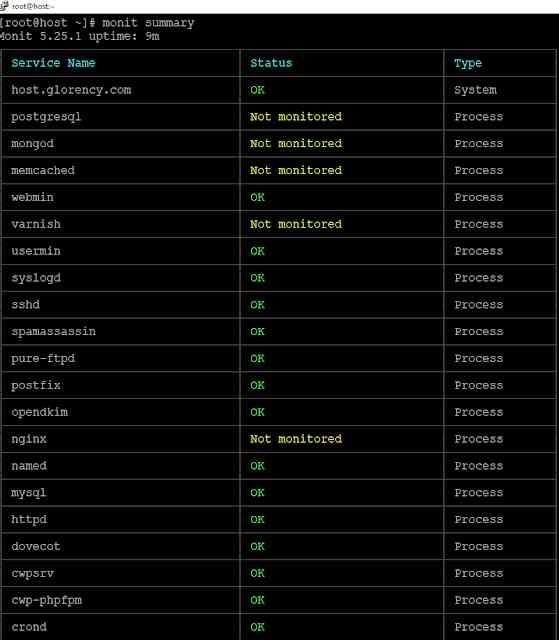
Joale, kena ho seva sa monit u sebelisa lebitso la mosebelisi la Monit le password eo u e behileng pejana.
Kena URL:http://SERVER_FQDN:2812
Rarolla bothata ba hore tšebeletso ea Monit e lula e sa laoloe
Monit e kenyelletsa litaelo tsa ho bulela le ho tima tlhokomelo ea litšebeletso tsohle kapa tse ikhethileng.
Haeba tšebeletso ea Monit e lula e sa laoloe, u ka sebelisa taelo e latelang▼
monit monitor mysql
Kapa etsa hore ho behoe leihlo hape▼
monit monitor all
- Hlokomela hore o tlameha ho nolofalletsa sebopeho sa Monit HTTP hore litaelo tsena li sebetse.
Monit Command (E khethehileng bakeng sa CentOS 7)
Sheba boemo ba ho qala Monit▼
systemctl status monit.service
Qala tšebeletso ea Monit▼
systemctl start monit.service
Koala tšebeletso ea Monit▼
systemctl stop monit.service
Qala hape tšebeletso ea Monit▼
systemctl restart monit
Qala tšebeletso ea Monit ha u qala▼
systemctl enable monit.service
Bulela le ho tima tshebeletso ya Monit▼
systemctl disable monit.service
Monit Notes
Monit monitors process services, e bolelang hore lits'ebeletso tse shebiloeng ke Monit li ke ke tsa emisoa ho sebelisoa mekhoa e tloaelehileng, hobane hang ha e emisitsoe, Monit e tla qala hape.
Ho emisa tšebeletso e shebiloeng ke Monit, u lokela ho sebelisa ntho e kangmonit stop nameTaelo e joalo, mohlala, ho emisa nginx ▼
monit stop nginx
Ho emisa lits'ebeletso tsohle tse behiloeng leihlo ke Monit, kenya taelo e latelang▼
monit stop all
Uninstall Monit monitoring programme ▼
yum remove monit
Re tšepa hore sengoloa se reng "Mokhoa oa ho kenya software ea ho beha leihlo ea Monit ho CentOS Webpanel (CWP7)?" se arolelanoeng ho blog ea Chen Weiliang ( https://www.chenweiliang.com/ ) se tla u thusa.
Ikutloe u lokolohile ho arolelana sehokelo sa sengoloa sena: https://www.chenweiliang.com/cwl-1443.html