
Kudumisha utendakazi thabiti wa huduma kwenye seva za Linux ni muhimu kwa SEO ya tovuti.
Paneli ya udhibiti ya CWP itakusaidia na zana za ufuatiliaji wa huduma.
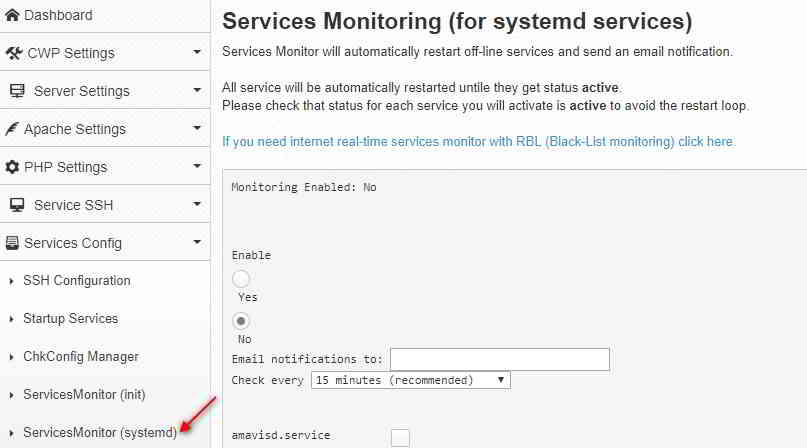
Jinsi ya kuwezesha ServicesMonitor (systemd) kwenye jopo la kudhibiti CWP?
Ili kuwezesha ufuatiliaji wa huduma katika CWP:
- kuungana na yakoCWP安装
- tafuta; Tazama juuHuduma Config->ServicesMonitor( mfumo )Chaguo
- Chagua/Ingiza:
Wezesha / Zima- Hii itawezesha/lemaza ufuatiliaji wa huduma.
Email arifaTuma kwa - Ingiza anwani ya barua pepe ambapo utapokea arifa.
Angalia kila- muda wa muda kati ya hundi - Chagua huduma unayotaka kufuatilia, kwa mfano: mariadb.service, monit.service
- bonyeza提交kitufe.Utaona ujumbe wa uthibitisho:
Service Monitoring is not enabled
Enabling monitoring in cron
MAILTO=cwp1@ chenweilaing.com
*/15 * * * * root /usr/local/bin/svcMonitor-systemd
Monitoring Enabled: Yes
注意 事项:
- iwapohali ya mfumohuduma ni
Unknown,Ufuatiliaji hautafanya kazi kwa huduma. - Huduma zilizochaguliwa za kufuatilia zitahifadhiwa kwenye faili
/usr/local/etc/services-monitor-systemdndani. - Ufuatiliaji wa kazi za cron unaweza kupatikana kwenye faili
/etc/cron.d/svcMonitor-systemd中kugeuka juu.
Unaweza pia kuongeza/kuondoa huduma kwa mikono kwa kutumia amri ya chkconfig :
chkconfig service_name onchkconfig service_name off
Kwa mfano, wakati huduma zote zinazopatikana zimewashwa, tutaonyesha ujumbe wa cron kama vile:
From: (Cron Daemon) <[email protected]>
Subject: Cron <root@cwp1> /usr/local/bin/svcMonitor-systemd

Restarted service amavisd.service on cwp1 at Sat Mar 31 01:00:01 EDT 2018 Job for amavisd.service failed because the control process exited with error code. See “systemctl status amavisd.service” and “journalctl -xe” for details.

Restarted service arp-ethers.service on cwp1 at Sat Mar 31 01:00:03 EDT 2018 Restarted service [email protected] on cwp1 at Sat Mar 31 01:00:04 EDT 2018 Failed to stop [email protected]: Unit name [email protected] is missing the instance name.

See system logs and ‘systemctl status [email protected]‘ for details.

Failed to get load state of [email protected]: Unit name [email protected] is missing the instance name.

Failed to start [email protected]: Unit name [email protected] is missing the instance name.

See system logs and ‘systemctl status [email protected]‘ for details.

Restarted service console-shell.service on cwp1 at Sat Mar 31 01:00:05 EDT 2018 Restarted service garb.service on cwp1 at Sat Mar 31 01:00:06 EDT 2018 Restarted service [email protected] on cwp1 at Sat Mar 31 01:00:07 EDT 2018 Failed to stop [email protected]: Unit name [email protected] is missing the instance name.

See system logs and ‘systemctl status [email protected]‘ for details.

Failed to get load state of [email protected]: Unit name [email protected] is missing the instance name.

Failed to start [email protected]: Unit name [email protected] is missing the instance name.

See system logs and ‘systemctl status [email protected]‘ for details.

Restarted service ntalk.service on cwp1 at Sat Mar 31 01:00:09 EDT 2018 Job for ntalk.service failed because a configured resource limit was exceeded. See “systemctl status ntalk.service” and “journalctl -xe” for details.

Restarted service rdisc.service on cwp1 at Sat Mar 31 01:00:10 EDT 2018 Job for rdisc.service failed because the control process exited with error code. See “systemctl status rdisc.service” and “journalctl -xe” for details.

Restarted service [email protected] on cwp1 at Sat Mar 31 01:00:17 EDT 2018 Failed to stop [email protected]: Unit name [email protected] is missing the instance name.

See system logs and ‘systemctl status [email protected]‘ for details.

Failed to get load state of [email protected]: Unit name [email protected] is missing the instance name.

Failed to start [email protected]: Unit name [email protected] is missing the instance name.

See system logs and ‘systemctl status [email protected]‘ for details.

Restarted service svnserve.service on cwp1 at Sat Mar 31 01:00:18 EDT 2018 Job for svnserve.service failed because the control process exited with error code. See “systemctl status svnserve.service” and “journalctl -xe” for details.

Restarted service tcsd.service on cwp1 at Sat Mar 31 01:00:19 EDT 2018 Job for tcsd.service failed because the control process exited with error code. See “systemctl status tcsd.service” and “journalctl -xe” for details.

Restarted service vzfifo.service on cwp1 at Sat Mar 31 01:00:20 EDT 2020
Jopo la Kudhibiti la CWP Washa Mafunzo ya Video ya ServicesMonitor (mfumo).
Hapa chini kuna mafunzo ya video ya YouTube kuhusu jinsi ya kuwezesha ServicesMonitor (systemd) kwenye paneli ya kudhibiti ya CWP ▼
Tunatumaini, makala "Jinsi ya Kuwezesha ServicesMonitor (systemd) katika Paneli ya Kudhibiti ya CWP" yaliyoshirikiwa kwenye blogu ya Chen Weiliang ( https://www.chenweiliang.com/ ) yatakuwa na manufaa kwako.
Jisikie huru kushiriki kiungo cha makala haya: https://www.chenweiliang.com/cwl-1414.html