
Sengoli sa Lingoloa
Phanele ea taolo ea VestaCP e bonolo ebile e bonolo ho e sebelisa: Ho kenya phanele ea taolo ea VestaCP ho nolofalletsa ho kenya ka bohona litifikeiti tsa SSL tsa Let's Encrypt, e leng se etsang hore e ratoe ke litsebi tsa SEO linaheng tse ling.

Let's Encrypt ke eng?
Let's Encrypt ke Lekhotla la Setifikeiti sa SSL le phatlalalitsoeng ka la 2016 Mmesa 4.
- E fana ka setifikeiti sa mahala sa X.509 bakeng sa encryption ea Transport Layer Security (TLS) ka mokhoa o ikemetseng,
- E etselitsoe ho felisa tlhahiso ea hajoale ea matsoho, netefatso, ho saena, ho kenya le ho nchafatsa litifikeiti bakeng sa liwebsaete tse sireletsehileng.
Leqephe la ho kena la phanele ea VestaCP, le sebelisa port 8083.
Port 8083 ke eng?
- 8083 ke leqephe la proxy le boema-kepe ba ho jarolla lifaele, ke boema-kepe bo utloahalang.
- Ho thekenoloji ea marang-rang, likou li kenyelletsa likou tsa 'mele le likou tse utloahalang.
Phapang lipakeng tsa Physical Port le Logical Port
- Likou tsa 'mele li bua ka likou tse hlileng li leng teng, joalo ka li-modem tsa ADSL, li-hubs, li-switches le li-routers tse hokahantsoeng le lisebelisoa tse ling tsa marang-rang tse kang li-port RJ-45, SC ports, joalo-joalo.
- Boema-kepe bo utloahalang ke boema-kepe bo khethollang litšebeletso ka moelelo o utloahalang, joalo ka likou tsa litšebeletso ho protocol ea TCP/IP.Linomoro tsa boema-kepe ke 0 ho isa ho 65535.
Leha ho le joalo, hajoale port 8083 ea phanele ea taolo ea VestaCP e bonts'oa ka boiketsetso ntle le setifikeiti sa ts'ireletso sa SSL ...
Ka hona, kamora ho kenya phanele ea VestaCP , Google Chrome e tla bonts'a temoso e latelang:
- Khokahano ea hau ha se khokahano ea lekunutu
- Bahlaseli ba ka 'na ba leka ho utsoa lintlha tsa hau (mohlala, li-password, likhokahano kapa lintlha tsa karete ea mokoloto).
Phanele ea ho kena ea Vesta e thusa https
Mohato oa 1: Kena phanele ea taolo ea VestaCP u sebelisa lebitso la moamoheli le koung 8083 ▼
http:// 你的域名:8083/
Mohato oa 2: Fumana tšebeletso ea webo ea VestaCP, fumana lebitso la moamoheli la seva ea hau, ebe u tobetsa Edit. ▼
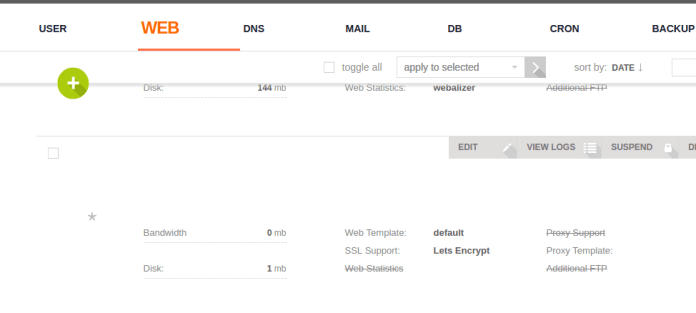
Mohato oa 3: Fumana le ho hlahloba SSL le A re Encrypt. "Enable SSL (Tšehetso ea SSL)" le "Sebelisa Tšehetso ea A re Encrypt (Tšehetso ea A re Encrypt)" ▼
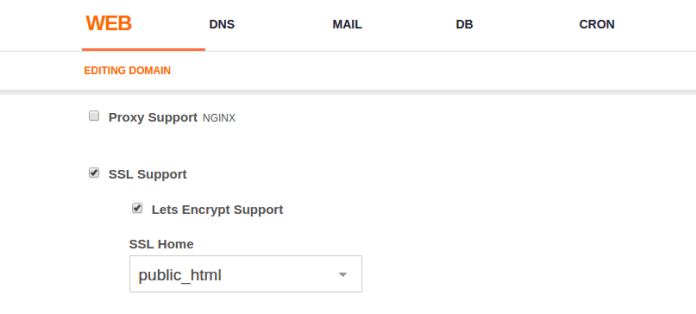
- Ebe o tobetsa Boloka (mookameli o tobetsa Boloka ebe o emela metsotso e ka bang mehlano ho bona kopo ea setifikeiti sa SSL)
Likhahlelo tsa 4:Fumana sebaka sa Ha re Encrypt sebaka se sireletsehileng sa polokelo ea setifikeiti Ha re Encrypt re boloke setifikeiti sa SSL ho /home/username/conf/web/ sebakeng. Ka kopo, thathamisa libaka tsa bona ▼
/home/username/conf/web/ssl.website.crt
/home/username/conf/web/ssl.website.key
Phanele ea taolo ea VestaCP, boloka setifikeiti sa SSL sa lebitso la moamoheli ho ▼
/usr/local/vesta/ssl/certificate.crt
/usr/local/vesta/ssl/certificate.key
Ka hona, re hloka ho qala ho reha lifaele tsa khale tsa setifikeiti sa VestaCP ho mongolo o mong oa dummy e le hore VestaCP e se ke ea hlola e e sebelisa, ebe o hokahanya lifaele tsena ka tsela ea tšoantšetso. Ka kopo latela mehato e ka tlase ho ithuta ho etsa sena.
Mohato oa 5: Kenya ka SSH ho seva sa hau 'me u kenye litaelo tsena tse peli ho reha lifaele tsa khale lebitso le lecha ▼
mv /usr/local/vesta/ssl/certificate.crt /usr/local/vesta/ssl/unusablecer.crt
mv /usr/local/vesta/ssl/certificate.key /usr/local/vesta/ssl/unusablecer.key
- Haeba lits'ebetso tse latelang li hloleha ho sebetsa, li baka hore sehokelo sa SSL se hlolehe, sebaka sa marang-rang se ke ke sa buloa, 'me faele ea SSL "sa sebelisoeng"lebitso, khutlela ho lebitso le fetileng"setifikeiti sa” ntle le ho senya nako ho khutlisetsa phanele ea VestaCP.
Mohato oa 6: Theha sehokelo sa tšoantšetso ho supa sehokelo se secha sa tšoantšetso. Ka kopo nkela lebitso la hau la mosebelisi sebaka, joalo ka: admin. Nkela sebaka sa chenweiliang.com ka lebitso la moamoheli la seva sa hau sa VPS (FQDN). ▼
ln -s /home/admin/conf/web/ssl.chenweiliang.com.crt /usr/local/vesta/ssl/certificate.crt
ln -s /home/admin/conf/web/ssl.chenweiliang.com.key /usr/local/vesta/ssl/certificate.key
Mohato oa 7: Qala VestaCP hape
service vesta restart
Mohato oa 8: Hlakola polokelo ea sebatli sa hau ebe u leka ho kena phanele ea taolo ea VestaCP hape u sebelisa koung ea 8083.
- Hona joale SSL ea hau ho port 8083 e sireletsehile!
Tharollo ea tumello e robehileng
Ho lokisa litumello tse robehileng, kenya taelo e latelang▼
- tla your.adminpanel.com Kenya sebaka ka URL ea khomphutha ea hau ea tsamaiso ea VestaCP.
chgrp mail ssl.your.adminpanel.com.key
chmod 660 ssl.your.adminpanel.com.key
chgrp mail ssl.your.adminpanel.com.crt
chmod 660 ssl.your.adminpanel.com.crt
Ka holimo ke mokhoa oa ho nolofalletsa setifikeiti sa SSL mokokotlong oa VestaCP.
Joang ho qobella lebitso la domain ho sebelisa setifikeiti sa https SSL?
Mohato oa 1: Kenya template ea nginx e ikhethileng ▼
cd /usr/local/vesta/data/templates/web
wget http://c.vestacp.com/0.9.8/rhel/force-https/nginx.tar.gz
tar -xzvf nginx.tar.gz
rm -f nginx.tar.gz
Likhahlelo tsa 2:Beha template ea moemeli ho qobella-https 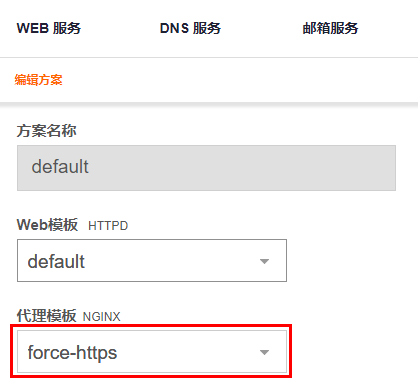
- Theha setaele se secha, kapa ka setaele se seng se ntse se le teng, beha matla-https joalo ka template ea proxy ea Nginx.
- Ha o eketsa basebelisi ba bacha, o ka sebelisa template ea "force-https" ho fana ka tumello ho basebelisi ba morero o hlophisitsoeng.
HTTP e lebisa ho HTTPS ka bo eona
VestaCP e tsamaisa HTTP joang ho HTTPS e sebelisa htaccess? Na u batla ho tsamaisa sebaka sa hau sa Marang-rang ho mofuta o sireletsehileng (HTTPS) oa sebaka sa hau sa marang-rang se kentsoeng ka mokhoa o patiloeng?
Ho faele ea .htaccess, eketsa syntax e latelang ea 301 redirect▼
RewriteEngine On
RewriteCond %{HTTPS} off
RewriteRule (.*) https://%{HTTP_HOST}%{REQUEST_URI} [R,L]- "L" e ka holimo [R,L] e bolela ho Qetela (Last), haeba li-grammars tse ling le tsona li na le L, http e ke ke ea fetisetsoa ho https.
- Ka hona, ho khothaletsoa ho tsamaisa http301 ho https syntax holimo (pele ho li-syntaxes tse ling).
Haeba u batla ho kenyelletsa setifikeiti sa SSL se sireletsehileng libakeng tse ling tsa phanele ea taolo ea VestaCP, ka kopo sheba thuto ena ▼

Re tšepa hore sengoloa se reng "VestaCP Backend Port 8083 HTTPS ha se sebetse? Thuto ea ho Kenya Setifikeiti sa SSL" se arolelanoeng ho blog ea Chen Weiliang ( https://www.chenweiliang.com/ ) se tla u thusa.
Ikutloe u lokolohile ho arolelana sehokelo sa sengoloa sena: https://www.chenweiliang.com/cwl-705.html