
Article directory
The frameset frame calls the page code: can keep the URL unchanged
Our goal in learning website building is to make money, and selling advertising is the best way to generate revenue for a website.
Chen Weiliang will share an example of using a frameset to call an ad page here, for beginners who are just learning WordPress website building .
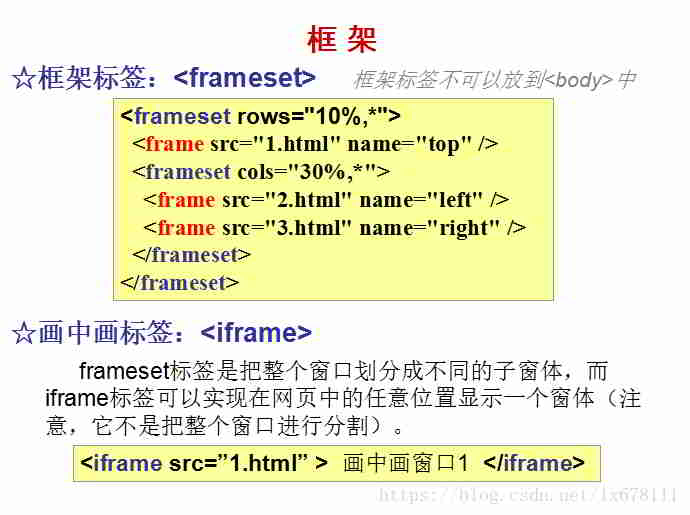
HTMLframe tag definition
- frameset frame tag, cannot be placed in
<body>in. - The frameset element defines a frameset.It is used to organize multiple windows (frames).
- In the simplest applications, the frameset element simply specifies how many columns or rows are in the frameset.
- You have to use the cols or rows attribute.
frameset calls web method
Step 1: Create a folder first
- Folder name, in English lowercase, for example:UFO
Step 2: Create a new TXT notepad file
TXT Notepad creates a blank file with the following contents▼
- After editing, just copy and paste.
<html>
<head>
<meta http-equiv="Content-Type" content="text/html; charset=UTF-8">
<title>标题</title>
<meta name="keywords" content="关键字">
<meta name="description" content=描述">
<link rel="Shortcut Icon" href="favicon.ico" type="image/x-icon">
</head>

<frameset rows="100%,*" frameborder=0 framespacing=0>
<frame src="在此输入你想调用的页面网址" frameborder=0 scrolling="yes" noresize marginhight=0 marginwidth=0>
</frameset>

<body>
</body>
</html>
Step 3: Save as a new file
- In Notepad file "Save As"
- In "Save in", select the folder you just created.
- In "Save as type", choose All files.
- File name, change to: index.html
- and press "Save"
Step 4: Upload the folder to the server hosting space
Finally, transfer the folder to the Linux server via FTP.
Hopefully, the article "How to Call a Webpage Using a Frame? Calling Webpage Code Using the Frameset Tag" shared on Chen Weiliang's blog ( https://www.chenweiliang.com/ ) will be helpful to you.
Feel free to share this article's link: https://www.chenweiliang.com/cwl-1089.html