
Article directory
Want to buy a Telegram account on Account Planet ? This tutorial provides you with a detailed guide to avoid pitfalls and practical demonstrations, covering key steps such as payment methods, account binding, and mobile phone verification, helping you complete the purchase quickly and securely and easily start cross-border social media operations.
I've tested dozens of virtual account registration and purchase channels and encountered many problems. Recently, many friends who bought Telegram accounts from "Account Planet" don't know how to use them, encounter risk control issues, or fail to receive verification codes .
This article clearly explains frequently asked questions, operational details, and risk warnings, and includes practical screenshots and suggestions. After reading it, you should know how to safely and successfully obtain and use an account.
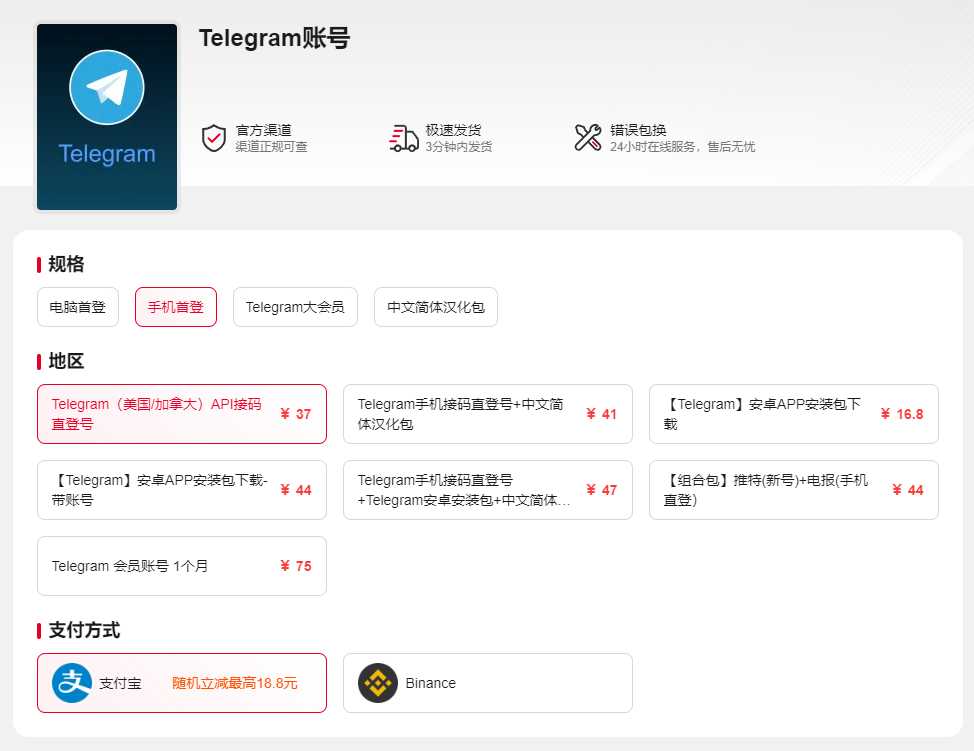
I. Telegram Product Introduction
Direct login to a pre-existing account? Yes. Account Planet platform provides mobile API access to pre-existing accounts, with the region being the United States/Canada (area code + 1). After purchase, you will receive the corresponding mobile phone number and SMS verification code website; simply log in.
Prerequisites for logging in: You must first log in to your Telegram account on your mobile device before you can use it on your computer (log in to the mobile app first, then log in to the computer).
II. Purchase Process and Preparation
- Place your order on "Account Planet" and keep the order information.
Get a discounted account from Account Planet now, secure delivery in just 5 minutes ▼
- Please note that customer service on Account Planet is not available on weekends and holidays. If there is no stock and the item is not automatically shipped, you will need to wait for customer service to resume operations before the item can be shipped.
- Wait for the system to generate an account and SMS verification code entry (usually within a few minutes).
- Ensure your device has the latest version of the Telegram app installed and that you have a stable internet connection.
Tip : Exit other Telegram conversations on your device beforehand to avoid conflicts.
III. SMS verification URLs and verification code usage
- Valid periodThe SMS verification code website is valid for one month. Please bind your email address as soon as possible after logging in.
- CAPTCHA characteristicsThis card has a very short validity period and can only be used once. Please ensure that you log in successfully the first time.
- Network influenceIf you fail to log in due to network issues, please wait 1–2 hours, switch networks, and try again.
- Risk control reminderEach time a verification code is obtained, the probability of triggering risk control increases. Please try to keep your operating environment stable.
IV. Linking Email and Account Activation
- The email binding feature is currently in the official internal testing phase, and may not be available for some accounts yet.
- It is recommended to keep your account active to increase the success rate of account binding.
- After binding, you can complete the verification in the Telegram client settings under "Privacy & Security" → "Bind Email".
V. Login Instructions
- After logging in on your mobile device, please do not log out of your account immediately.
- Always keep at least one device logged in.
- If you are unable to log in due to improper operation, after-sales support will no longer be provided.
VI. Telegram Usage and Risk Management: Avoiding Pitfalls
Why is my account frequently subject to risk control measures?
Telegram's risk control system is very sensitive; frequently obtaining verification codes, switching login networks, and registering multiple times in a short period will trigger restrictions. To mitigate risk:
- Use a stable network environment (preferably a combination of fixed IP and 4G/5G).
- Try to avoid requesting verification codes multiple times in a short period of time.
- Activating Telegram Premium membership can reduce the probability of risk control to some extent (but you may still face risk control after the Premium membership expires).
What should I do if the SMS verification code receiving website is invalid?
Please log in and bind your email address as soon as possible within the 1-month validity period; if it has expired, you can only contact the platform for a replacement (depending on stock).
Can I purchase in bulk?
Bulk purchases are supported. Please contact our online customer service for a quote and to place an order. Discounts are available for bulk orders.
VII. Important Notes for Apple Users
iOS devices may require an overseas Apple ID to download Telegram-related apps. For example, you can log in to the App Store and search for third-party clients such as "Nicegram" to assist in using the app.
8. Quick Reference for Frequently Asked Questions
| problem | Solutions |
|---|---|
| Unable to receive verification code | Check for SMS blocking; wait 1–2 hours, switch networks and try again. |
| Disconnected immediately after logging in | Ensure you remain logged in on your mobile device; avoid frequently switching between multiple devices. |
| The SMS verification code website cannot be opened. | Check your network connection; try a different browser or use incognito mode. |
| Can I get a refund? | Virtual goods are generally non-refundable unless there are account security issues. |
IX. Security and Account Maintenance Recommendations
- Stay activeLog in regularly to avoid long periods of inactivity.
- Equipment ManagementDo not frequently change your login device.
- bind emailIncrease the success rate of account recovery and appeals.
- Network environmentUse a trusted network and avoid frequently switching between Wi-Fi and mobile data.
- Use third-party tools with cautionUnofficial plugins or cracked tools are very likely to result in account bans.
X. Summary
The key to purchasing a Telegram account lies in "stability" and "quietness": a stable network environment, a one-time CAPTCHA login, and at least one permanently installed device. As long as you follow the procedures and avoid high-risk behaviors, the account can be used normally for a long time.
If you have any after-sales issues, please submit a support ticket on the order page. Our customer service will handle it within working days.
Get a discounted account from Account Planet now, secure delivery in just 5 minutes ▼
Hopefully, the article "Avoiding Pitfalls and Practical Tutorials for Buying Telegram Accounts on Account Planet" shared on Chen Weiliang's blog ( https://www.chenweiliang.com/ ) will be helpful to you.
Feel free to share this article's link: https://www.chenweiliang.com/cwl-34045.html