
Article directory
The latest AutoClaw (OpenClaw) installation tutorial from Zhipu provides a complete one-click deployment guide that even beginners can easily follow. It covers both Windows and macOS platforms, eliminating complicated command-line operations. It also includes a guide to avoid installation pitfalls and core local deployment techniques to help you quickly install and deploy AutoClaw.
Previously, computers were used for typing and watching videos; now, they can become your personal work assistant 24/7.
What is AutoClaw "Australian Dragon"?
Zhipu has released AutoClaw (Chinese name "澳龙"), which is the first truly "one-click installation" local version of OpenClaw in China.
After downloading and installing, users can directly deploy "Lobster" OpenClaw on their computers without complicated configurations or cumbersome command-line operations, truly achieving one-click setup.

YouTube video timestamp:
- 00:00 AutoClaw Australian Dragon One-Click Installation Tutorial (Opening)
- 00:05 Zhipu AutoClaw Australian Dragon Download Address & Chen WeiliangBlog
- 00:24 What is AutoClaw? Introduction to China's first localized version of OpenClaw
- 00:33 One-click deployment of OpenClaw Lobster: No commands or configuration required
- 00:41 AutoClaw Full Features: Native OpenClaw + Instant Messaging + 50 Skills
- 01:00 Free quota + paid points support access ChatGPTGemini and other large models
- 01:24 AutoClaw Automatic Browser Operation Function Demonstration
- 01:33 AutoClaw Official Website Download + Shrimp Farming Community Entry
- 01:52 Login requires a Chinese mobile phone number; solutions for those without a mobile phone number.
- 02:09 AutoClaw Login + Installation Wizard Complete Steps
- 02:21 A one-click configuration and migration tutorial for OpenClaw is available.
- 02:41 AutoClaw Usage Demonstration:AI Model selection + crayfish dialogue
- 02:51 Zhipu Aolong OpenClaw: Zero-threshold, one-click deployment without commands
- 02:54 Like, favorite, and subscribe for continuous updates on AutoClaw usage skills
Why is it called the "full-blooded version" of OpenClaw?
AutoClaw supports both macOS and Windows platforms, and once installed, you can enjoy the full capabilities of the native OpenClaw.
It can not only automatically connect to instant messaging tools such as Lark, but also directly assign tasks to "Lobster" in the chat box, making AI your ever-ready assistant.
50+ popular skills pre-installed, ready to use out of the box.
The newly launched AutoClaw includes over 50 popular skills.
These skills cover multiple scenarios such as daily office work, information processing, and task automation.
For example, you can let it automatically generate daily reports, schedule task reminders, batch process files, and even complete cross-departmental communication directly within Lark.
Free quota + multi-tiered paid packages
Zhipu provides users with a certain amount of free credit, allowing everyone to experience the "Lobster" capabilities at zero cost.
In addition, it offers multiple tiers of paid loyalty programs to meet the needs of different users.
This flexible model allows you to easily get started and choose higher-level services based on your actual usage.
Open model access, compatible with multiple AI engines
AutoClaw is not limited to Zhipu's own GLM model.
It offers completely open model access, supporting any Coding Plan or API.
This means you can access models such as DeepSeek, Kimi, MiniMax, GLM, and even more third-party AI engines in the future.
This openness greatly enhances AutoClaw's scalability and adaptability.
Pony-Alpha-2, a lobster-themed model
Zhipu also built a dedicated optimized model, Pony-Alpha-2 (internal beta codename), into AutoClaw.
This model is more stable and powerful in terms of tool invocation, task progress, and response speed.
It is particularly suitable for real-world workflows such as skill calls, scheduled tasks, and continuous execution.
According to data from Zhipu, Pony-Alpha-2 performs better in typical and even advanced application scenarios, proving its capabilities.
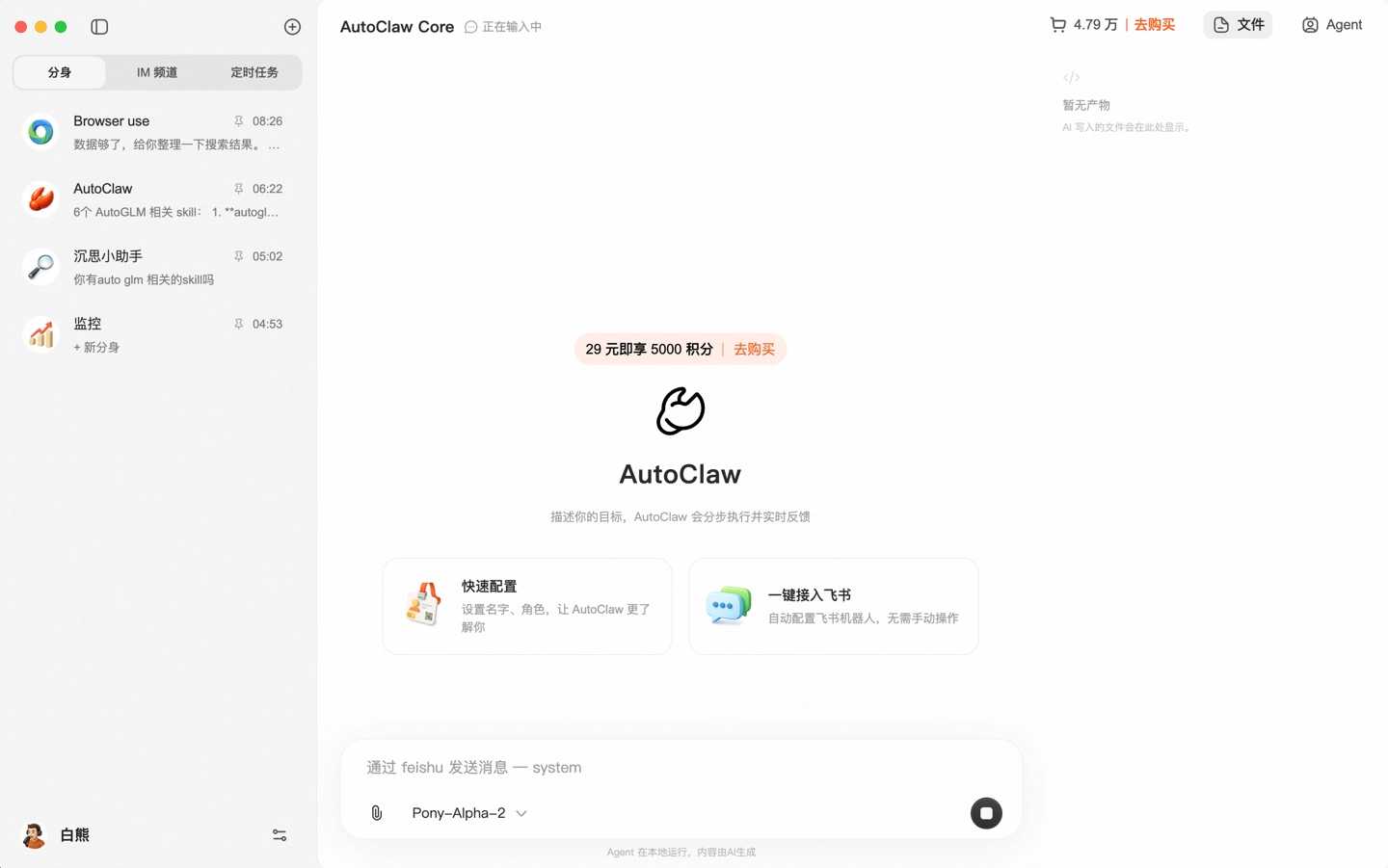
AutoGLM Browser-Use: Addressing Browser Operation Shortcomings
In the past, OpenClaw had certain shortcomings in complex browser tasks.
AutoClaw integrates Zhipu's self-developed AutoGLM Browser-Use capability, which can reliably complete multi-step, cross-page browser operations.
For example, it can automatically chain together a series of web page actions to achieve long-chain automated tasks.
This allows AutoClaw to execute commands far beyond simple instructions, truly entering the realm of automating complex tasks.
IT Home noted in its report: "OpenClaw is a personal AI assistant that runs on your own device and can connect to various messaging platforms."
This means that AutoClaw's positioning is very clear: it is not a shared AI in the cloud, but a personal assistant on your computer.
Zhipu AutoClaw OpenClaw Steps
I. Download and Installation
The official website provides a download link for PC:
- Select your system: Windows download .exe / macOS download .dmg
- Double-click the installation package, click "Next" through the default settings, and no environment configuration is required.
- Installation complete. Open AutoClaw.
AutoClaw login requires a Chinese mobile phone number ▼
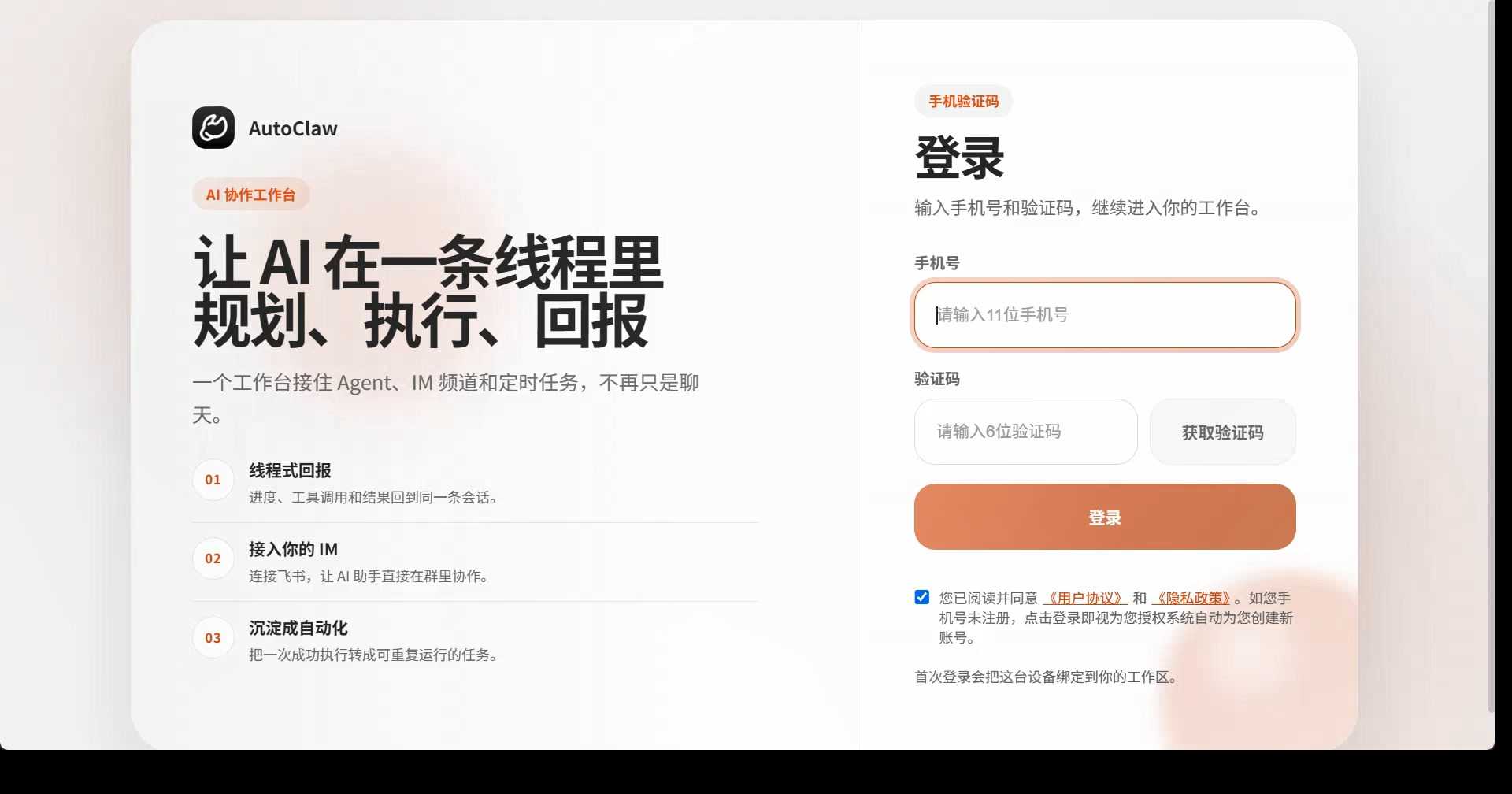
If you don't have a Chinese mobile phone number, you can directly refer to the tutorial below to complete the application online ▼

II. Login Configuration
- Login with Chinese mobile phone number
- Quick Configuration: Enter your name → Select "Off" for file access scope.
- Initialization complete, Pony-Alpha-2 model included by default.
III. Getting Started
- Direct input tasks: writing documents, organizing files, batch processing data.
- It can be integrated with Lark with one click to automatically perform tasks as an AI assistant.
- Supports adding third-party model API keys
IV. Common Questions
- Installation failed: Turn off your antivirus/firewall and reinstall.
- Unable to read file: Check if file access is disabled.
- Lark error: Re-authorize with one click
Conclusion
In my opinion, the launch of AutoClaw "Aolong" marks a new stage for personal AI assistants.
It is no longer a concept in the laboratory, nor an abstraction in the cloud, but has been truly implemented on everyone's computer.
This "one-click installation + local deployment" model solves the biggest pain point of past AI tools—complexity, difficulty in use, and instability.
In the future, whoever masters this truly capable AI assistant will be able to stay ahead in the information deluge.
As Zhipu emphasizes, AutoClaw is not just a tool, but a new way of working.
The power of action always surpasses that of observation.
Download it, experience it, and let your computer truly evolve into a 24/7 personal assistant.
This is the value of Zhipu's "Australian Dragon".
Hopefully, the article "Complete One-Click Deployment Guide to Zhipu AutoClaw (OpenClaw) Download, Installation, and Installation Tutorial" shared on Chen Weiliang's blog ( https://www.chenweiliang.com/ ) will be helpful to you.
Feel free to share this article's link: https://www.chenweiliang.com/cwl-33803.html