
Article directory
ChatGPT has been receiving a lot of updates recently: GPT-6 Astra was launched and then moved to Codex and ChatGPT Work, followed by the release of ChatGPT Images 2.5.
Astra is better suited for coding, research, and complex tasks, but it consumes credits faster than GPT-5.6 Sol in some tasks.
On September 10, 2026, OpenAI suspended new subscriptions and upgrades for ChatGPT Pro 20x (the $200 tier).
For users who have been using Codex frequently recently, who could previously upgrade to Pro 20x when their credit limit was insufficient, they now need to switch to other plans during the suspension period.

I. How to handle insufficient dosage
1. Reset equal credit limit
If the task is not urgent, you can check the reset time on the usage page and continue using it after the credit limit is restored.
If your account shows that you still have a chance to reset, you can also follow the prompts to restore your application usage in advance.
The account mentioned in the original example shows that it has 3 more reset opportunities.
2. Upgrade your membership
When you frequently run out of credit, you can compare the usage and price of higher-tier memberships.
Currently, new subscriptions and upgrades for the Pro 20x are suspended, while the Pro 100 USD tier is still available for purchase.
3. Purchase additional credit.
When rushing to complete a project or without adjusting your membership plan, you can purchase ChatGPT Credits to supplement your usage of support features such as Codex and ChatGPT Work.
Recharging does not change your membership tier or extend your membership validity period.
II. Differences between ChatGPT Credits, Membership, and API Balance
ChatGPT Credits are additional usage credits purchased separately.
Even after the package's credits are used up, the supported features can continue to be charged from the Credits balance, and the original membership tier will remain unchanged.
| Project | The main purpose | Changes after purchase |
|---|---|---|
| ChatGPT Membership Subscription | Get the features and included usage of the corresponding package. | Activate, renew or upgrade your membership |
| ChatGPT Credits | Additional usage for supplemental support functions | Increasing credit limit balance will not extend membership validity period. |
| OpenAI API Balance | Pay for calling the model via API | Increase API available balance, but do not increase ChatGPT member usage. |
Purchasing Credits will not upgrade your Plus to Pro status, nor will it allow you to top up your API Key.
API bills in the developer platform require the corresponding API recharge entry.
"ChatGPT credit limit" does not mean that all functions are applicable.
The official documentation lists supported features including Codex, ChatGPT Work, and ChatGPT for Excel, subject to availability depending on the account.
When you run out of credits in regular chat or when a model prompts you to use them, you need to first confirm whether the limit supports adding credits.
III. How to Purchase ChatGPT Credits
Method 1: Purchase through OpenAI's official website
Web version users
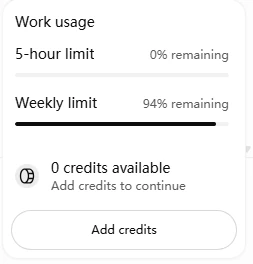
If you are short of credits, click on "5-hour limit" in the bottom left corner to view detailed information. You will then see the "Add credits" option. Click on it to purchase credits as needed.
PC users
When your account supports purchases, you can view your balance and purchase entry point in ChatGPT's Settings → Usage, or in the Codex app's Usage & Billing.

The amount and payment options are subject to the actual checkout page.
If there is no purchase option, it may be because the account is not eligible to make a purchase.
Method 2: Replenish existing Plus/Pro credit limits via Account Planet
Account Planet offers ChatGPT membership top-up services, as well as Plus/Pro account credit top-up services.
Your original account and membership package will be retained, and you can continue to use them once the Credits are credited.
Please confirm that the account meets the following conditions before purchasing:
- Plus/Pro memberships are still valid;
- You can log in and use Codex normally;
- The usage page displays an entry point for purchasing or topping up Credits;
- The account has no payment restrictions, security restrictions, or abnormal status that would affect recharge.
Codex credit top-up service does not currently support Free/Go accounts.

IV. How to confirm receipt of funds after recharge
Check the Credits balance, not the plan usage progress bar.
Additional credit is recorded separately from the pre-paid usage of the package. After topping up, the original progress bar will not return to 100%, so you cannot determine that the credit has not been received based on this.
The newly added consumption should be taken into account when checking.
For example, if you continue processing files after topping up, your current balance may be lower than "your original balance plus the purchase amount".
Verifying the usage records together is more accurate than comparing only two numbers.
If you haven't seen the funds arrive yet, check in order:
- Account consistency: Is the account used to place the order the same as the account used to view the balance?
- Order processing status: Payment completion and recharge completion must be confirmed separately;
- Is the information valid? If the submitted information or link is incorrect or invalid, please supplement it according to the customer service instructions.
- Are there any subsequent consumptions? Compare the time before and after the recharge to see if there are still tasks using the quota.
If you still cannot confirm receipt of funds after verifying all of the above, please provide the order number and relevant screenshots for verification.
5. Frequently Asked Questions
1. Will the additional credit limit be used in conjunction with the member's usage?
Credits will be consumed according to the following rules: the amount included in the package will be used first, and the available credits will be used after the limit is reached.
Adding to your subscription will not upgrade your membership tier or change your existing subscription.
2. Will ChatGPT Credits expire? Can they be transferred to other accounts?
Purchased credits are valid for 12 months after purchase. Unused credits will expire and cannot be transferred to other accounts.
3. Will existing members be affected by the suspension of Pro 20x upgrades?
Existing Pro 20x subscriptions can still be renewed as usual.
Once the cancellation or downgrade takes effect, you cannot repurchase 20x until the suspension is lifted.
4. Can ChatGPT Free/Go users purchase Credits?
The official website has opened the purchase portal to some Free/Go users; whether or not it is available for purchase depends on the actual display on the account.
Account Planet's top-up service currently only supports eligible Plus/Pro accounts.
Hopefully, the article "ChatGPT/Codex Balance Insufficient? Online Payment and Top-up Price List and Instructions" shared on Chen Weiliang's blog ( https://www.chenweiliang.com/ ) will be helpful to you.
Feel free to share this article's link: https://www.chenweiliang.com/cwl-34685.html