
Article directory
For community marketers , receiving payments through WeChat groups is indeed good news.
Let's imagine:
- Many nowInternet marketingPeople established their own paid communities and sold them throughWeb PromotionVIP members come for a fee.
- but,Wechat marketingAfter the membership service expires, the WeChat group owner needs to charge again.
- I used to receive red envelopes or one-to-one private messages, but now I can directly use the group to charge.
If you don't know how to quickly create a WeChat group, you can read this tutorial ▼
Suitable for community operation
If we run a WeChat group, it is also a community.
We do not give lectures by ourselves, but invite experts in network promotion to share in the group.
After the sharing is over, we can start to initiate group charging, and the course fee will automatically enter the WeChat wallet.
Also, if we want to organize an event, we first move interested people to the WeChat group and finally agree to participate in the event.
We use the group charging function to solve the problem of activity funding.
In WeChat 6.3.28 iOS version, 2 major features have been updated:
- Wechat group to add people, the group owner needs to confirm
- WeChat group collection.
First of all, WeChat group owners can turn on the function that requires the group owner's confirmation before inviting friends to join the group.
- In this way, members of the WeChat group will not be able to invite others to join the WeChat group casually.

Team activities, you can collect money through WeChat group chat:

- In this case, if there is a group activity that needs to be settled uniformly.
- It will be very convenient, and you can also stop receiving money.
WeChat's "group collection" function is actually an upgrade of the previous AA payment collection function.
Users can initiate "group payment" in group chats, where the fee can be split equally among the participants or a specific amount can be specified, making it very convenient for receiving payments in our daily lives .
How to use the WeChat group payment function?
Step 1: Download and install the latest version of WeChat.
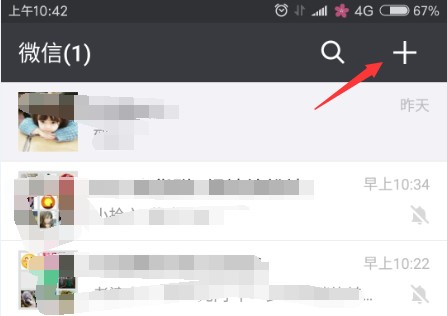
Step 2: Click the + sign
In the latest version of WeChat, users can click the "+" sign ▼ in the WeChat group chat ▼

Step 3: Locate the group payment function ▼

After group collection starts, group members who need to pay will be reminded.
At the same time, the group payment will send a system reminder to friends who have not paid for more than 24 hours, so as to avoid the embarrassment of the recipient's active reminder.
Group payment must be verified by real name
However, before using the group payment function, users must use real-name authentication.
At the same time, the WeChat team reminds users to confirm the identity of the other party before paying and pay attention to payment security.
WeChat group payment FAQ
Hopefully, the article "How to Create a WeChat Group to Collect Money? How to Set Up Fees in a WeChat Group?" shared on Chen Weiliang's blog ( https://www.chenweiliang.com/ ) will be helpful to you.
Feel free to share this article's link: https://www.chenweiliang.com/cwl-725.html