
Article directory
New media professionals need to register various accounts and verify their email addresses when doing online promotion .
Foreign trade salespersons often use email to contact clients when doing online marketing .
E- commerce professionals also need to use email to collect user feedback and opinions.
However, the QQ Mail app on my phone displayed the message: IMAP/POP3 service is not enabled. ▼
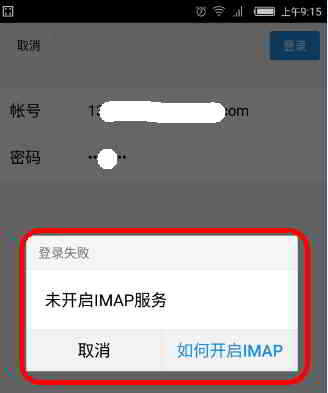
In this article, Chen Weiliang will share with you: How to enable POP3/SMTP service?
QQ mailbox is POP3 or IMAP?
- Usually e-mail is POP3 by default.
- By default, QQ mailbox needs to open the IPOP3/SMTP service function.
How to enable POP3/SMTP/IMAP service function?
- For mailbox security, by default, the POP3/SMTP service of QQ mailbox is turned off.
- If necessary, log into your mailbox settings and turn it on.
1) Enter the mailbox settings
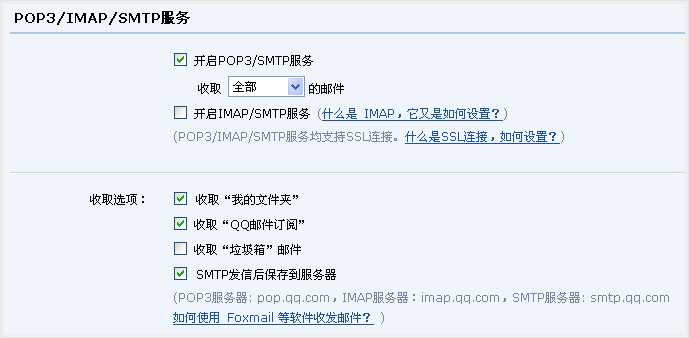
Please enter the "Settings" of the mailbox, you can find the "POP3 / SMTP Service" setting item in the "Account" item ▼
2) Enable POP3/SMTP service
- You must check "Enable POP3/SMTP service".
- In addition to receiving emails from your inbox, you can also receive emails from other folders as needed.
3) "Save to server after SMTP sending"
- This is a special function provided by QQ mailbox for users.
- If this option is selected, messages sent via SMTP will be backed up to "Sent" in the mailbox in case you need it.
- After "Save" settings, the mailbox's POP service is successfully opened.
What are the QQ mailbox POP3 and SMTP server ports?
QQ mailbox POP3 and SMTP server addresses are set as follows:
| mailbox | POP3 server (port 995) | SMTP server (port 465 or 587) |
|---|---|---|
| qq.com | pop.qq.com | smtp.qq.com |
- Please note: The SMTP server requires authentication.
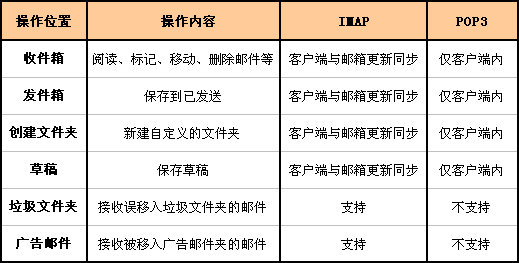
About what are POP3, IMAP and SMTP?Please see this tutorial ▼
How to enable IMAP/POP3 in Gmail ? See here for instructions on setting the Gmail server address ▼
Hopefully, the article "How to set up POP3/SMTP address when IMAP service is not enabled in QQ Mail?" shared on Chen Weiliang's blog ( https://www.chenweiliang.com/ ) will be helpful to you.
Feel free to share this article's link: https://www.chenweiliang.com/cwl-1071.html