
Article directory
Many e-commerce professionals who use WordPress to build websites want to know: How do I bind my domain email address as my primary QQ account?
Now, let's quickly see how to change a QQ Mail account to a custom domain email address.
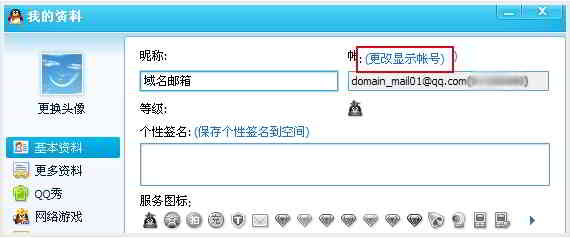
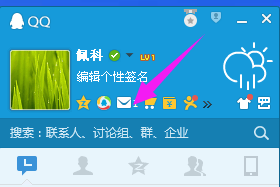
1) Log in to your QQ, then click your avatar on the main panel to open the "My Profile" panel ▼

2) Click "Change Display Account" above the "My Profile" panel ▼
3) Go to the "Bind Email Account" page, and then select "Bind Other Email Addresses"▼

4) On the next page, enter your full domain email address, click Detect and Submit ▼
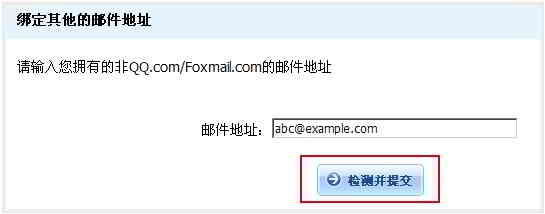
5) Activate according to the activation letter received and successfully log in to QQ.
The benefits of using a personal domain email
What is the biggest advantage for online marketers using personal domain email addresses?
- The biggest advantage is that when sending and receiving emails, it can be automatically implementedWeb PromotionEffect.
QQ domain name mailbox application conditions
- personal domain name
- QQ mailbox
If you don't have a personal domain name, you can follow this tutorial to apply for your top-level domain name ($1 will be sent to you) ▼

How to set up QQ personal domain name mailbox? QQ personal domain name mailbox application tutorial, please see here ▼
Hopefully, the article "How to Change the Domain Name of QQ Mail? A Tutorial on Changing QQ Mail to a Custom Domain" shared on Chen Weiliang's blog ( https://www.chenweiliang.com/ ) will be helpful to you.
Feel free to share this article's link: https://www.chenweiliang.com/cwl-1075.html