
Article directory
Each new media platform needs to register and save multiple account passwords on multiple websites.
Setting the same password on multiple e- commerce websites is especially insecure.
- Experts use password managers to save and manage multiple different account passwords.
Some online marketers have said that the free version of RoboForm cannot sync and they want to switch to KeePass password management software.
The question is how to export the login account password data from RoboForm 7 as HTML file data, and then import it into the KEEPASS password manager?
RoboForm 7 export account password data
1) If you use RoboForm 7 and want to perform this account password export operation, please open RoboForm's Passcard Editor ("Edit Passcard" or "RoboForm Editor" in the Windows Start Menu)
2) Then in the editor's main menu select 'Passcard' → 'Print List' (in newer versions you have to click the 'RoboForm' button → 'Print List' → 'Login')▼
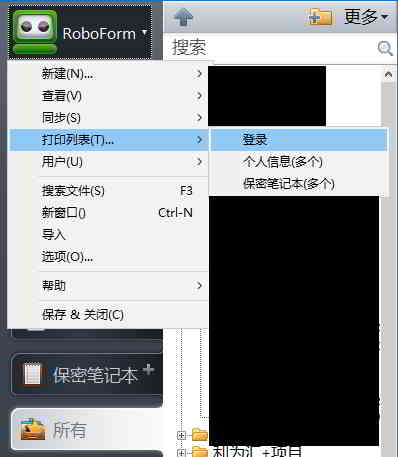
3) In the dialog box that opens, click the "Save" button ▼
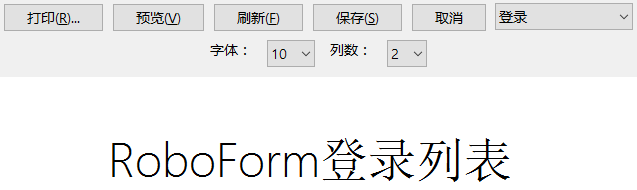
- Choose a location and file name, and click Save.
Import RoboForm account password data to KeePass
Step 1: Open the KeePass 2.x database file.
Step 2: Go to "File" → "Import".
Step 3: Select "RoboForm HTML" as the format, choose the HTML file you just exported, and then click "OK" ▼
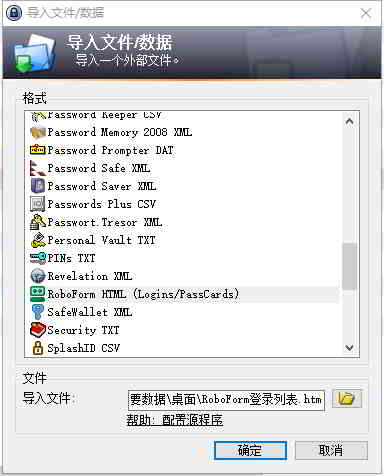
Import RoboForm 7 data into KEEPASS password manager and you're done!
Hopefully, the article "How to Export RoboForm7 Data and Import it into KeePass Password Manager?" shared on Chen Weiliang's blog ( https://www.chenweiliang.com/ ) will be helpful to you.
Feel free to share this article's link: https://www.chenweiliang.com/cwl-1325.html