
Article directory
How to use the Postfix mail server in the CWP control panel to solve spam problems?

Before starting, we should stop the postfix mail server ▼
service postix stop
How does CWP use postfix for anti-spam?
First, let's count the number of emails stuck in the mail server queue ▼
postqueue -p | grep -c "^[A-Z0-9]"
Select several similar emails and use ID to check them ▼
postqueue -p
Similar results will be displayed▼
2F0EFC28DD 9710 Fri 15 03:20:07 hello@ abc. comNow we need to read that email by ID ▼
postcat -q 2F0EFC28DD- By reading the content of the email, we can determine if it is spam.
- If the email is spam, then you need to find its source.
- If the email source contains something like sasl login: This means that the "sasl" password for the email account "[email protected]" was hacked to log in.
To protect your server, you need to change your email account password:
- named_attribute: sasl_method=LOGIN
- named_attribute: [email protected]
After changing the account password, you should restart postfix ▼
service postfix restart
Remove all messages from the queue ▼
postsuper -d ALL
Before deleting any emails, you should check their source as it could be a php script hacked inside.
If you can't solve the problem of hackers spamming spam, you can directly disable sending emails and set up server cron.
If using the CWP Control Panel, log into the CWP Control PanelOf Server Setting → Crontab for root ▼
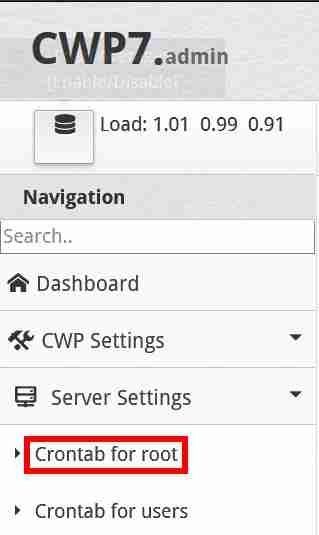
In "Add Full Custom Cron Jobs", enter the following fully custom cron command ▼
* * * * * /usr/sbin/postsuper -d ALL
- (delete all queued messages every 1 minute)
How to Avoid Hacking Spam Settings?
Don't forget to scan your CWP for malware.
In the CWP control panel, navigate to the left and click Security → Security Center → Malware Scan → Accounts Scan: Select your account option to scan for malware.
If you install mod security with auto-update rules to prevent any further hacking of your website, but it may also make your website inaccessible with a "403 Forbidden Error" error in the background, you need to turn on mod security with caution.
This article will be updated from time to time! ! !
The link below summarizes the list of commonly used command lines in Postfix▼
Hopefully, the article "How to Use Postfix to Combat Spam with CWP? Spam Prevention Settings" shared on Chen Weiliang's blog ( https://www.chenweiliang.com/ ) will be helpful to you.
Feel free to share this article's link: https://www.chenweiliang.com/cwl-27468.html