
Article directory
I installed the Redis server on a new CentOS 7 machine, but I can't start it using systemctl.
Try to start the Redis service▼
systemctl start redis.service
- Redis failed to start (no output).
Here's what happens when trying to connect to Redis:
redis-cli
Could not connect to Redis at 127.0.0.1:6379: Connection refused
not connected>
But starting Redis manually works:
[root@redis ~]# redis-cli
127.0.0.1:6379>
Query Redis status, it shows that Redis is not activated ▼
[root@redis ~]# systemctl status redis.service
redis-server.service - Redis persistent key-value database
Loaded: loaded (/usr/lib/systemd/system/redis-server.service; disabled)
Active: inactive (dead)

November 25 18:52:16 redis systemd[1]: Starting Redis persistent key-value database...
November  25 18:52:16 redis systemd[1]: Started Redis persistent key-value database.
The following is another query to query the status of Redis, showing an example of Redis failure ▼
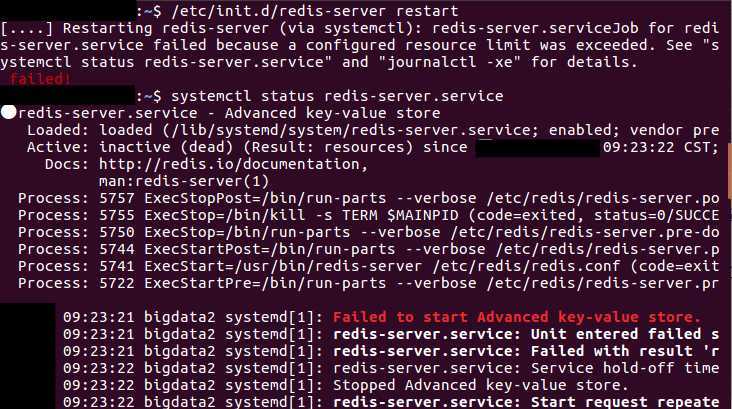
Solve the problem that the Redis server fails to start
To run the latest version of Redis with systemd, you need to edit the Redis configuration file:
/etc/redis.conf
Build and configure Redis with systemd support ▼
daemonize no

supervised auto
What should I do if Redis cannot obtain remote connection access after restarting the VPS server?
If you restart the VPS server, Redis cannot start to obtain remote connection access, you can delete the dump.rdb (memory snapshot) file ▼
cd /var/lib/redis
mv dump.rdb dump.rdb_bak
Check if the Redis service is started▼
ps -ef|grep redis
- Try to restart the VPS server. If Redis can start as usual, it means that the Redis configuration file just edited works.
Hopefully, the article "Troubleshooting Redis Server Startup Failure: Solving the Problem of Unable to Obtain Remote Connection Access After Restart" shared on Chen Weiliang's blog ( https://www.chenweiliang.com/ ) will be helpful to you.
Feel free to share this article's link: https://www.chenweiliang.com/cwl-29424.html