
Article directory
What should I do if I don't receive the SMS verification code when logging into WeChat on an iPhone?
Don't worry, this article will teach you how to solve this problem and let your mobile phone easily log in to WeChat.
Recently, a netizen named Luca YU left a message on Telegram saying:
Hello brother, I saw your blog about binding mobile phone number with WeChat on Google. I have encountered some problems recently, because I will most likely live in Hong Kong permanently, so I want to change my WeChat to 852 mobile phone number, but there are various bugs, either logic errors or my verification code errors, or all kinds of strange errors, too many operations in a short period of time, who should I contact? to solve it, it's really annoying
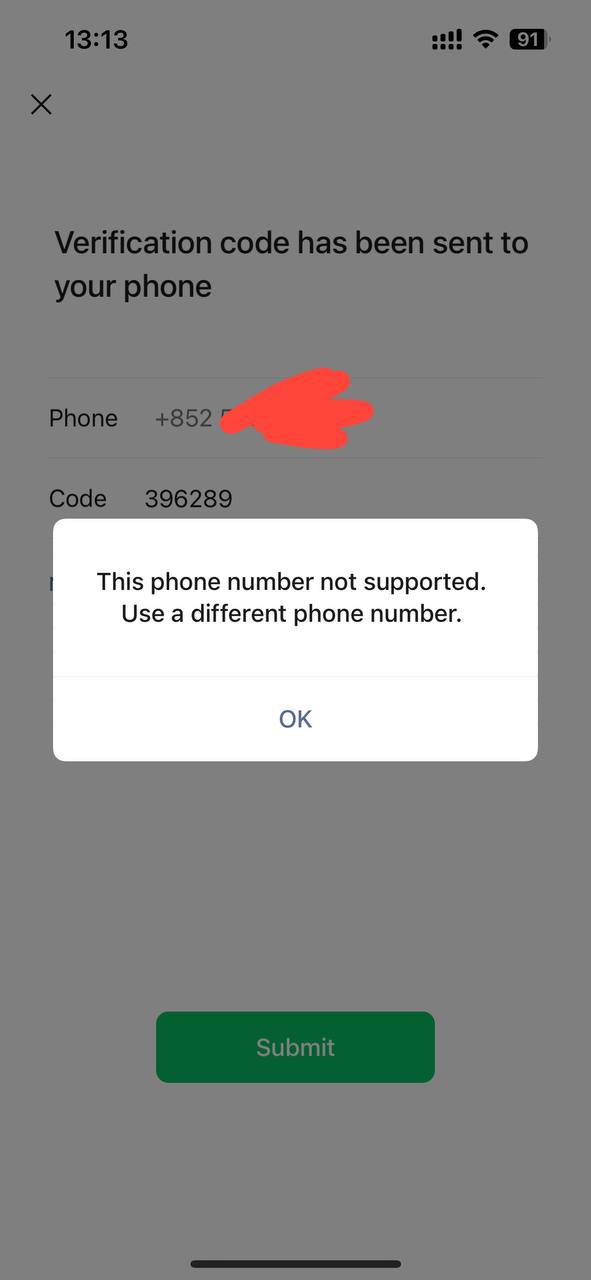
Verification code has been sent to your phone
Phone +852
Code 396289
This phone number not supported.
Use a different phone number.
Can't receive SMS verification code when logging in to WeChat with Apple mobile phone?
Follow the tips below to troubleshoot:
1. The "Region" setting of the mobile phone number is wrong
- Double check that thePhone NumberThe correct country is selected in front of the input box.
2. Incorrect mobile phone number entered.
- double check your inputcellphone numberis it right or not.After selecting a country, you do not need to include the country code before the mobile number you enter.Landline phone numbers are not accepted.
3. SMS verification codes are sent too frequently
- There is a limit to the number of SMS verification codes that can be sent to a mobile number per day.Please try registering again later.
4. Check whether the currently bound mobile phone number is the same as the mobile phone number bound when registering or binding WeChat.
If you have changed your mobile phone number, please log in through other methods (such as password login), and update your bound mobile phone number as soon as possible.
5. Are you sure that your mobile phone and mobile number can receive text messages?
- Try sending a text message to your phone number from another phone to make sure your phone is able to receive text messages.
- If you cannot receive the text message, it may be that the network is not good, or it is roaming/arrears/service interruption, etc. Please try again after 30 minutes or register with a different mobile phone number.
6. Check if your phone has antivirus software installed that blocks text messages from unknown senders.
- If so, temporarily turn off your antivirus app's blocking feature and request another SMS verification code.
7. Please check whether your mobile phone has installed anti-virus software that intercepts SMS messages from unknown parties.
- If so, please temporarily disable the blocking function and obtain the SMS verification code again.
- Please try to recall, have you ever asked your telecom operator to block any mobile number messages from WeChat?
- Or, is this number blocked on your mobile phone, for example, the content of the message you replied before is "STOP", "UNSUBSCRIBE", "CANCEL" and so on.
- If you are not sure about the situation as above, you can check with your telecom operator and request to unblock our number.
How to solve the problem that the iPhone cannot log in to WeChat and receive the SMS verification code?
8. Finally, netizen Luca YU commented: I don't know why it doesn't work on iPhones, but Android phones can send SMS codes. I've also confirmed that my phone number (852) has never been used to open any other WeChat accounts. It's very strange...
Chen Weiliang replied: It's precisely because the iPhone has a closed operating system and many functions are limited that I will only choose to use an Android phone.
If you want to purchase a virtual Hong Kong mobile number , register an account, and receive and send SMS verification codes, please see here ▼
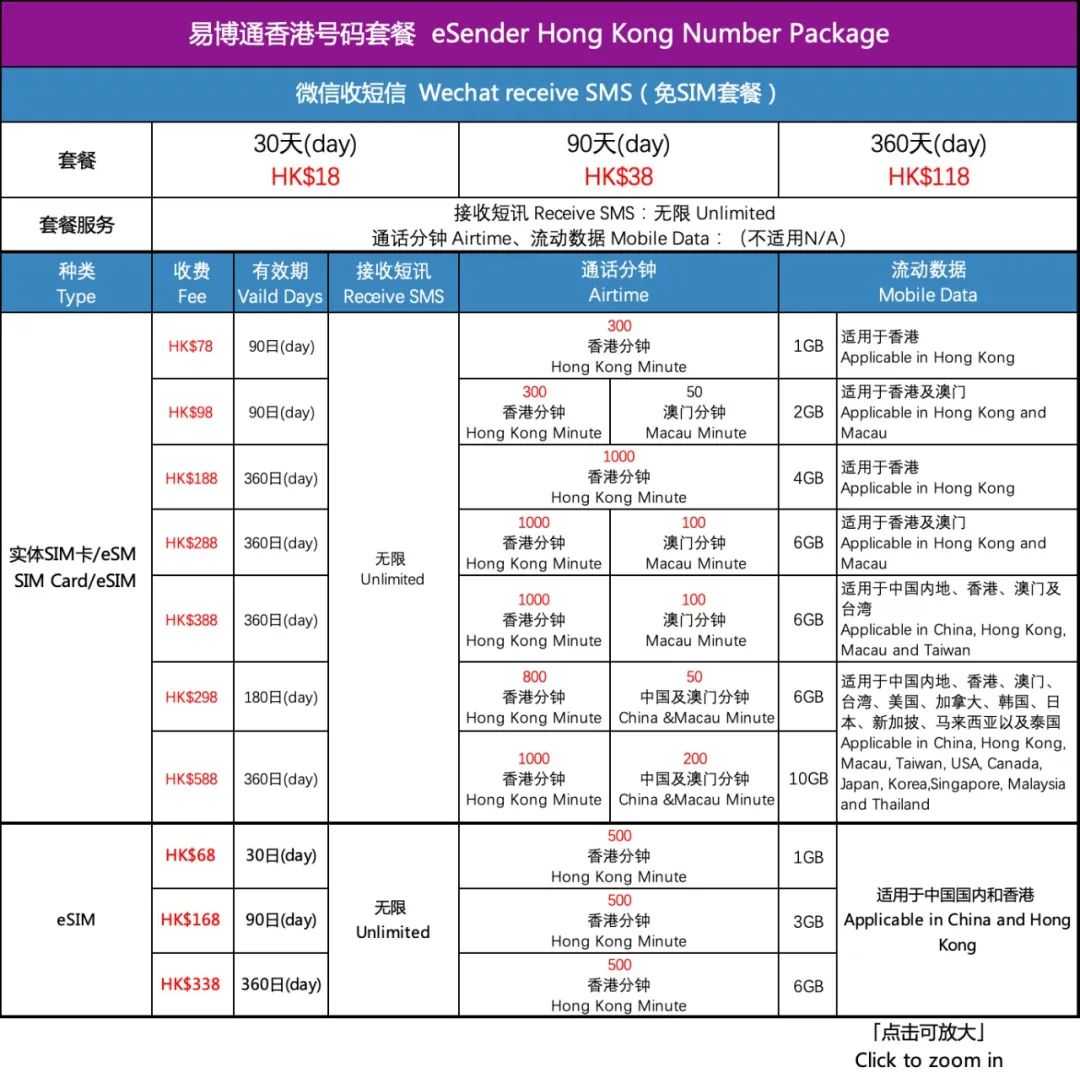
To purchase a Hong Kong mobile data plan , please click the link below for a tutorial ▼
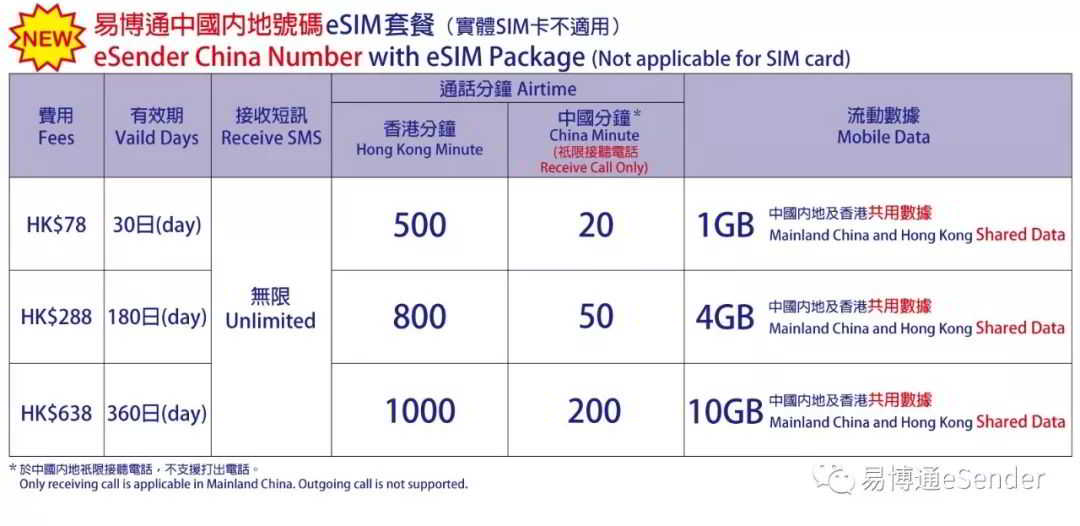
eSender Hong Kong promo code:DM6888
eSender Promotion Code:DM6888
- If you enter the discount code when registering:DM6888
- Available on first successful purchaseHong Kong mobile numberAfter the package, the service validity period is extended for an additional 15 days.
- " eSender "Promo Code" and "Recommender" eSender Number" can only be filled in one item, it is recommended to fill in eSender Promo Code.
- althoughHong Kong mobile phone number can register TikTok, but usingHong Kong mobile phone numbers must be real-name.
Hopefully, the article "What to do if you can't receive SMS verification codes when logging into WeChat on an Apple phone with a Hong Kong mobile number?" shared on Chen Weiliang's blog ( https://www.chenweiliang.com/ ) will be helpful to you.
Feel free to share this article's link: https://www.chenweiliang.com/cwl-30210.html