
Article directory
With the help of modern technology, people can use chatbots to get answers, provide assistance and have conversations.
ChatGPT is an intelligent chatbot capable of answering various questions, featuring a powerful language model and multilingual capabilities.
Many users may wish to save their conversations with ChatGPT so they can be viewed and reviewed again later.
This article will explain how to save ChatGPT conversations for later access.
1. Where is ChatGPT chat history?
ChatGPT's chat history is saved in a chat history, which contains all conversations between the user and ChatGPT.
ChatGPT's chat history is accessed through the "History" in the sidebar of the ChatGPT chat window ▼
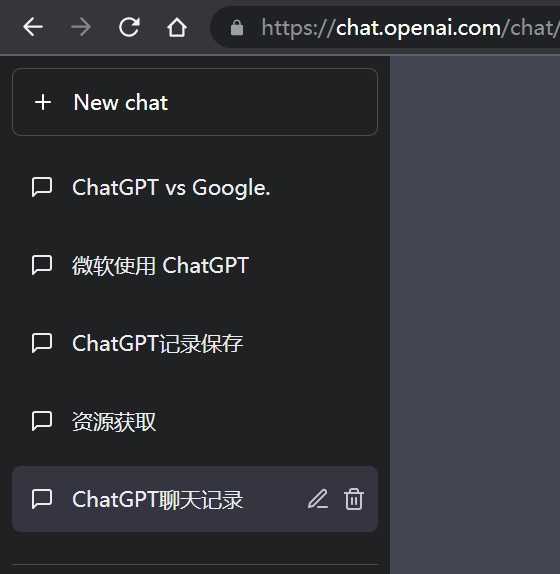
2. How to save ChatGPT conversation
Sometimes ChatGPT history chat records, there will be "Not seeing what you expected here? Don’t worry your conversation data is preserved! Check back soon." error message.
- This problem and the same "
ChatGPT History is temporarily unavailable" error case is similar.
There are several ways to save ChatGPT conversations for later access.Here are some possible approaches:
2.1. Copy and Paste
Users can save ChatGPT conversations by copying the chat history and pasting it into a text editor or document.This is the easiest way and records can be accessed and edited at any time.
2.2. Screen capture
Users can save the conversation by taking a screenshot of the ChatGPT chat window.This method is suitable for users who only want to save a small number of conversations.
2.3. Using the chat history saving application
Users can also save ChatGPT conversations using the chat history saving app.
These apps can automatically save chat history and store it in the cloud for easy access when needed.
3. How to access the saved ChatGPT chat history
Once users have saved ChatGPT chat history, they can access and view the history at any time.
Here are some ways:
3.1. Open in a text editor or document
If a user saved a ChatGPT conversation using the copy and paste method, the recording can be accessed by opening the saved text editor or document.
3.2. View in the chat history saving application
If the user usesGoogle Chromeextension"Export ChatGPT Conversation"Save the ChatGPT conversation Notion app, then you can access the recording by opening the app.
3.3. View in ChatGPT chat window
Users can also view the chat history by turning on the "History" option in the ChatGPT chat window.
This method is only suitable for those users who only have a small number of saved conversations.
4. How to protect the saved ChatGPT chat history
In order to protect the saved ChatGPT chat history, here are some methods:
4.1. Encrypted records
Users can use encryption software to encrypt chat logs to protect them from being viewed by unauthorized visitors.
4.2. Stored in a secure cloud
Users can store chat transcripts in a secure cloud to protect transcripts from device failure, loss or theft.
4.3. Delete unnecessary records
If users no longer need the saved chat records, they can consider deleting these records to reduce potential security risks.
5. Summary
There are many ways to save ChatGPT conversations for later access, and users can choose the appropriate method according to their needs and preferences.Either way, keeping your chat history safe is always important.By understanding and applying these methods, users can securely save and access the records of their conversations with ChatGPT.
If you register Open in Mainland ChinaAI, a prompt will appear:OpenAI's services are not available in your country."▼
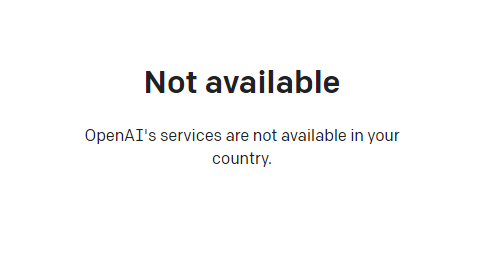
Since advanced features require users to upgrade to ChatGPT Plus to use them, it is difficult to activate ChatGPT Plus in countries that do not support OpenAI, and you need to deal with cumbersome issues such as foreign virtual credit cards...
Here we would like to introduce you to an extremely affordable website that provides ChatGPT Plus shared room accounts.
Please click the link below to register a Planet account ▼
Click the link below for a detailed guide to registering your account on Planet▼

Tips:
- IP addresses in Russia, China, Hong Kong, and Macau cannot register for an OpenAI account. It is recommended to register with another IP address.
FAQ
Q: Is it necessary to save ChatGPT conversation records?
A: Saving ChatGPT conversation records is useful for users who wish to review and learn from past conversations.Additionally, keeping records serves as a backup for easy access when needed.
Q: Are there any free chat history saving apps? ?
A: Yes, there are many free chat-keeping apps to choose from.However, users should carefully read the app's terms and conditions to see if they protect the user's privacy and security.
Q: Can I access saved ChatGPT conversations on multiple devices?
A: If users save their chat history in the cloud, they can access the history on multiple devices.If the recording is only kept on one device, the recording needs to be copied to other devices.
Q: Is there a time limit for accessing saved ChatGPT conversations?
A: If the user chooses to save the recording in the cloud, the recording can be accessed anytime and anywhere.If the user chooses to save the recording in device local storage, the recording will only be accessible on that device.
Q: How to delete saved ChatGPT conversation records?
A: Users can manually delete saved chat records.If you use a chat history saving application, you can use the delete function provided by the application to delete the recording.
Hopefully, the article "ChatGPT chat history lost? How to retrieve lost chat history?" shared on Chen Weiliang's blog ( https://www.chenweiliang.com/ ) will be helpful to you.
Feel free to share this article's link: https://www.chenweiliang.com/cwl-30295.html