
Article directory
Explore Soundraw, the AI music generation platform! A magical place to create royalty-free music, allowing you to generate music effortlessly with just one click! 😍
You can create with zero basic knowledge, no need to learn music theory, one-click to generate high-quality music, free and copyright-free, suitable for video editing, couple confession, music creation and other scenarios.
What is Soundraw?
Soundraw is an online AI music generation tool founded by Tago Company in February 2020.
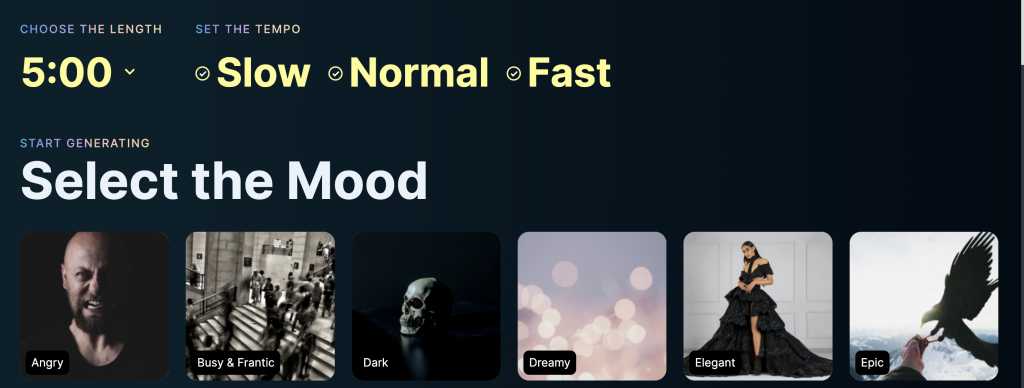
Its feature is that it allows users to create original, royalty-free AI music by selecting different instruments, genres, styles and other parameters.
Soundraw offers users the opportunity to use generated music in various scenarios, such as YouTube videos, movies, and live streams. However, it does not allow users to directly publish the generated AI music on audio streaming platforms such as Spotify or Apple Music, or use it as background music for songs.
Soundraw emphasized: "We prohibit this type of behavior to ensure that Soundraw remains a platform dedicated to helping users carry out their creative work, rather than being abused by unscrupulous users to flood the Internet."
Soundraw Features
- AI Music Generation Tool Price: Get Started for Free
- Release date: February 2020
- Developer: Soundraw
- Users: 150 million
- Automatically generate music: Users only need to select genres, styles, instruments and other parameters to automatically generate music.
- Supports manual editing: Users can freely edit music according to personal needs, such as shortening the intro, adjusting the chorus, etc.
- Supports multiple genres: Users can choose from pop music, country music and other genres.
- Supports downloading: allows users to download music in wav format, and can download up to 50 songs per day.
- Supports multiple emotions: Allows users to create music for various emotions, such as calm, sad, happy, etc.
How to log into Soundraw?
Soundraw has free and paid versions.
There is no need to register or log in for the free version, which is only required when using paid services.
The following are the steps to log in to Soundraw:
- Enter the Soundraw website and click the "Login" button in the upper right corner.
- Enter your Soundraw account and password, then click "Log In" to log in successfully.
- If you don't have a Soundraw account yet, you can click "Create Account" in the lower right corner.
- Read and agree to the Terms of Use and Privacy Policy.
- Enter your email address and select payment plan, payment method and other information according to your needs.
- Click "Apply" to get the promo code.
- Fill in the receivedVerification code, then click "Create Account" to complete registration.
How to use Soundraw?
Go to the Soundraw website and click "Create Music" on the homepage.
Choose the musical emotion you want to create, such as running, sadness, peace, etc...
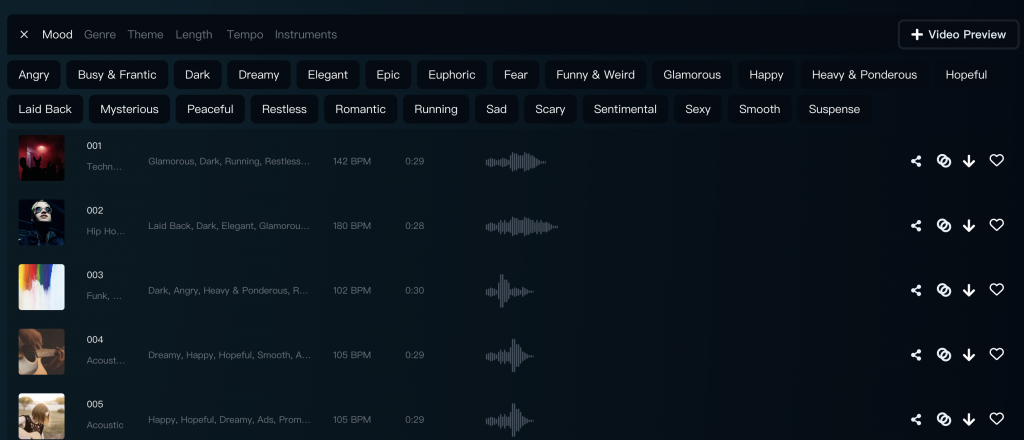
- Next, select the song genre such as hip-hop, pop, rock, etc.
- Then, choose the song duration, tempo, and instrumentation.
- Next, Soundraw will generate 15 pieces of music for you. If you are not satisfied, you can click "Create More" to generate more songs.
But Soundraw doesn’t stop there, it also has some unique features that other AI music generation platforms don’t have: video preview function
Video Preview
If you want to add background music to your video, Soundraw thoughtfully provides a video preview function in the upper right corner.
You can upload your videos to know in advance how each song will fit into your video ▼

Pro Mode
In addition to basic setting functions, Soundraw also provides a more advanced professional adjustment mode, namely Pro Mode ▼

- For example, after listening to a piece of music, if you want to strengthen the intensity of the intro melody, you only need to adjust the energy of the melody in the corresponding color adjustment area.
- Here, gray represents the lowest, while bright blue represents the highest.
- The Pro toolbar below also allows you to adjust the length of the measure, BPM (beats per minute), instrument, melody, and the volume of each instrument one by one.
- Most platforms can only generate music, and at most fine-tune it. If you are not satisfied, you can only regenerate it. Soundraw is directly ahead of other music generation platforms.
- In Pro mode, you can even make adjustments on a bar-by-bar basis.In addition to the intuitive energy adjustment just introduced, you can also adjust main melody, accompaniment, drums, bass, transitions and other elements separately... (This is a unique feature that other music generation platforms do not have).
Soundraw Pricing
Soundraw has free and paid versions. Please see the table below for details:
| 计划 | Free | personal plan |
|---|---|---|
| Price | $0 | 19.99 dollar |
| FEATURES |
|
|
Soundraw review
Eileen: I created some music with Soundraw and used it in YouTube videos, and a lot of people commented that the music was brilliant!
Jenny: Soundraw provides an extremely rich selection, and its artificial intelligence technology is so powerful!
Henry: It’s amazing how many instruments can be used simultaneously in Soundraw!
FAQ
Question 1: Is Soundraw free?
Answer: Soundraw offers free and paid versions.The free version allows users to use the most basic features, such as automatic music generation.However, if you want to enjoy more high-quality services, you can choose the paid version, which costs $19.99 per month.
Question 2: Are there alternatives to Soundraw?
A: Soundraw is an AI music generation tool, but we can achieve free AI music generation and recording through internal recording software on Windows computers , internal recording apps on Android phones , or audio methods on Apple phones .
Question 3: Is Soundraw copyright-free?
Answer: Soundraw is an artificial intelligence music generation tool that allows users to create royalty-free music of any style, type and length.As long as the music is generated by Soundraw, you don't need to worry about copyright issues.
If you register OpenAI in mainland China, a prompt will appear:OpenAI's services are not available in your country."▼

Advanced features require users to upgrade to ChatGPT Plus, but activating ChatGPT Plus in countries that do not support OpenAI is quite difficult and involves dealing with cumbersome issues such as using foreign virtual credit cards…
Here we would like to introduce you to an extremely affordable website that provides ChatGPT Plus shared room accounts.
Please click the link below to register a Planet account ▼
Click the link below for a detailed guide to registering your account on Planet▼

Tips:
- IP addresses in Russia, China, Hong Kong, and Macau cannot register for an OpenAI account. It is recommended to register with another IP address.
Hopefully, the article "Soundraw: An AI-powered one-click music generation platform that allows for free online synthesis of copyright-free pure music," shared on Chen Weiliang's blog ( https://www.chenweiliang.com/ ), will be helpful to you.
Feel free to share this article's link: https://www.chenweiliang.com/cwl-31000.html