
Article directory
Imagine you are on vacation abroad and suddenly need to send money to friends or family. Are you anxious? If you use the CIMB OCTO app, these problems can be easily solved.
With this app, you can easily use foreign wire transfer (FTT) or quick remittance (SpeedSend) to transfer money, you no longer have to worry about remittance. So, how to do it specifically? Don't worry, let's unlock this magical function step by step!
1. Open the CIMB OCTO app
First of all, of course, open your CIMB OCTO app. Make sure you have successfully logged into your account, which is the basis for subsequent operations.
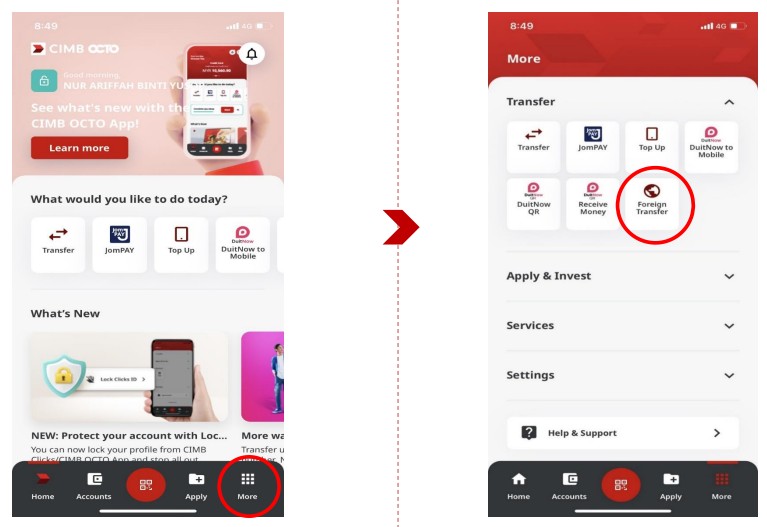
2. Click the [Foreign Currency Transfer] icon on the homepage
Once you enter the app homepage, you will find various icons.
At this time, don't be confused by the dazzling options, just click on the icon that says "Foreign Currency Transfer".
This icon is like the key to unlocking your foreign exchange transfers!
3. Select the recipient bank country > recipient currency
Next, you need to select the country where the receiving bank is located. Suppose you want to send money to a friend in Japan, then you need to find "Japan" in the country list and select the receiving currency, such as Japanese Yen. At this point, your target account is basically locked.
4. Select the debit account
Don't forget that you have to choose an account to debit the money from. The app will ask you to choose which account to debit from, and if you have multiple accounts, choose one with enough balance to avoid the embarrassing "insufficient balance" prompt.
5. Select the transfer type (transfer to account/cash collection)
Here, CIMB OCTO gives you a very flexible choice - do you want to transfer the money directly to the other party's bank account, or let the other party go to the local bank branch to collect cash? It depends on your needs. If the other party has an account, directly select "Transfer to Account", if not, you can choose "Cash Collection".
6. Select the currency to send > enter the amount
Next, it’s time to enter the amount. Once you’ve decided on the country and currency you want to remit to, the app will automatically convert the exchange rate, and you only need to enter the amount you want to remit. If you want to transfer $5000, just enter $5000 in the amount box, and the app will take care of the rest for you.
7. Select payment type (FTT / Money Transfer)
Now, you have to choose a remittance method. There are two options here: Foreign Telegraphic Transfer (FTT) and SpeedSend. If you are not in a hurry, you can choose FTT, which is usually cheaper; if the money must be received as soon as possible, then choose SpeedSend, which is more expensive, but the speed will definitely satisfy you.
8. Enter the recipient's address and bank details (if applicable)
Once you've chosen a payment method, the app will ask you to enter the recipient's details. This step is essential to ensure that the money reaches the recipient. Enter the recipient's name, address, and bank account information (if you've chosen to transfer to an account).
9. Enter sender details
This step is relatively simple, just fill in your personal information, including name and contact address. Don't be afraid, this is just to ensure the legitimacy and accuracy of the remittance.
10. Choose payment method
The last and more interesting step is choosing the purpose of the remittance. Are you sending money to a friend for travel expenses, or to send living expenses to family? Whatever the reason, choosing the appropriate purpose of payment helps the bank understand your remittance motivation and avoids any unnecessary trouble.
11. Review and approve the transaction through SecureTAC
Once everything is done, the app will review your transaction through SecureTAC, a secure verification method that ensures that only you can approve the transaction. Once confirmed, you can simply click "Approve" and the money will be delivered to the other party's account or cash pickup point.
Conclusion
Making foreign exchange transfers through the CIMB OCTO app is simple and secure, and it fits the pace of modern life. Whether you choose FTT or Speed Remittance, the whole process is full of technological convenience, allowing you to easily control every detail of cross-border remittances. I believe that as long as you follow the steps in this guide, you will never worry about remittances again.
Remittances are more than just transferring funds; they're a bridge connecting us all, bridging distances. With this app, you can not only help family and friends in their time of need, but also experience unprecedented efficiency and convenience. Open CIMB OCTO now and try it out—experience the magic of technology!
Summary of the article:
- 1. Open the CIMB OCTO app
- Click the [Foreign Exchange Transfer] icon on the home screen
- Select the recipient bank country > recipient currency
- Select Debit Account
- Select the transfer type (transfer to account/cash payment)
- Select Send Currency > Enter Amount
- Select payment type (FTT / SpeedSend)
- Enter recipient address details and bank details (if applicable)
- Enter sender details
- Select payment purpose
- Review and approve transactions through SecureTAC
Using CIMB OCTO for transfers is simple and convenient, ensuring fast and secure transactions , solving your international remittance problems!
Hopefully, the article "How to Use the CIMB OCTO Application for Foreign Wire Transfer (FTT)/SpeedSend" shared on Chen Weiliang's blog ( https://www.chenweiliang.com/ ) will be helpful to you.
Feel free to share this article's link: https://www.chenweiliang.com/cwl-32100.html