
Article directory
Whenever a digital marketer opens WPS software to write online promotion copy , a WPS Hotspot pop-up window appears...
So, how to turn off WPS hotspot and automatic update?
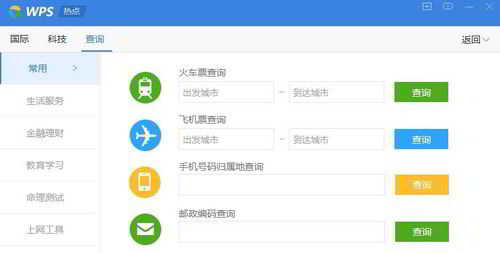
Preparation tools
- computer
- WPS software
Turn off WPS automatic update and upgrade method
Step 1: Open WPS Configuration Tool
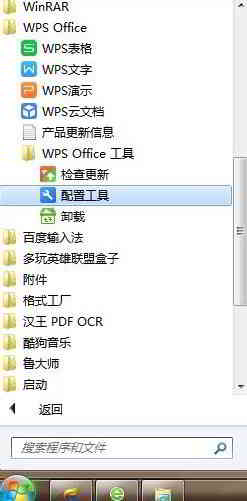
Click the "Start" icon on the computer desktop, then find WPS Office → WPS Office Tools → "Configuration Tools" option and open it ▼
Step 2: Click the "Advanced" option
After opening the comprehensive repair/configuration tool interface of WPS Office, click the "Advanced" option▼
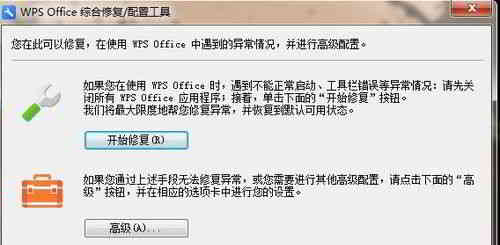
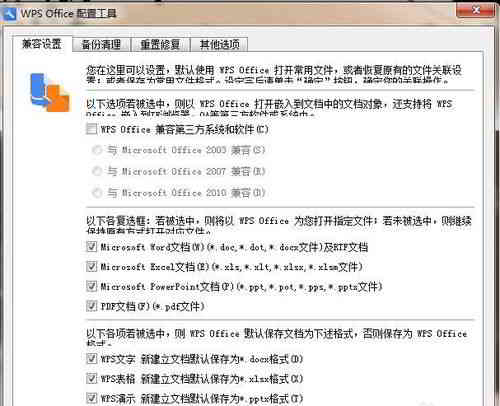
There are 4 options on the WPS Office Configuration Tool interface:
- Compatibility settings.
- Backup cleanup.
- Reset to fix.
- other options.
Step 3: Click the last option – Other Options ▼
Step 4: Turn off WPS automatic updates and advertisements
Go to the "Other Options" screen and turn these off ▼
- Turn off automatic upgrades
- Recommended selected software after the upgrade is complete
- subscribe wps hotspot
- Accept advertising push
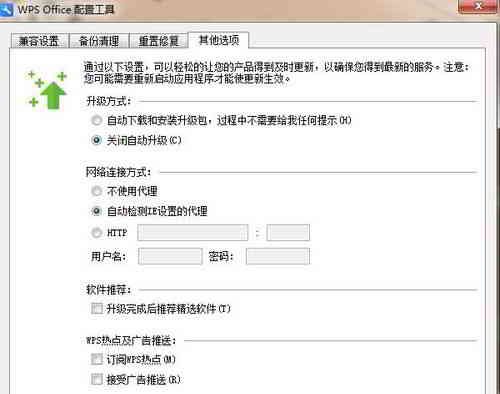
- In this way, when the WPS software is opened next time, there will be no hot news push.
- If there is an update for WPS Office, it will pop up to remind you to upgrade after opening.
- You can choose not to upgrade and decide according to your own personal needs, but generally there is not much change, and there is no need to upgrade, soChen WeiliangIt is recommended to disable the WPS automatic update and upgrade function.
Extended reading:
Hopefully, the article "How to Turn Off/Cancel WPS Automatic Upgrades? Disabling WPS Update Pop-up Prompts" shared on Chen Weiliang's blog ( https://www.chenweiliang.com/ ) will be helpful to you.
Feel free to share this article's link: https://www.chenweiliang.com/cwl-1317.html