
Article directory
WordPress migration disaster! ❌ERR_TOO_MANY_REDIRECTS, here's a trick to fix it!
Do you encounter the WordPress website too many redirects error during the website migration? This guide will provide detailed solution steps to help you easily solve itERR_TOO_MANY_REDIRECTSWrong. Say goodbye to the trouble of moving, let your website move smoothly! 🚀🎉✨
After the WordPress website is moved to a new space, the error "You have been redirected too many times" appears. This is often caused by enabling the SSL certificate on the website and implementing HTTPS secure encryption protocol access to the website.

The reason for the error "ERR_TOO_MANY_REDIRECTS redirected you too many times" is actually caused by the access redirection between http and https ▼
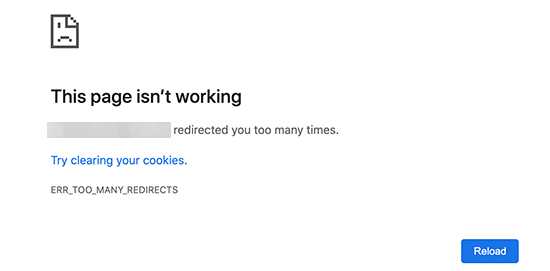
This page isn't working
redirected you too many times.
Try clearing your cookies.
ERR TOO_MANY_REDIRECTS
Detecting the "err_too_many_redirects" problem
Sometimes you have to do some testing to fix"err_too_many_redirects"problem.
If you are unlucky enough to encountererr_too_many_redirects"The trouble is that you need to useOnline Tools, detect the problem of too many redirects.
If you can understand the source of the redirect problem, you can remove it from your site to make it accessible again.
Why does the error of redirecting you too many times appear?
Before moving the website and resolving the domain name DNS to the IP address of the new server, it is impossible to generate an SSL security certificate on the new server.
At the same time, because the website's WP_HOME and WP_SITEURL configurations use https prefix links, this will cause the website to be migrated to a new server and result in too many redirects.
Another situation: If you use the duplicator plug-in to move the website, after importing the website data to the new server, you can successfully access the website. By default, the website is redirected to a link starting with http.
Then, open the wp-config.php file, and you will find that the default WP_HOME and WP_SITEURL are configured for http, as follows:
define( 'WP_HOME', 'http://www.chenweiliang.com' );
define( 'WP_SITEURL', 'http://www.chenweiliang.com' );
If you force change the configuration to https in wp-config.php:
define( 'WP_HOME', 'https://www.chenweiliang.com' );
define( 'WP_SITEURL', 'https://www.chenweiliang.com' );
There may be too many redirects, making the website inaccessible:
This webpage (www.chenweiliang.com) is not functioning properly and has redirected you too many times.
Try deleting your cookies.
ERR_TOO_MANY_REDIRECTS
Solution
1. First, log inphpMyAdmin, edit the WordPress data table wp_options"siteurl"with"home"for http:// 你的域名 .com/
- For now, use http:// as the prefix.
2. Then, log in to the website FTP or the file management of the website host and find the wp-config.php file.
Open the wp-config.php file and you will find that the default WP_HOME and WP_SITEURL are configured for https, as follows:
define( 'WP_HOME', 'https:// 你的域名 .com' );
define( 'WP_SITEURL', 'https:// 你的域名 .com' );
- There may be too many redirects, making the website inaccessible...
3. Therefore, you need to temporarily change it to http as the prefix:
define( 'WP_HOME', 'http:// 你的域名 .com' );
define( 'WP_SITEURL', 'http:// 你的域名 .com' );
4. Next, DNS modifies the A record IP address to the new space IP address and does not enable the CDN proxy.
- turn onWordPress backendLog in to the website and access is successful!
5. At this point, you can generate an SSL certificate in the HestiaCP panel:
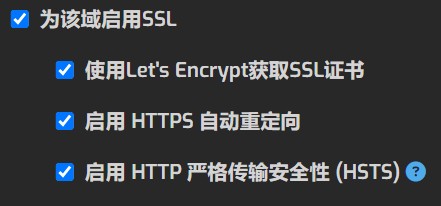
- Enable SSL for this domain
- Obtaining an SSL certificate using Let's Encrypt
- Enable HTTPS automatic redirection
- Enable HTTP Strict Transport Security (HSTS)
6. Also, in Cloudflare , re-enable the CDN proxy and set the SSL/TLS encryption mode to "Full".
7. If the website access is unsuccessful, you can try to refresh the DNS cache:
- Refresh DNS locally, run with WIN+R shortcut key
cmdenteripconfig/flushdns - Delete the browser cache of the domain name, or turn on the browser incognito mode!
8. Finally, after generating the SSL certificate in the new website space, you need to change the "http" prefix link that you just modified in the two places back to the "https" prefix link:
- WordPress Data Tablewp_optionsof"
siteurl"with"home",change intohttp:// 你的域名 .com/ wp-config.phpDocumentaryWP_HOME和WP_SITEURLConfiguration, modified tohttps:// 你的域名 .com/
Conclusion:
- If you encounter the "you have been redirected too many times" error after moving your WordPress website, the first thing you need to do is to detect the problem with the redirect link.
- This problem can be effectively solved by modifying the database configuration → modifying the wp-config.php file → generating an SSL certificate → modifying the CloudFlare settings.
- Remember, stay calm and troubleshoot the problem step by step to ensure that the website runs normally.
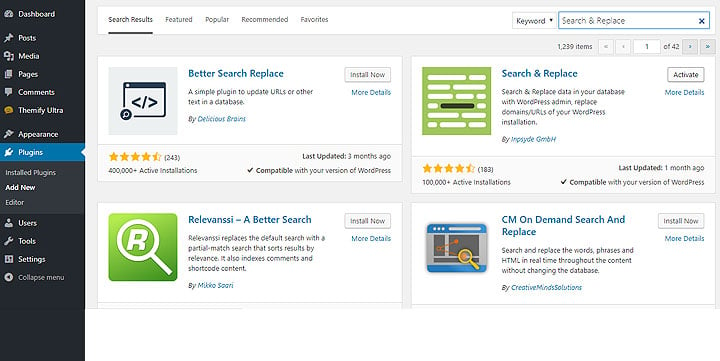
If you’re looking for a way to change all the URLs in your WordPress database to HTTPS, then the link below might be the resource you need!
Click the link below to learn how to achieve this goal by installing the Search & Replace plugin to protect your website security and data privacy. Continue reading for detailed tutorials and steps:
Hopefully, the article "Solving WordPress Website Migration Error: Too Many Redirects. Try Deleting Your Cookies. ERR_TOO_MANY_REDIRECTS" shared on Chen Weiliang's blog ( https://www.chenweiliang.com/ ) will be helpful to you.
Feel free to share this article's link: https://www.chenweiliang.com/cwl-31780.html