
Article directory
OpenAI recently launched a new model trained on GPT-4 called CriticGPT, which is specifically designed to capture and improve errors in ChatGPT code output.

In short, through this model, human trainers can use GPT-4 to find and optimize GPT-4's own defects. According to OpenAI's experimental data, with the assistance of CriticGPT, the trainer's ability to find errors has increased by 60%.
How CriticGPT works to find code bugs
CriticGPT works by reviewing the code generated by ChatGPT and making suggestions for improvements.
Although CriticGPT’s recommendations are not always perfect, its introduction greatly enhances the trainer’s ability to discover model problems.
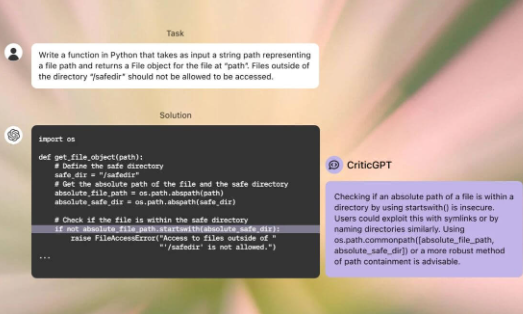
OpenAI said that due to the lack of better tools, it is currently difficult for people to evaluate the performance of advanced AI.
The launch of CriticGPT means that OpenAI has taken an important step in evaluating the output of advanced AI systems.
However, OpenAI also frankly pointed out the limitations of CriticGPT, including insufficient understanding of long tasks, the generation of hallucination errors, the difficulty of dispersing misidentification, and evaluation limitations when faced with extremely complex tasks.
The release of CriticGPT sparked heated discussions
Some netizens used the vivid phrase "left foot stepping on right foot to reach the sky" to describe this process of self-improvement.

If you register OpenAI in mainland China, a prompt will appear:OpenAI's services are not available in your country."▼

Advanced features require users to upgrade to ChatGPT Plus, but activating ChatGPT Plus in countries that do not support OpenAI is quite difficult and involves dealing with cumbersome issues such as using foreign virtual credit cards…
Here we would like to introduce you to an extremely affordable website that provides ChatGPT Plus shared room accounts.
Please click the link below to register a Planet account ▼
Click the link below for a detailed guide to registering your account on Planet▼

Tips:
- IP addresses in Russia, China, Hong Kong, and Macau cannot register for an OpenAI account. It is recommended to register with another IP address.
Hopefully, the article "How to Find Code Bugs with ChatGPT? Efficiently Finding Errors with CriticGPT" shared on Chen Weiliang's blog ( https://www.chenweiliang.com/ ) will be helpful to you.
Feel free to share this article's link: https://www.chenweiliang.com/cwl-31833.html