
Article directory
Your WeChat account has suddenly been frozen? This ultimate unfreezing and revival technique is not something I tell just anyone.
Imagine waking up in the morning, instinctively picking up your phone, only to find that you've been abruptly cut off from the world.
The cold pop-up on the screen informing you that your account has been frozen is definitely more painful than losing your wallet.
Your contacts, your chat history, and even the funds in your WeChat Wallet seem to be instantly sealed in a glass box that you can see but can't touch.
This is the digital nightmare of modern people; we are too reliant on this little green icon.
But take a deep breath and put away your anxiety first.
I wrote this article to pull you out of this despair.
I've been in that situation before, and I understand that feeling of helplessness all too well.
What we need to do is not get angry at the screen, but rather, like a calm surgeon, break down the problem step by step.
This is not just a technical guide, but a battle to protect your digital assets.
Next, I will translate those obscure and difficult-to-understand official guidelines into plain language for you.
We must utilize every rule to reclaim what is rightfully ours.
Ready? Let's begin this account "rescue operation".
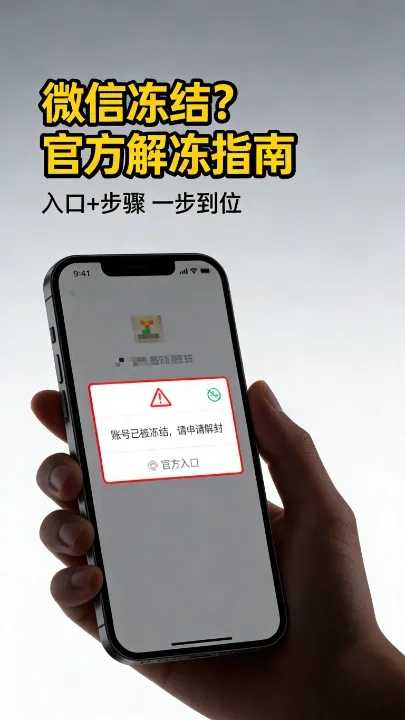
Why is my WeChat account frozen?
The reasons given by WeChat for account freezing are usually vague, but based on years of practical experience, 90% of account freezes fall into these three traps.
Adding friends too frequently is the most common pitfall.
Some people who do WeChat marketing or online promotion add dozens of friends a day, and the system directly identifies them as WeChat marketing accounts.
Logging in from a different location will also trigger security mechanisms.
For example, if you log in from Beijing yesterday but today the IP address suddenly shows that it's in Hainan, the system will suspect that your account has been stolen.
Involving sensitive content is the absolute red line.
Forwarding certain special links or discussing sensitive topics in groups may result in a "freezing period".
Self-service unfreezing: This is your first lifeline to get your account back.
When disaster strikes, the first thing we should do is try the simplest path.
It's like when the fuse in your house trips; you should first try to put it back on, not immediately tear down the wall.
Whether you are overseas or in China, WeChat provides a self-service channel.
We need to select different "lock picking tools" depending on the version you are using.
If you are using the international version of WeChat, which is the version registered with a mobile phone number outside of mainland China, the operation process is as follows.
Please make sure to pick up the device that you originally used to operate the account but which was subsequently frozen. This is of utmost importance.
The system records the device's fingerprint information, and operating with the original device can greatly increase the probability of success.
International version of WeChat self-service unfreezing
Open the WeChat app, but don't rush to enter your password.
Move your gaze to the bottom of the screen and find the "More Options" button.
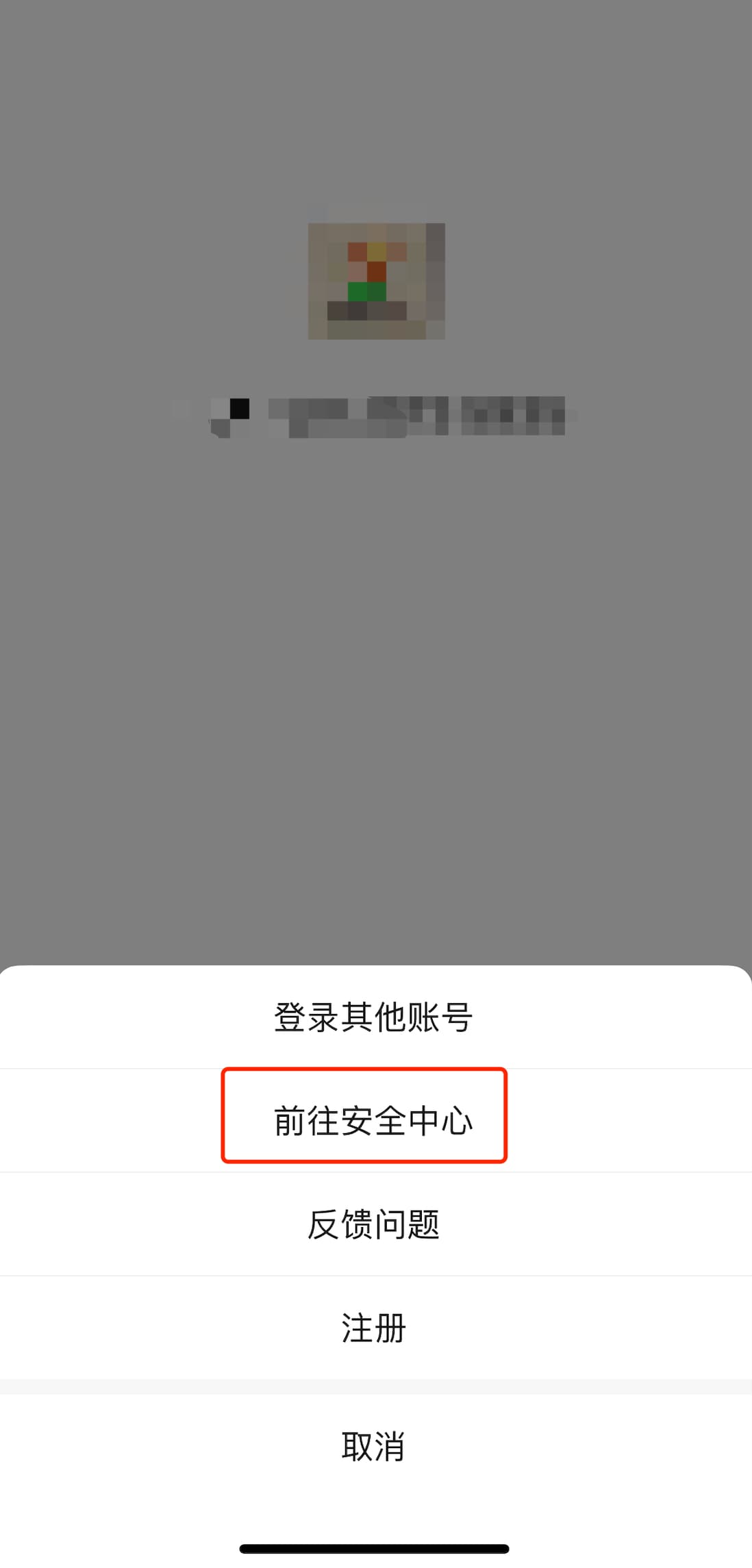
Click on it, and then find "WeChat Security Center" among a bunch of options.
- This is our command center for solving problems.
Next, click "Unfreeze Account" and then select "Start Unfreezing".
The following steps are as simple as following a navigation app; just follow the instructions.
Self-service unfreezing of WeChat in China
If you are using the Chinese version of WeChat, the operation logic is largely the same, but the entry point is slightly different.
Similarly, open the WeChat interface and click on the "More" option ▼
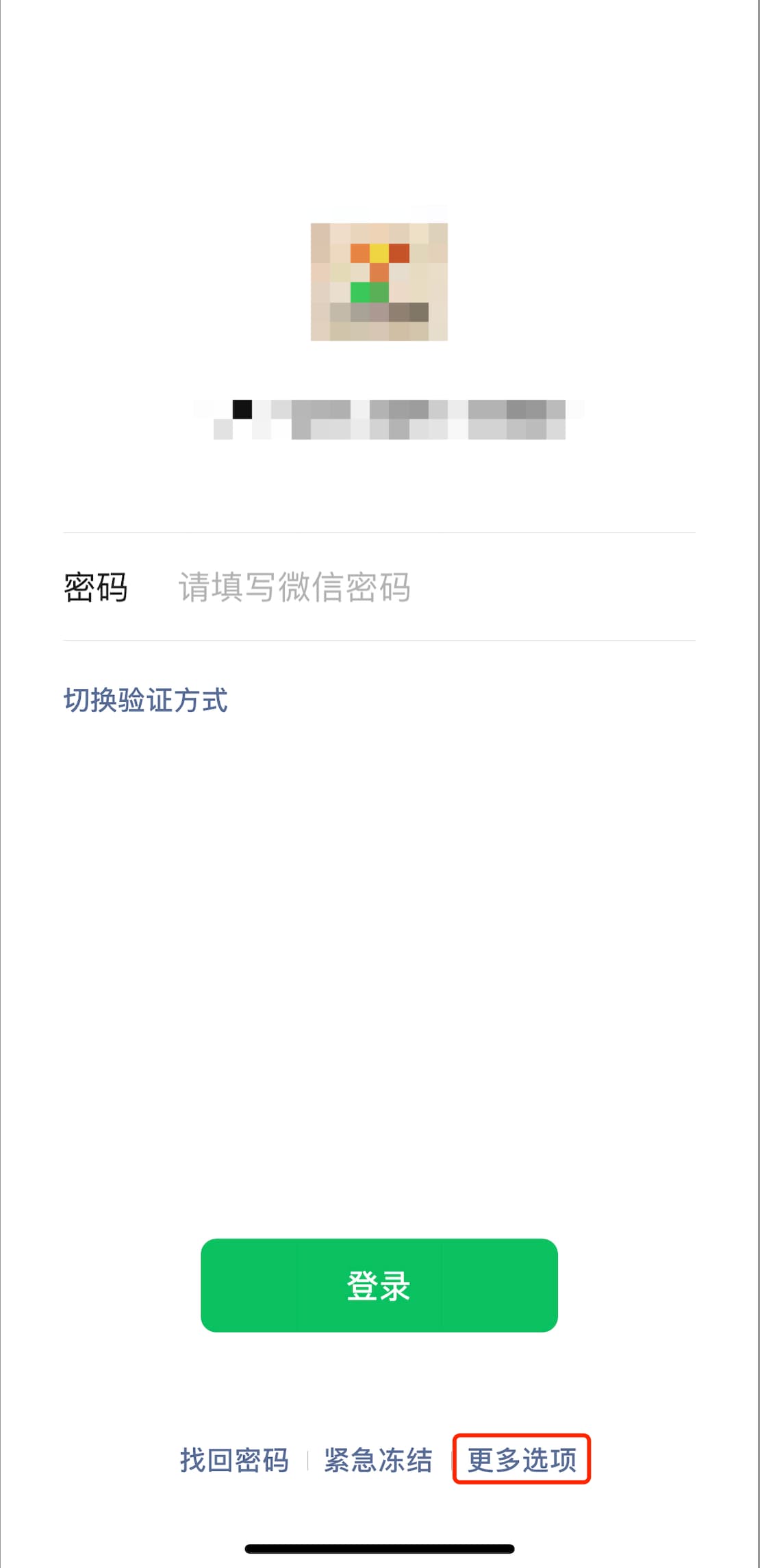
Go to WeChat Security Center ▼
You will see a prominent "Unfreeze Account" option; click it ▼
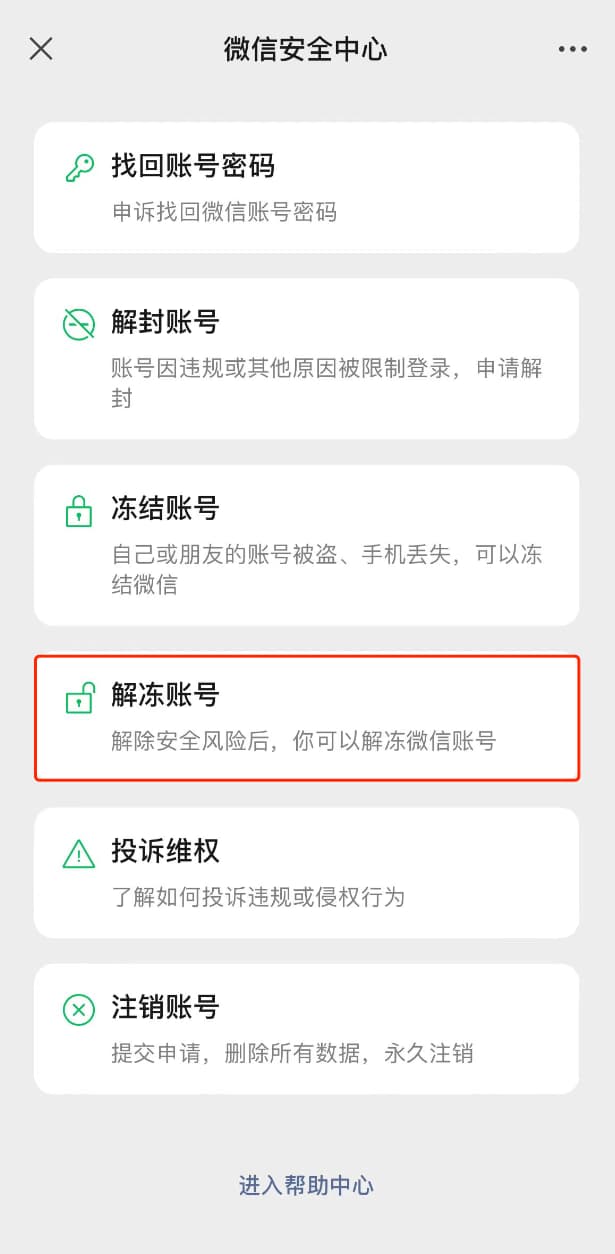
Then, follow the on-screen instructions step by step to complete the verification.
This usually requires you to verify your phone number or invite a friend to assist with the verification.
Unless you've done something terribly wrong, most temporary freezes can be resolved here.
Is your QQ number becoming an obstacle? Here's a universal key.
On the road to unfreezing, sometimes an unexpected obstacle will appear: a QQ account.
Many early WeChat users registered or linked their accounts directly through their QQ numbers.
If the system indicates that your account was frozen via your QQ number, you need to resolve the issue with your QQ account first.
It's like you want to enter a gate, but you find that the key is broken in the lock; you have to fix the lock first.
You must change your QQ password before you can come back and unfreeze your account.
This isn't WeChat deliberately making things difficult for you; it's to ensure that your original account is safe.
Changing your QQ password on a mobile phone may be inconvenient.
I suggest you find a computer and visit the website aq.qq.com.
This is Tencent's Security Center, which specializes in handling these kinds of complex issues.
After changing the password, return to the WeChat unfreezing process, and you'll usually be able to proceed smoothly.
I'd like to add a special note here regarding the frequency of operation.
Some people are extremely anxious and, if the unfreezing fails, they frantically click repeatedly.
Please be sure to control your fingers.
The system perceives the frequent freezing and unfreezing operations as not the owner's attempt to save themselves, but rather as a hacker's brute-force attack.
To protect account security, WeChat will automatically trigger a higher level of defense, locking your account even more securely.
At that point, even if you're right, you won't be able to explain yourself.
Another action that many people easily overlook is "clearing landmines".
Even after you successfully unfreeze and log in to WeChat, the crisis is not completely over.
You should immediately go to "Me" > "Settings" > "Accounts and Security" > "Login Device Management".
Here you will see a long list of devices that have logged into your account.
Remove any devices you don't recognize or no longer use without hesitation.
These old devices are safety hazards, potential time bombs.
Once these devices are deleted, anyone who wants to log in again using them will have to re-authenticate.
This is equivalent to giving your account a new lock.
What if your application to unfreeze your account fails? This is where your best trick comes in.
Of course, life never follows the rules.
Sometimes, even when you follow the steps exactly, the system still throws cold water on your progress.
If you encounter a message like "The device used to unfreeze the account is inconsistent with the device used to freeze the account," it can be quite frustrating.
This usually means you've changed your phone, or the system can't recognize your device's fingerprint.
Or perhaps you froze it through your QQ number, but you've forgotten the password for that QQ number, or you can't even change it.
This is a dead end; the conventional path is blocked.
At this point, we need to activate Plan B, which is the "appeal" process.
This is not a simple unfreezing process, but rather proving to the system "I am who I am".
Pick up your phone and open the WeChat app.
On the login screen, do not enter a password; instead, select "Forgot Password".
You'll see a bunch of service agreements, which are quite long, but you'll have to click "agree".
Then tap the hopeful button: "Start Appeal".
The following process is similar to filling out an immigration card, requiring you to provide accurate information.
Follow the on-screen instructions step by step to file your appeal.
This may require you to provide your historical passwords, the linked mobile phone number, or a friend's WeChat ID.
After completing the appeal form, you may find yourself in an anxious waiting period.
The official statement is that the appeal result will be notified by SMS within 24 hours, but those 24 hours may feel like a year to you.
If your appeal is successful, congratulations, you have passed the most difficult test.
The new WeChat password will be sent to you directly via SMS.
This password is your rebirth key.
You need to use your WeChat ID plus this new password to log in to WeChat.
There is a detail that must be noted:
Once you successfully log in with your WeChat ID and new password, the old binding relationships will be completely severed by the system.
This means that all phone numbers , QQ numbers, emails, and Facebook links will be automatically unbound.
It's like you've got a brand new account; your friends are still there, but your security settings are completely reset.
Therefore, the first thing to do after successfully logging in is to bind a new mobile phone number or other security measures.
This is to prevent you from having nowhere to turn if you forget your password next time.
There's one more pitfall I need to tell you about beforehand.
If you accidentally delete a new password received on your phone, you'll be devastated.
There's no going back now; you'll have to go through the appeal process all over again.
Therefore, as soon as you receive the password, write it down or save a screenshot.
Your appeal was successful, but you still can't log in? You might have made a basic mistake.
Sometimes, what's most frustrating isn't a failed appeal, but rather that even when the appeal is successful, the new password still shows as incorrect.
This is truly testing the limits of human psychological endurance.
But in my experience, 99% of the time it's a problem with the user's input.
Let's examine these possible causes of high blood pressure one by one.
First, check if your gaze is wrong.
The passwords issued by the system are randomly generated; sometimes the number "0" and the letter "o" look almost like twins.
You need to open your eyes wide and distinguish carefully. If you're unsure, try both once.
Secondly, your login method may be incorrect.
As I emphasized earlier, after a successful appeal, you must log in using your WeChat ID and WeChat password.
Many people have muscle memory that makes them habitually enter their phone number.
If you log in using a mobile phone number, QQ number, or email address that has been unbound, the system will of course prompt an incorrect password.
Because it no longer recognizes those old association methods.
The third common pitfall is that the WeChat ID itself is entered incorrectly.
Your WeChat ID is your account's unique identifier; even a single character error is unacceptable.
Please carefully check whether you have mistyped or omitted any letters.
Especially for IDs with underscores, if you don't enter the underscore or enter a hyphen "-" instead of the underscore, the system will report an error.
This kind of attention to detail, which determines success or failure, is vividly demonstrated in this aspect.
How to open the manual appeal standard
If you've tried all the methods mentioned above and are still not getting in, then we'll have to resort to our last resort.
This is manual review, which means submitting evidence directly to the official team.
It's like going to court; you need to provide a complete chain of evidence.
Please try logging in using the above appeal method first. If the appeal fails, please be sure to keep the appeal number displayed at the end of the process.
Alternatively, take a screenshot of the error message; these can all serve as your "evidence in court."
You will need to submit a very detailed set of personal information and account usage details.
This is to prove that you are the true owner of this account through the "feedback" channel.
The system has very strict verification standards to prevent impersonation.
Only when the information is complete and accurate enough can it pass through that invisible wall.
You need to prepare the following checklist, and fill in every word carefully:
First, clearly state the reasons for the appeal; avoid unnecessary details and get straight to the point.
Second, provide your real name, not your online nickname.
Third, an accurate WeChat ID, which is the coordinates for locating your account.
Fourth, recall when you registered, the more precise the better.
Fifth, the last login time, which proves that you were still using it recently.
Sixth, the originally linked mobile phone number, even if it has been deactivated.
Seventh, the mobile phone numbers that can currently receive text messages are the official channels for contacting you.
Eighth, use an email address that can currently send and receive emails as a backup contact method.
Ninth, this is difficult, you need to provide the WeChat friend IDs of the account.
You can try contacting your real-life friends and asking them to send you their IDs.
Tenth, the phone model you frequently use to log in to WeChat, such as iPhone 13 or Huawei P40.
Eleventh, your user's nationality.
Twelfth, current permanent work location.
Thirteenth, the crucial case number of the unsuccessful appeal.
Once you've pieced together all the information like a jigsaw puzzle and submitted it, all that's left is to wait for the verdict.
If the information is complete and passes the review, relevant staff will contact you within three business days.
This is your last chance, so please make sure the information is accurate.
We respect and protect user privacy. The above appeal information serves only as important evidence to verify the identity of the WeChat account holder. Please be aware of this.
The authorities don't need this data to spy on you, but to protect you.
Conclusion: Protecting your "existence" in the digital deluge
In this era of the Internet of Everything, the freezing of accounts is not just a technical glitch, but more like a "shock" to digital identity.
We entrust too much of our lives, emotions, and wealth to these cloud-based data streams.
Only when these connections are severed do we truly realize the fragility and importance of "digital contracts".
Each thawing process is essentially a re-examination of the boundaries between us and the digital world.
It reminds us that in this seemingly free virtual space, rules and security are always the cornerstones that go hand in hand.
Getting the account back is not just about restoring communication functions, but also about defending the "right to survival" and "right to speak" in this digital society.
Hopefully, this guide will be a powerful tool in your hands, cutting through the barriers and allowing your digital life to see the light of day again.
Don't wait until you lose something to appreciate it; you should take action now.
Check your account settings, update your password, and clean up your login devices.
In this uncertain online world, only by taking precautions can we go further and more steadily.
May every click you make resonate with the world; may your digital life always be smooth sailing.
Hopefully, the article "WeChat Account Frozen? Official Unfreezing Guide + Operation Guide" shared on Chen Weiliang's blog ( https://www.chenweiliang.com/ ) will be helpful to you.
Feel free to share this article's link: https://www.chenweiliang.com/cwl-33632.html