
Article directory
I used the domestic version of WorkBuddy for free for a month and found that the international version is really not as good.
A couple of days ago, a friend who works in social media messaged me late at night, saying, "Dude, you're always tinkering with these AI gadgets, can you help me decide whether I should download the domestic or international version of Tencent's WorkBuddy app?"
I laughed then.
I'm not laughing at his indecisiveness , but rather at how precisely the question was asked. I've been using the domestic version of WorkBuddy for over a month now, completely free, and haven't spent a single penny. The more I use it, the better I find it compared to the overseas version.
So in this article, I'm skipping the fluff and just sharing my honest impressions from the past month, along with the differences between the two sides, all in one go.
Remember this: the domestic version and the international version may seem like two different versions of the same product, but in reality, they are at least four different hurdles.

Four dimensions to see exactly where the differences lie between the two sides.
The first hurdle is modeling capability.
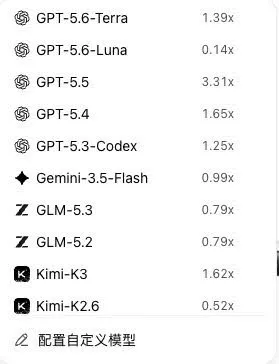
Honestly, I initially thought it was just a matter of switching servers, but after using it, I realized it's not that simple. The domestic version defaults to using a large, domestically developed model, which is perfectly adequate for your daily tasks of writing articles, creating graphs, and running AI agents. What's even more impressive is that it's currently offering Hy4 preview and Hy3 for free for a limited time, essentially giving you two top-tier models to build whatever you want.
The international version takes a different approach, allowing access to large-scale models from overseas. This is a two-sided issue. If you're already accustomed to using those overseas models, or if there are certain scenarios where they're indispensable, then the international version certainly opens that door for you. But conversely, the domestic version doesn't completely lock you out; it still allows you to add custom models, so the freedom isn't limited.
Returning to the topic of models, my feeling is that for daily work, this combination of features in the domestic version is more than enough for most of us.
The second hurdle is the server node.
I don't want to pretend to know everything about this, but I can only say that in terms of user experience, the domestic version's nodes are right here in our country. When you tap, the response is incredibly responsive. If you take out your phone to change a plan while commuting on the subway in the morning, it barely spins. The international version's service is overseas, so if you're in China, you might occasionally feel a slight lag, like talking through frosted glass—you can hear it, but it's not as clear.
For ordinary users, this delay may not be a big deal, but if you use it as a productivity tool every day, the difference between responsive and unresponsive will be significant after a month.
The third hurdle is data compliance.
I have to be fair about this. If you're in China and your data is hosted on a domestic node, you feel much more at ease. The compliance requirements are clear, and you don't have to worry about your chat logs and work documents ending up on some unknown platform. The international version of the data goes through overseas platforms. For some, that's freedom; for others, it's a question mark hanging over their heads.
I completely understand that feeling—you're using a tool, but you don't know whose server your data is actually stored on. The domestic version eliminates that question mark for you.
The fourth hurdle, and the toughest one, is subscription rights.
Now, I need to focus on this part, because it's the core reason why I haven't spent any money for over a month.
The overseas version, frankly speaking, gives you a batch of free credits for the first time, but once you use them up, you have to pay to subscribe. That's normal; they need to make a living too.
But the domestic version is completely different. Every day when you log in, you get 100 points – free computing power. Plus, you can accumulate more points by checking in and completing tasks. For over a month, relying solely on these 100 points daily, plus bits and pieces of task rewards, I haven't triggered a single payment notification.
Think about it, 100 points a day, that's 3,000 a month. For an average creator, that's enough to run AI programs and have AI write articles and create graphics for you. In other words, it uses a points-based mini-game to keep you engaged, and you're quite happy about it.
I was stunned. This is just the same old trick from those games where you get resources for daily sign-in, but you actually fall for it.
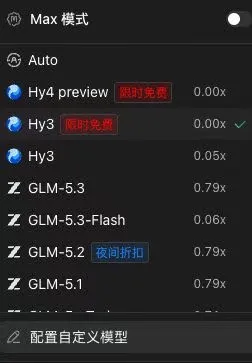
Speaking of which, I have to share a little discovery of my own. Using the 100 free points I get every day, I casually built a little AI to automatically organize my resource library and drafts. It's been running for a month, and it's never once been blocked by insufficient resources. Can you believe it??? An automated production line that would normally require a paid subscription to fully utilize, I got running thanks to the free computing power I get from daily check-ins.
Let's talk about this "coupon-hunting" mentality. I've always felt that the strategies employed by domestic AI companies in the last two years are essentially the same as the early internet subsidy wars. Back then, with ride-hailing subsidies, you'd open the app every day to claim coupons, and once you got used to it, you wouldn't want to switch apps.
The AI workbench now gives out points, using the exact same logic, except this time it's giving out computing power—the new-era equivalent of water, electricity, and gas.
If you follow this field, you should be able to sense that whoever masters the free quota strategy will be the first to attract users. Only after attracting users can the real business begin.
Returning to WorkBuddy, my assessment is that if you're in China and mainly use AI for basic tasks like writing code and automation, the Chinese version is basically a no-brainer. It offers just as many features as the overseas version, plus you get 100 free points every day – it's a great deal no matter how you look at it.
How to registerChina国内版WorkBuddy?
So how do I register for the domestic version of WorkBuddy? Let me walk you through the steps.
It's very simple, just click this invitation link.
Click in and follow the steps. After registering and logging in, remember to log in every day to collect your 100 points. Also, complete the daily check-ins and tasks, and your points will accumulate. My free trial of over a month started from this step.
There's a detail I need to remind you of: don't register for the international version. They look similar, but the entry points are different. Make sure you register for the domain workbuddy.cn ; the one with ".cn" at the end is the domestic version.
With just this one small action, I managed to save a month's subscription fee.
Overseas Chinese registering for WorkBuddy: What if I don't have a Chinese mobile phone number?
WorkBuddy requires a Chinese mobile phone number to register and log in. What can overseas Chinese do if they do not have a Chinese mobile phone number?
Where there's a problem, there's a solution!
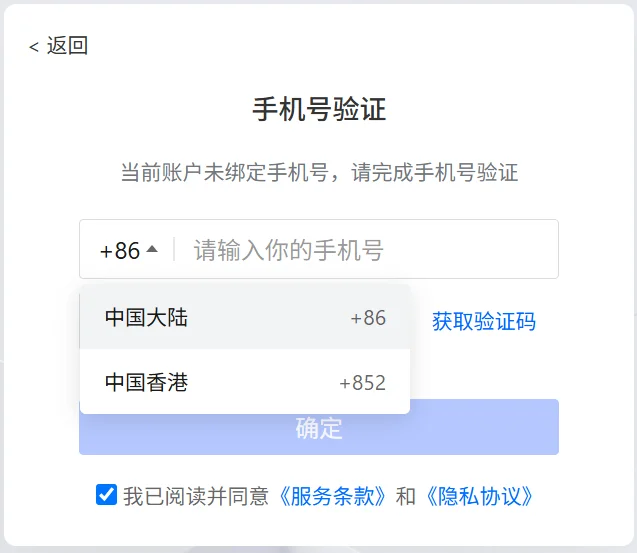
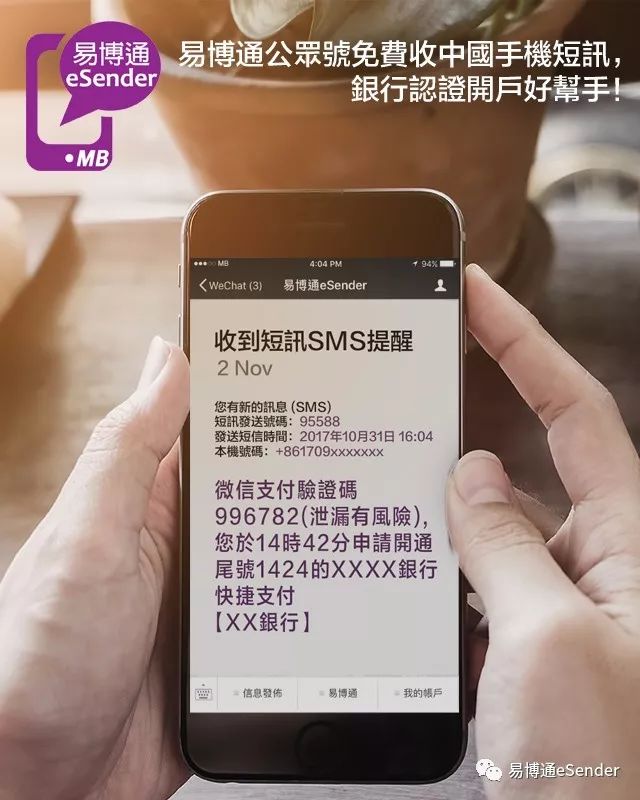
You can click the link below to obtain a private Chinese virtual mobile phone number through a trusted channel ▼
Since you've read this far, if you found it helpful, please like and share it. If you want to receive updates first, you can also follow me! ⭐
Thank you for reading my article. See you next time.
Hopefully, the article "What are the differences between the Chinese and international versions of Tencent WorkBuddy? Download and register the domestic version to get 100 points every day!" shared on Chen Weiliang's blog ( https://www.chenweiliang.com/ ) will be helpful to you.
Feel free to share this article's link: https://www.chenweiliang.com/cwl-34565.html