
Article directory
The reason I'm sharing methods for downloading, parsing, converting, and saving Facebook videos to MP3 is that some new media professionals and micro-business owners want to download videos from Facebook to obtain video materials for online promotion .
- Goal 1: Create WeChat through video marketingPublic account promotion.
- Objective 2: Share to WeChat Moments and WeChat Groups, doWechat marketing和Community Marketing.
In this article, Chen Weiliang will introduce a free online Facebook video downloader and MP3 converter service that allows you to quickly download Facebook videos or convert them into MP3 audio.
Facebook Video MP3 Converter Advantages
Advantage 1: Simple and quick operation.
- Download Facebook video/MP3 by simply copying and pasting the Facebook video link.
- Download any Facebook video/MP3 to your computer in seconds.
Advantage 2: No additional browser extensions are required.
- Whether you use Google Chrome, Firefox, Safari or Opera, it works as usual.
- The way to download Facebook videos is very simple.
Advantage 3: Free service that requires no registration.
- It's 100% free.
- Registration is not required.
Get Facebook video URL
To download a Facebook video, please follow these steps:
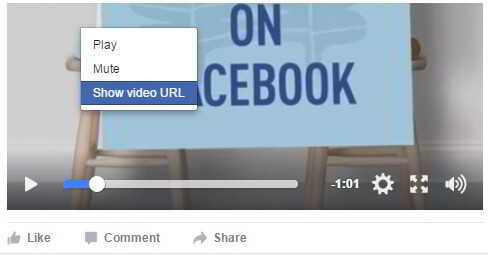
1) Get Facebook video URL link
- Right click on the FB video and select "Show video URL" ▼
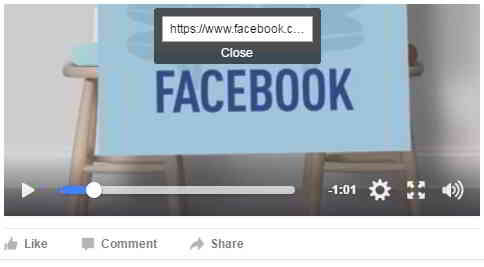
2) Show Facebook video URL link
- A small box will appear with the Facebook video link ▼
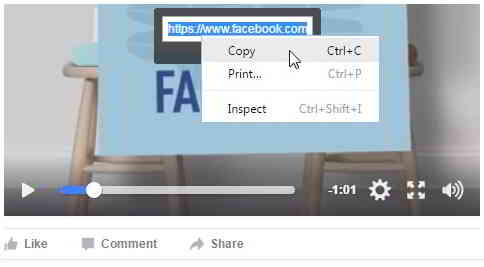
3) Copy Facebook video URL
- To copy the Facebook video URL, right-click the link and select Copy ▼
Facebook video download site
According to the above method, after successfully obtaining the Facebook video URL link, the next step is to enter the Facebook video download website and let it help you analyze the Facebook video download.
- After entering the free Facebook video download site, you can download Facebook videos/MP3 with just a few simple steps.
Step 1: Go to the Facebook video download website
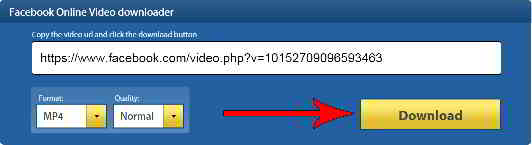
Click here to enter the Facebook video download site- Paste the URL of the Facebook video you want to download into the white box.
- This will take you to the download page that parses the Facebook video.
Step 2: Click the download button
- To download Facebook video, click the download button ▼
Step 3: The service will parse the video from Facebook. ▼

- Please wait, this may take some time.
Step 4: Click the download button to start downloading the Facebook video/MP3 immediately. ▼

How to download private Facebook videos?
If you want to download a private Facebook video that can only be seen by logging in.
Follow these simple steps:
Easily download private Facebook videos using the Facebook Video Downloader bookmark (no software required ) ▼
Click here to get Facebook Video Downloader BookmarkConclusion
- Obviously, Facebook doesn't want users to download videos/MP3s.
- Although it is allowed to play Facebook videos directly online, sometimes we need to download Facebook videos/MP3.
- You can refer to the above instructions to download Facebook video/MP3.
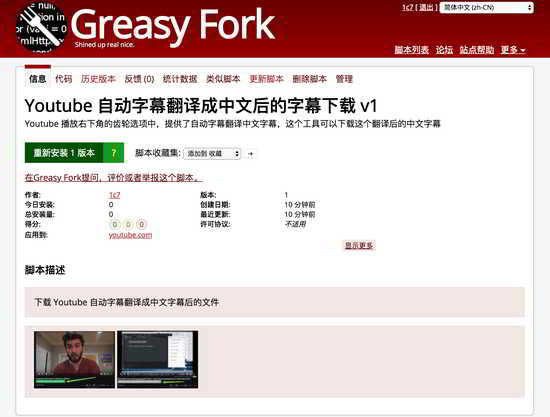
If you want to download YouTube videos and subtitles, please refer to this tutorial ▼
Hopefully, the article "How to Download Facebook Videos? Analysis of Video/MP3 Conversion and Saving Methods" shared on Chen Weiliang's blog ( https://www.chenweiliang.com/ ) will be helpful to you.
Feel free to share this article's link: https://www.chenweiliang.com/cwl-819.html