
Article directory
Since WeChat has a wide user base, a self-service unblocking service has been launched, but the requirements are different for each period.
- With more and more users of WeChat, the rules of WeChat are becoming more and more strict, the purpose is to avoid malicious and excessive users.Wechat marketing.
Now, Chen Weiliang will share the latest process on how to unblock and unlock a blocked WeChat account.
WeChat unblocking tool
- WeChat account
- Auxiliary account
- cellphone number
WeChat self-service unblocking steps
Step 1: Log in to the blocked WeChat account
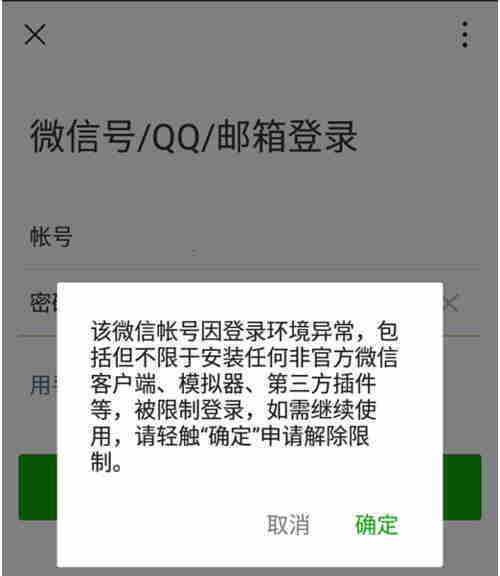
On the WeChat login page, enter the account password;
Then click [OK] in the pop-up window ▼
Step 2: Apply for lifting of lockdown
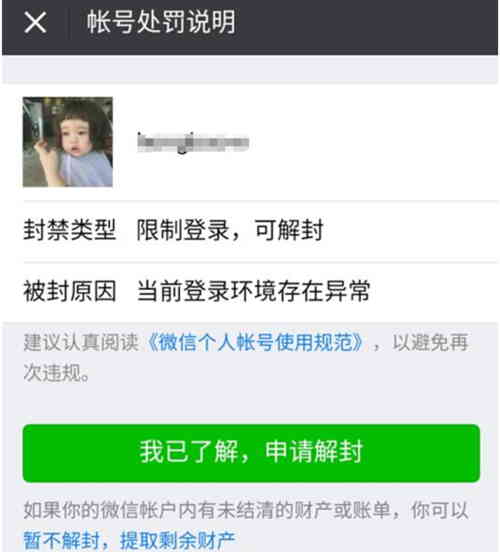
In the next step, click [I understand, apply for unblocking]▼
Step 3: Security Verification
On the security verification page, click the English letters in order, and then click [Verify]▼
![WeChat self-service unblocking steps: On the security verification page, click the letters in order, and then click [Verify].](https://img.chenweiliang.com/2019/12/wechat_unblock_003.jpg "WeChat self-service unblocking steps: On the security verification page, click the letters in order, and then click [Verify].")
Step 4: Enter your mobile phone number
Enter the mobile phone number that can send and receive SMS in the next step, and then click [Next]▼
![WeChat self-service unblocking steps: In the next step, enter a mobile phone number that can send and receive SMS messages, and then click [Next].](https://img.chenweiliang.com/2019/12/wechat_unblock_004.jpg "WeChat self-service unblocking steps: In the next step, enter a mobile phone number that can send and receive SMS messages, and then click [Next].")
- Send SMSVerification code: Please follow the prompts on the page to edit the SMS and send it to the specified recipient.
- Then click [I have sent a text message, next]
Step 5: Find and leave messages for QQ friends who have added you on WeChat:
- Hi!I want to ask you a little favor, I don't know if it's ok?
- My WeChat may have mistakenly touched sensitive words, or been maliciously reported by someone, or have other problems, and have been restricted from logging in.
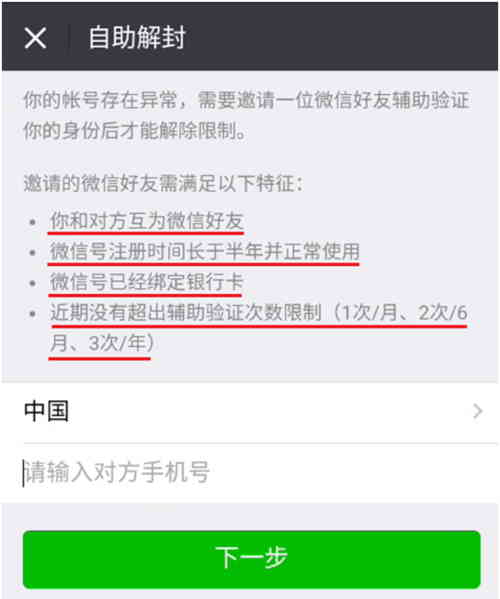
- I need to enter the mobile phone number that my WeChat friend assisted to unblock in order to unblock it.
- Our WeChat is a friend, can you help me unblock WeChat?
- If you could help me, it would be greatly appreciated!
If the other party agrees to assist verification to unblock WeChat, say:
- I'm in the process of lifting the login restriction, please wait a moment.
If the other party does not agree to assist verification to unblock WeChat, say:
- If you can't help me with verification, please let me know and I'll find another friend.
- ▲ After entering the assistant's mobile phone number, click [Next].
Step 6: Enter the assistant's mobile phone number
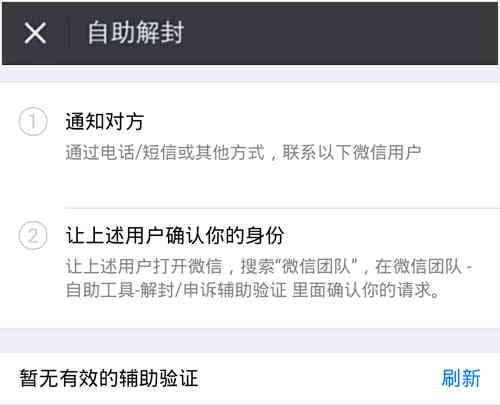
① Self-service unblocking notify the other party:
- Contact WeChat users by phone/text or other means.
- Notify the assistant to open "WeChat Team" for assistant confirmation.
② Let the above users confirm your identity:
- Ask the above user to open WeChat, search for "WeChat Team", and confirm your request in "WeChat Team" → "Self-Service Tools" → "Auxiliary Verification".
- If the assistance is successful, [Accepted] will be displayed, that is, the unblocking is successful.
Unblocker-assisted verification method
Step 1: WeChat Team [Assisted Verification]
Open WeChat Team, click [Self-Service Tools], and then click [Auxiliary Verification]▼ in the pop-up window
![WeChat self-service unblocking steps: Open WeChat Team, click on [Self-service Tools], and then click on [Assisted Verification] in the pop-up window.](https://img.chenweiliang.com/2019/12/wechat_unblock_007.jpg "WeChat self-service unblocking steps: Open WeChat Team, click on [Self-service Tools], and then click on [Assisted Verification] in the pop-up window.")
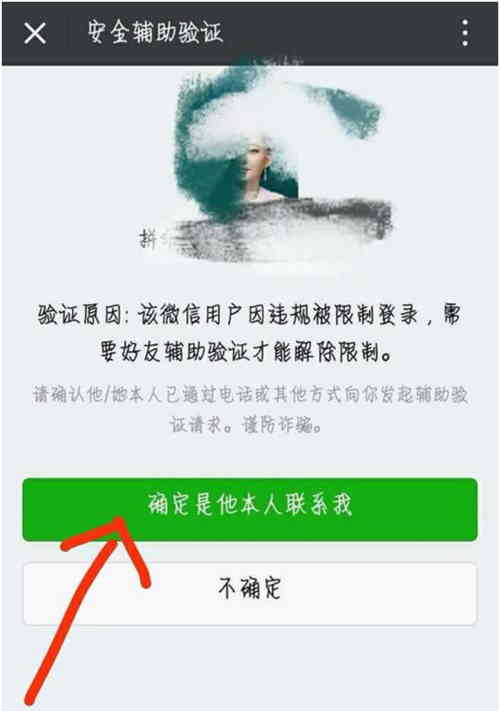
Step 2: Click on "Confirm it's him contacting me" ▼
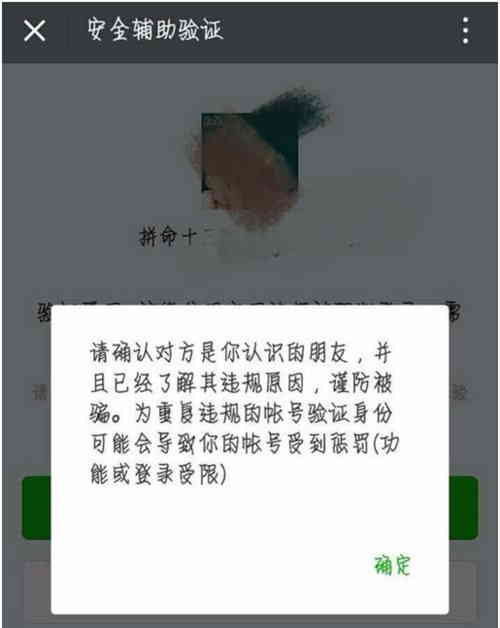
Step 3: Click "OK" in the pop-up window ▼
Step 4: Enter your personal information as required, then click [Next] ▼
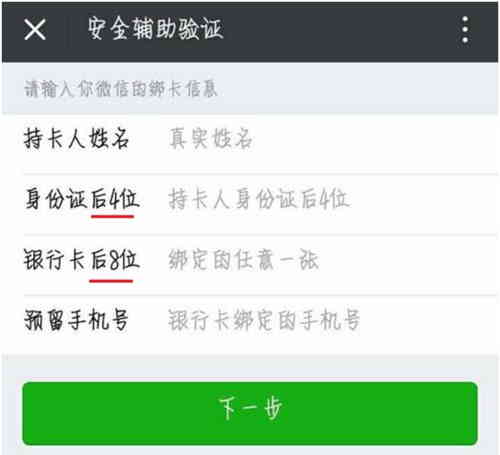
- The binding information is for the WeChat official to confirm whether it is your own operation, and check the information you previously bound to WeChat.
- The accuracy of the information in this step is directly related to whether it can assist the successful unblocking, so you must clearly remember this information before unblocking.
Step 5: On the "Security Assisted Verification" page, click on [Identity Confirmed] ▼
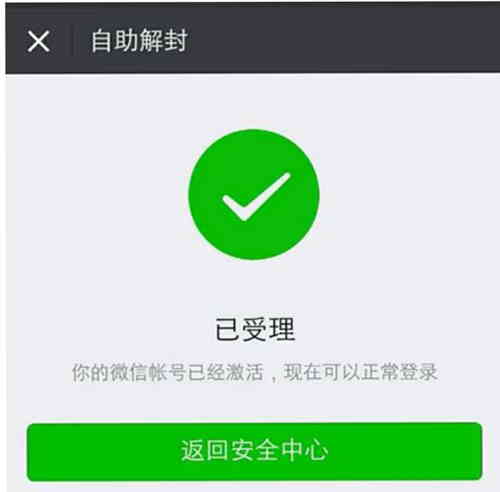
- The auxiliary verification is successful, and the page displays [Submitted].
This is the end of the WeChat team [Auxiliary Verification].
Precautions for WeChat self-service unblocking friend verification
- Four major requirements for auxiliary unblocking must be met.
- Remembering the information that binds the bank card and mobile phone number is a key step to success.
- If your blocked WeChat account has WeChat friend A, you can also use other WeChat accounts to add WeChat friend A in the blocked account and ask the other party to unblock WeChat for you.
How long does it take for WeChat self-service unblocking?
Usually WeChat self-unblocking, waiting for friends to verify and confirm the operation, may take 15 to 30 minutes.
How long does the WeChat self-service unblocking invitation expire?
The WeChat self-service unblocking invitation has a time limit: within 1 hour.
- After more than 1 hour, you need to restart the WeChat self-service unblocking process.
Hopefully, the article "How to Unblock a Restricted WeChat Account? Self-Service Method for Unblocking Friend Verification" shared on Chen Weiliang's blog ( https://www.chenweiliang.com/ ) will be helpful to you.
Feel free to share this article's link: https://www.chenweiliang.com/cwl-1596.html