
Article directory
If you are using WordPress to build a website, how can you load PHP/JavaScript/CSS code in the header and footer of a specific post or page?
We can use WordPress' powerful custom fields to implement different JavaScript pages for a given post or page load.
This article will show you: How to use custom fields on WordPress, custom JavaScript or CSS files?
If you can understand, custom field values are not as simple as JavaScript and CSS files.
How to add custom fields in WordPress?
Typically, open the header.php file of your WordPress theme and ensure that the following code has been added: ▼
<?php wp_head(); ?>
How to Customize Header in WordPressA more recommended approach: via functions.php or code plugin implementation
Directly modify the theme header.php Or footer.php The code is easily lost after the theme is updated.
Safer and more standardized practicesAdd the following code to the current theme. functions.php In the file, or using Code Snippets These types of plugins are used to manage custom code.
To avoid modifying the core theme files, we use... functions.php Mount code.
Step 1: Add functional code
Please add the following PHP code to your theme. functions.php At the end of the file, or via Code Snippets Create a new code snippet in the plugin and paste it:
<?php
/**
 * 指定文章/页面加载 Head 自定义字段代码
 */
add_action('wp_head', 'add_custom_head_code');

function add_custom_head_code() {
    // 只在文章详情页和独立页面执行
    if (is_single() || is_page()) {
        global $post;

        // 获取自定义字段 'head' 的值
        $head = get_post_meta($post->ID, 'head', true);

        // 如果有值,则输出到 head
        if (!empty($head)) {
            echo $head;
        }
    }
}

/**
 * 指定文章/页面加载 Foot 自定义字段代码
 */
add_action('wp_footer', 'add_custom_foot_code', 99);

function add_custom_foot_code() {
    // 只在文章详情页和独立页面执行
    if (is_single() || is_page()) {
        global $post;

        // 获取自定义字段 'foot' 的值
        $foot = get_post_meta($post->ID, 'foot', true);

        // 如果有值,则输出到 footer
        if (!empty($foot)) {
            echo $foot;
        }
    }
}
(Note: If) functions.php The file already has a file at the end. ?>Please do not add it repeatedly; just insert the code above directly. ?> (Previously)
Step 2: Use in the article editing page
- Access the WordPress backend to edit a post or page.
- Find it on the editor page "Custom Fields" (If you don't see the metabox, please click "Display Options" in the upper right corner or "Preferences" in the Gutenberger Editor and make sure "Custom Fields" is checked).
- Click Enter new :
- Name Enter:
head(For header code) orfoot(For use in the bottom code). - Value Input box: Paste the HTML, CSS, or JS code you need to add.
- Name Enter:
- Click Add a custom field And update/publish articles.
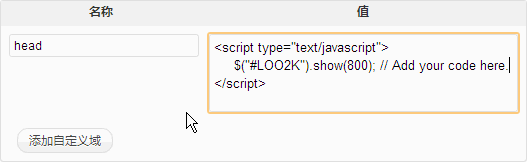
- Updating the article will allow you to code the theme and enter values for these custom fields.
Since you only output the code that needs to be loaded in "value", you need to enter the following similar code in "value" ▼
<script type="text/javascript">...</script>
or ▼
<style type="text/css">...</style>
to output the above code.
The advantages of this modification:
- safer: Do not modify directly
header.php和footer.phpThis prevents the code from being overwritten when the theme is updated. - More standardized: Using WordPress recommended
add_actionHook-based mounting code. - Clear logicEncapsulating functionality within functions makes subsequent maintenance easier.
Hopefully, the article "Loading PHP/JavaScript/CSS Code for Specifying Post Headers and Footers in WordPress," shared on Chen Weiliang's blog ( https://www.chenweiliang.com/ ), will be helpful to you.
Feel free to share this article's link: https://www.chenweiliang.com/cwl-2022.html