
Article directory
Having trouble sending and receiving emails through a WordPress website?
Email sending errors are a common problem in WordPress. By default, WordPress uses the PHP mail ( ) function to send emails.
But the problem is that many WordPress hosting servers are not configured to use this feature, which is why many of your emails may end up in the spam folder, or not send at all.
The most important thing in email marketing is to successfully send emails to the inbox.
The good news is that this problem can be easily solved by installing a WordPress plugin on your website and configuring an SMTP server.
In this tutorial, we will teach you how to set up and configure SMTP and make the communication process smoother.
Now, let's get started.
How to install and configure WP SMTP plugin?
The first thing you need to do, is to install a WordPress plugin, for example: WP SMTP plugin ▼
- WP SMTP plugin was originally created by BoLiQuan and it is now owned and maintained by Yehuda Hassine.
The WP Mail SMTP plugin makes it easy to fix email delivery issues by improving and changing the way your WordPress site sends emails.So, let's see how to use this plugin.
We will show you how to use the WP SMTP plugin.
- WP SMTP can help us to send emails via SMTP instead of PHP mail() function.
- It adds a settings page to Dashboard → Settings → WP SMTP, where you can configure email settings.
- If the From field is not a valid email address, or the SMTP Host field is left blank, the wp_mail() function will not be reconfigured.
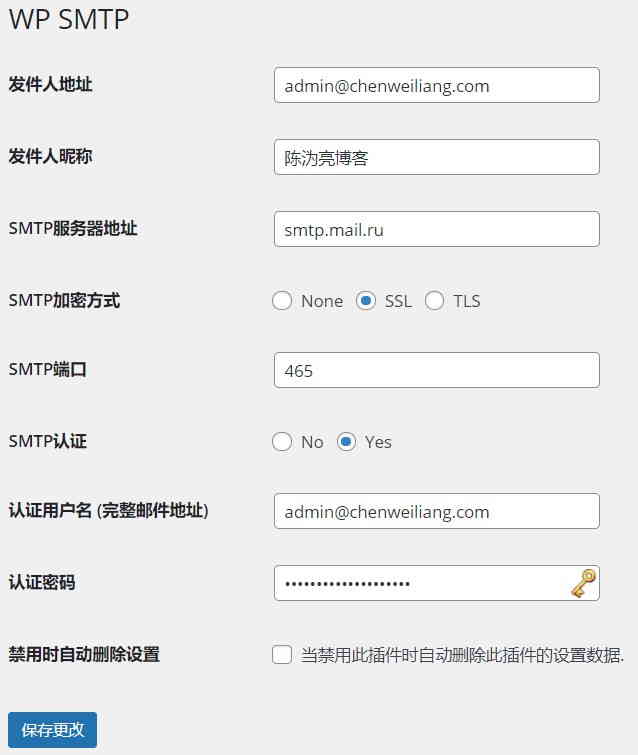
WP SMTP plugin to set other mailbox methods
The SMTP server address is different for different mailbox settings, and it needs to be set based on the SMTP server address we use.
The SMTP server address can usually be found on the help page of the mailbox.
For instructions on setting up SMTP addresses for QQ Mail and Gmail , please click the link below for a tutorial ▼
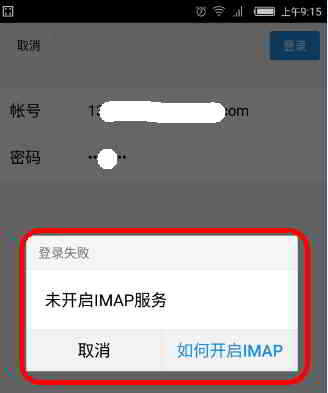
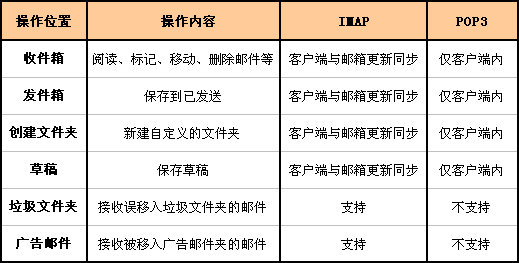
For in-depth understanding of the difference between POP3 and IMAP, please visit the following link▼
Because internet services in China have too many restrictions and are very troublesome, WeChat and QQ are prone to account freezing due to abnormal login environments, making it impossible to log in to Tencent corporate domain email. Therefore, the way to avoid this risk is to use Mail.ru email to bind a custom corporate domain email.
Hopefully, the article "WordPress Cannot Send Emails? How to Configure Other Email Addresses with the WP SMTP Plugin" shared on Chen Weiliang's blog ( https://www.chenweiliang.com/ ) will be helpful to you.
Feel free to share this article's link: https://www.chenweiliang.com/cwl-1166.html